

- Easy Access to US, UK Streaming Services From Anywhere - August 18, 2012
- 5 Fresh Android Games Released in 2012 - July 5, 2012
- Google Chrome Explodes On To iOS, Puts Desktop Experience In Your Pocket - June 30, 2012
 A few weeks back, while researching for my comparison review of Shelfster and Evernote, I stumbled upon another alternative to collect information and organize your life: Springpad. I had the pleasure of speaking with the CEO and co-founder of Springpad, Jeff Janer (formerly of Third Screen Media and Britemoon) — and I have to say, Evernote user or not, Springpad may have a place in your life.
To test this theory against my normal giddy excitement for new tech, I got my wife to try it — and, let me tell you, if my wife can find a new piece of tech both useful and exciting, then it may just be one of the best bits software to appear in a long, long time.
“The beauty of Springpad is that it functions less like a junk drawer where important items can get lost, but more like a personal assistant that keeps you organized and productive. Never forget anything of interest to you, like gift ideas for Mother’s Day or things to do on a trip to Florida; just save it into Springpad and it will be there for any event, for any use, from any location.” – Jeff Janer, Co-Founder and CEO
UPDATES: In the past year, Springpad has undergone some impressive rebuilds and equally impressive growth! They are now at over 1 million users, have completely reworked their interface, and added some great new features. You can get some details on the updates in our posts Springpad: Easier Than Ever to Save and Organize Everything and Springpad Gets Even Better — Again.
UPDATE #2: Springpad adds autosave, backup, and export features! You can also add Types, Notebooks, and Tags directly to subject lines when sending in items via email. Oh, and viewing Springpad via RSS readers and full API access are also available. Check out the Springpad Blog for details!
GTD in SPRINGPAD: Learn how to implement David Allen’s Getting Things Done methodology (GTD) in Springpad in this post.
ANDROID USERS, check out our posts on Springpad for Android: Springpad Beats Evernote — At Least On Android, and Springpad Android Update Adds New Widgets, Save From Apps Feature, & More.
What is Springpad and How is it Different?
Anyone who has ever read this blog knows that we are fans and users of Evernote to an extent that borders on the religious. Naturally, then, the first question I had was “How does it compare, and why would I switch?” The answer is simple: Springpad and Evernote may overlap in some of their functionality, but Springpad is a vastly different approach that may even be complimentary to some Evernote users. Evernote is a brain dump, pure and simple — and it’s a brain dump that you have to create your own organization for, after the fact. Springpad, on the other hand, offers a both pretty and easy to use organization that is already implemented for you, and that you can easily fit yourself into. And it’s free. Completely free.
Springpad also offers a few features that Evernote users have been crying for. Namely: The ability to share single notes via favourite services, Google Calendar integration and event and task reminders. There are many other differences in the approach of Springpad vs Evernote as well, such as the customized views and functionality for different categories such as Notes, Tasks, Recipes, Bookmarks, Movies, Music and more; and the integration of about 75 apps that add more specific and configurable functionality to Springpad.
And once again… it’s free.

How it Works (jump to: The Good and Bad of Springpad)
You can quickly capture, organize, and even share everything that interests you from wherever you are, using the webclipper, mobile interface, or iPhone app (iPad and Android are on the the way in May). Springpad doesn’t stop there, though — on anything that you choose to post as public and shareable, Springpad will provide you with enhanced information and functionality, as well as offers from their partners. This is a great feature for three reasons:
- You have access to possible ways to save money on things you are actively interested in.
- You can automatically integrate your notes with other aspects of your life (such as adding a movie you noted in your Movies category to your Netflix queue, or seeing showtimes and buying theatre tickets via Fandango).
- This model keeps Springpad free — in fact, the more you add to Springpad, the more offers they can serve you and the better those offers will work for you. This means that Springpad will never cap you or charge you for storage — something you can’t get away from in Evernote.

Here’s a Usage Scenario:
- You’re surfing and come across a movie that you’re interested in.
- You don’t have too much time to research it, so you use the Springpad webclipper and capture the information for later — you can capture it as a bookmark or, as the clipper is intelligent, you can pick the movie category and do a quick search within Springpad’s userbase and partners — like Netflix for example — for more information to connect to your note.
- You add comments or tags if you like, or even additional media, and save the selected movie for later.
- When you have a moment, you pop open Springpad and open up the note for that movie.
- You are presented with a link to wherever you clipped it from and whatever information you added — as well as the ability (depending on what stage of release the movie is in) to see where and when the movie is playing nearby, links to more information, a link to add the movie to your Netflix queue, buy the movie via Amazon (possibly at a discount), or buy tickets to the movie via Fandango.
- You can also rate how much you want to see the movie, rate how much you liked the movie and even write a review.
- Finally, you can share the post via Twitter, Facebook, Email, or any of your favourite services via AddThis.
And all that is just one aspect. Springpad can also help you with Project Management, Task Management, Trip Planning, and numerous other things, including finding, organizing and sharing over 100,000 recipes that you can easily integrate into interactive shopping lists. Fun, huh? That was the thing that sold my wife on it…
The Good and Bad of Springpad (jump to: Will I Switch?)
The Good:
- Easy to use right out of the box. You can use it just as it is, or customize your notebooks, integrations and tabs (much like OneNote) to the extent that you are very nearly creating your own custom app.
- Crazy amounts of integrated features and services with more on the way. Currently you can login by and link your Springpad account to Twitter, Facebook, Gmail, and Yahoo/Flickr — there are plans for Last.fm, Pandora and more.
- Google Calendar integration! That’s right Evernote users, there is finally a note-taking service that has Gcal Sync built in — and it has its own built in task reminder system as well.
- Apps! There are about 75 apps already available for Springpad that offer you enhanced features for task management, GTD (Getting Things Done), more robust shopping lists, meal planners, and more. They plan to release their API soon, as well, which will likely mean some very cool third party integrations in the near future.
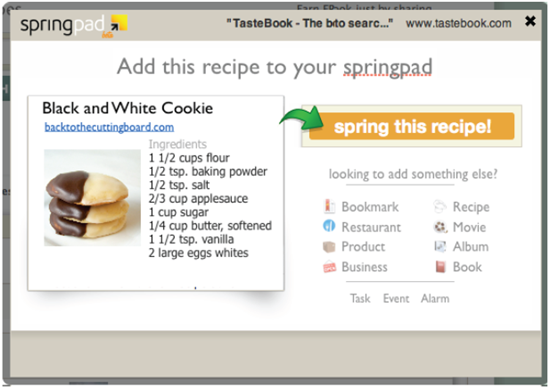
- The clipping tool is powerful and intelligent, almost as functional as working directly out of the main software. It can even grab just the recipe ingredients off of a page on a site like Epicurious, for example, or you can share what you are clipping on Twitter, Facebook or email right from the clipper. You can also set up events and task reminders from the clipper, which is a handy feature.
- Add by Email — Springpad provides you with an email address to add content to the service via email, much like Evernote or Posterous.
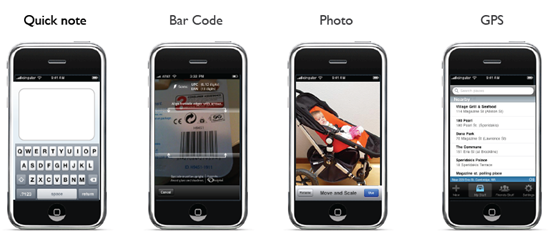
- Their iPhone App is simple and highly functional, providing you with the ability to add by text, by type, by photo, by a location-based search of what’s nearby, or by barcode. As mentioned, there is also an Android app on the way (mid-May), and other smartphone users can access the mobile version of the Springpad website.
- Offline sync! Just like the Evernote app, you can sync your entire Springpad with your iPhone for offline viewing.
- iPad app coming in about a month or so, also with offline sync! This should be a great help when you want to take a recipe into the kitchen…
- You can share notes and information with people quickly and easily. The inability to share notes and information easily is one of the major flaws of Evernote – not so, Springpad.
- Just start typing in Springpad and Live search the web and other users’ public Springpad posts. Share and “Spring” what you find into your own account.
- Follow Springpad users you respect, like Twitter, but with access to more than just 140 characters and a link.
- Bloggers can add a Save button directly to their blog. The button works just like the webclipper and is another great way to get your work shared about the web, especially as Springpad grows.
The Bad:
- No Desktop App yet. It’s in the works, but it will be later in the year (a Mac client may be available in June).
- There are times when the Clipper seems to miss things, at least when grabbing a recipe. When trying it out, my wife pointed out that one or two of the ingredients in the list were missing. Thankfully, it is extremely easy to copy and paste them back in.
- Since the Springpad service is so robust, there is still a slight learning curve as you figure out how to best make it work for you — however, I say again: if my darling and tech-resistant wife can get into it easily, then so can you. Apparently Springpad is actually very popular with moms, in general. It’s like a personal assistant that’s easy to get along with.
What’s on the horizon
Aside from the impending releases of of the API and iPad, Android, and Desktop apps, Springpad is integrating more and more services to provide users with even more enhancements. They are also adding an Alerts Dashboard feature that will allow you to opt in to offers from their partners — so you could be adding a note about a product that you really like and find yourself looking at (for example) a 50% Off coupon for that product or something related.
Will I Switch?
Switch? No. At least not right away, anyway. I have adopted Evernote as much too much of a major part of my general and offline workflow to just jump about all willy nilly. However, I may well refine my usage of Evernote and adopt Springpad as a more organized and visual approach to the information I collect, as well as my GTD process. Much of my decision here will come from watching how my wife adopts and handles the software over the next few weeks — which I plan to do a follow up post on.
Springpad has some of the features that I’ve always wished for in Evernote and, quite honestly, does a better job of presenting and allowing you to manipulate the information. Evernote does what it is meant for extremely well, but if you find it lacking or frustrating at times, Springpad may be what you need (especially with a desktop app on the way).
Give it a shot and let me know what you think!

rahul says:
Have anyone tried Zukmo. If you are looking for a simple note making tool to use as a private cloud and for sharing, Zukmo (zukmo.com) should be one of the best tool. Apart from notes, its have the ability to use Bookmarks, File Synchronization, Google docs, Twitter streams and RSS feeds.. Worth to have a try.
December 5, 2011 — 1:45 am
steve says:
sounds good (especially the g-cal sync) but, no swop over from evernote till there’s a PC app – I don’t live just on my iPhone
February 9, 2012 — 2:59 am
James says:
For a standalone desktop client, you might be waiting a good while. However, I believe the Chrome browser extension is designed to work off line. It’s identical to the online experience, and is a much more dependable platform than other thin alternatives, like adobe air for example.
In either Springpad or Evernote, look for clippers that allow you to save directly to the application when you are at your desktop. This saves substantial time clipping and saving, and does the online sync in the background. Otherwise, the latest clippers are saving directly to the online service, which might present less conflicts, but can really stall the process of collecting stuff.
February 9, 2012 — 9:24 am
Subeesh says:
Springpad….No words to say…just awesome ya….and its free…I like it…evernote is worst…thanks for the developers….
December 24, 2012 — 1:53 am