By now, you’ve probably seen some of the cool Google Doodles – those logos at the top of the Google search page that replace the standard Google logo from time to time. Those logos stick around for a day or so, and then are seemingly lost forever. Except they aren’t. You can find a complete list of Google logos on the Google logo archive page. The archive page has one shortcoming, though. Some Google logos were interactive, and on the archive page they are presented as static images, with no way to use the interactive elements. With a bit of digging (i.e. Google searching), though, you can locate some of the interactive logos. Here are six of them.
Are you on Google+ by now? If not, head on over to our invitations post, and request an invitation. While Google+ puts Facebook to shame in many areas, one feature that it lacks is a tool to search users. You can hack together some attempts to search Google profiles, but that’s about it. At least one site is attempting to fill the void. Find People on Plus is a site geared towards- you guessed it- finding people on Google+.
9/20/11 UPDATE: Invites are no longer needed, as Google has opened up Google+ to everyone, as of September 20, 2011. If you’re looking for someone to follow, you can follow Evan Kline or Bobby Travis from 40Tech.
We’re on Google+, and invites seem to be working – at least for now. If you’d like an invite, post your Gmail credentials here. You can mask it to avoid the spambots (for example, yourname[at]gmail.com), or you can use our contact form to get in touch with us (but that might take longer for us to approve). Fill out the comment form with the email address you want to use with G+ (might have to be a Gmail address), along with a request to be added, and we can add you. If there are many requests, we’ll do our best to keep up. There’s no telling how long Google will keep the invites open, so this might not last for long. If you want to thank us, please consider following us on Twitter or Facebook, or subscribing to the RSS feed.
UPDATE: I’ve gotten word that the invite links are once again not working, so I’m closing this thread for now. Invites appear to be open again, so I’m reopening this thread. Add a comment with your address if you want an invite. As long as you add your address to the email field in the form box, I can send you an invitation. Invites might not be instantaneous, though, depending on whether we’re by our computers when you request an invite.
Google+ is all the rage among the tech-geeks of the world right now. It’s the tech geek — and social geek — media equivalent of a major presidential upset or natural disaster. And with a new Google product, it could end up being either. It really depends on your level of cynicism when it comes to Google launches. Their efforts in the social tech space, while fantastic from the innovation perspective, have fallen flat repeatedly when it comes to adoption. And when I say flat, I mean a fall from a tall, tall building that ends with something reminiscent of a pancake. Or a crêpe.
So I’m curious: where do you stand on the Google+ front?
For me, I’m definitely interested and excited to try it out if and when it ever gets to me. However, I’m more than a bit cautious when it comes to the “Google+ will change social media and business as we know it” spiel. Sure, it’s possible that Google may kill, or at least finally be able to compete with Facebook and Twitter, but we’ve heard all of that before. Hello Google Buzz — and damn you Google Wave.
Frankly, I’m a bit tired of tech media spinning new products like this out of proportion. I’m tired of hearing about unproven products that are destined to kill proven products, especially when the creator has a poor track record of success and their only real merit is that the creator is a tech giant. What has been proven, time and again, is that — if you’ll excuse the age-old, multi-layered saying — size doesn’t matter.
So, what do you think? With the failures of Google Wave, Buzz, Orkut and Sidewiki drag Google down yet again? Is Google+ as amazing as it sounds? Even if it is, do you think it has a prayer of taking on Facebook and/or Twitter? Let us know in the comments.
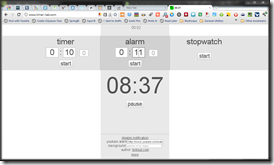
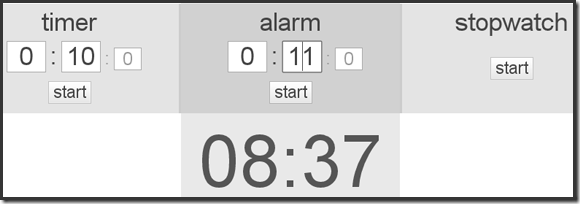
Chrome’s Web Store houses all manner of apps — but they don’t have to be complex to be effective. Timer Tab is really nothing more than a simple countdown timer, alarm, and stopwatch built into a web page (accessible in any browser, including mobile Safari) — but the integration it enjoys with Google Chrome makes it incredibly useful. Time is a commodity that we’re all a little short on, and Timer Tab helps you manage it simply and easily.
The interface of Timer Tab is a minimalist’s dream. It’s uncluttered, functional, and oddly pretty as it basks in its own emptiness. The functionality speaks for itself: enter a time to count down, or an alarm time, and press the start button. The stopwatch doesn’t require any entry at all, just a press of the button, followed by a click on the pause/resume button as needed. Even the options are simple — there are only three, and you get to them by rolling the mouse over the the “more” link on the bottom of the page.
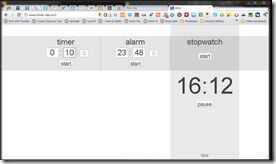
Timer Tab’s Chrome integrations allow for two important functions: desktop notifications and the flashing of the mini-version of the time that hangs out in the title area of the browser tab. This is a fantastic way to make sure your attention is brought to the alarm you set, and is especially helpful if you are trying to keep track of how much time you spend doing something on your computer, or to remind yourself to take a break. Notifications can be enabled or disabled with a single click in the options area, and if you want to, you can add a link to an image or a YouTube video as your alarm.
Theoretically, you should be able to add a YouTube video at a particular time index by adding something like &t=2m18s to the end of the link. Unfortunately, I haven’t been able to get that to work properly. If you have better luck, let me know!
Timer Tab is a simple, effective, and completely free/good looking way to keep track of time sensitivities when you are in the browser or just on the computer — which is often for so many of us these days. I recommend using it with any browser, but install it in Chrome to get the most out of it.