

- Easy Access to US, UK Streaming Services From Anywhere - August 18, 2012
- 5 Fresh Android Games Released in 2012 - July 5, 2012
- Google Chrome Explodes On To iOS, Puts Desktop Experience In Your Pocket - June 30, 2012
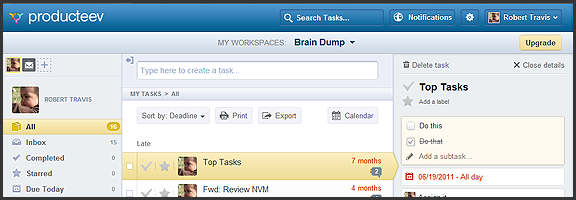
Producteev, one of our favourite — and one of the best — to-do apps, has released a massive upgrade that includes some long-awaited features and platform updates. The web and iPhone apps have gotten a makeover, the much clamoured-for Android app has finally arrived, and there is now a Windows 7 desktop app to balance out the Mac version. Even the logo has been updated (bye bye Tasky the beaver)!
To top it all off, Producteev has added a few new features into the mix — and yes (drumroll), that does include sub-tasks…
Check out the video below for the overview of some of the new functionality in the multi-platform task manager.
http://www.youtube.com/watch?v=qBnzWfAdVQsThere have been usability and visual enhancements across all apps, improvements to some of the main Producteev feature-set (discussed in previous posts), and some brand new features such as integration with TaskRabbit (a service for crowdsourcing small tasks), the ability to print tasks and export them to CSV, as well as the aforementioned sub-tasks.
Now, I know many of you have been waiting patiently for sub-tasks, but don’t get too excited. At this time, sub-tasks are really nothing more than a checkable list added to the top of the main task’s detailed view. There is no way to interact with them outside of that view, or to add specific dates, labels, or anything else. Also, they don’t appear to work in the mobile apps yet, either. Hopefully, there will be improvements, and soon, especially in the case of the missing mobile integration.
The Android app is great. I can now use Producteev with my wife’s phone just as easily as my own, and with an interface that’s nearly identical to the iPhone’s. As Producteev mentions in this post, however, Android users should be aware that the new app is in beta. Don’t expect an error-free experience, just yet.
As always, Producteev is free to use for workspaces that have one or two people. If you want to collaborate with larger teams, unlimited people and storage space can be had for $20 USD per month (it gets cheaper the more workspaces you buy).
Update: Google Calendar integration has been temporarily disabled due to stability issues. It should be back up and running within the week — and it will be better than before. Two way task-sync with Gcal, folks!

Eileen says:
Luvvit, luvvit, luvvit!!!
January 27, 2012 — 8:30 am
Bobby Travis says:
I’m with you, Eileen. Hopefully there will be even more updates in the short term.
January 28, 2012 — 11:23 am
Eileen says:
Huh… no, not so great after all.
Get some IO exception error when I try to login to Android. The error flashes on the screen so fast cannot get it all… java.io are there…..
January 27, 2012 — 11:33 am
Bobby Travis says:
I haven’t had the IO issue you mention, though. The app installed and works fine on my wife’s phone, so far. Have you checked with support? I’m curious to know if other people have the same issue.
January 28, 2012 — 11:25 am
Eileen says:
My son looked at it for me and sorted it. I think he said he did a ‘force stop’ and when I logged in again, it was fine.
January 28, 2012 — 3:03 pm
Bobby Travis says:
Glad to hear it, Eileen. And thanks for keeping us updated!
January 30, 2012 — 11:15 am
Sean says:
I’ve been using Toodledo. It’s nice but kind of tiresome. I’m going to evaluate Producteev (looks good so far). Free version seems to have more features than free Toodledo.
Q: Do you know how to get tasks out of Toodledo into Producteev?
Thx
January 27, 2012 — 5:41 pm
Bobby Travis says:
Unfortunately, I do not. There are a lot of ways to get tasks into Producteev, but importing from another system isn’t up on the list.
I’m not that familiar with Toodledo — interface drove me nuts. Evan might have more insight here, but if there is a way for you to get your tasks to your email account, you could then forward the email into Producteev via email to task.
January 28, 2012 — 11:32 am
Nina says:
I guess I finally have to upgrade to iOS 5 and check out Producteev again. I gave it a try a while ago but decided it wasn’t quite right for me; I love the new interface and I’m curious as to how the new version compares.
BTW, Bobby, I think you and Dan appear in the 3rd screen shot of new Producteev on the app store (“Task Details”)?
January 27, 2012 — 11:43 pm
Bobby Travis says:
Let me know how it works out, Nina! And yeah, there are several pics in the Producteev demos that include me, Dan, and other vocal Producteev users. They asked us a while back — it was a sort of thank you. :)
January 28, 2012 — 11:35 am
Nina says:
I tried it (loving iOS 5 so far!) and Producteev’s new UI is indeed lovely BUT it seems the update removed the option to connect workspaces with GCal. I hadn’t done it before and looked in every possible menu in the web app to do it now, but could only find email and messenger options, nothing for GCal or Google Tasks. That would have been the one feature to tempt me away from Awesome Note, to which I recently returned, thanks to Evernote’s rich text editing issues on iOS (since a lot of my recurring tasks include updating text files, I moved them to one of the AN folders, so now I can edit them either on the web or, if I’m on the road, on my phone without the formatting coming undone).
Perhaps I’m missing something? I think the GCal option used to be in the workspace admin menu but now I can’t see it anymore.
January 28, 2012 — 11:57 am
Bobby Travis says:
I looked around, and I discovered the same thing. Not sure why that would be, as the literature on their site still says Google Calendar integration, as does every recent post about Producteev I can find. I did see that they have a calendar view in the web app now, but I can’t see that they would remove one of their main selling features. What’s more, I can’t find a way in the new Windows app to do any sort of Workspace connectivity configurations. You still need the web app for that, apparently.
The Gcal thing could be an error, I suppose. I may have to contact them to find out.
January 28, 2012 — 1:19 pm
Nina says:
I hope it’s just an error. The calendar view in app is great, but doesn’t make up for sync with GCal.
January 28, 2012 — 2:29 pm
Bobby Travis says:
It will be back soon, Nina — and two-way!
January 30, 2012 — 11:16 am
Eileen says:
I read somewhere that it has been disabled temporarily for some reason.. on the blog I think I read it. Couldn’t believe my eyes!!! Working on enabling again. Ismael is the chap dealing with it I think.
January 28, 2012 — 3:07 pm
Bobby Travis says:
I just confirmed with their lead developer that Gcal was disabled temporarily for stability reasons — HOWEVER: it will be re-enabled hopefully within the week. It will also be two-way! :D
January 30, 2012 — 11:15 am
Nina says:
Great news, Bobby, thank you for checking re GCal!
January 31, 2012 — 7:09 am
Bobby Travis says:
My pleasure, Nina!
February 2, 2012 — 12:51 pm
Eileen says:
That is GREAT news Bobby. Thanks for checking that out for us. :-)
January 30, 2012 — 3:13 pm
Bobby Travis says:
My pleasure, Eileen!
February 2, 2012 — 12:46 pm
Eileen says:
They have also disabled the Daily Digest which was my daily list of to do’s that I hard copied every morning.
This will also, apparently,be returned soon… sure hope so….
February 2, 2012 — 1:16 pm
Brian says:
I just switched from Asana to Producteev for web-task management and love it. The one thing missed here is that sub-tasks are also not available in the native Mac and PC apps, which is frustrating.
Having looked at a handful of product management apps, I have to say, there is still nothing that compares to tasks in Microsoft Outlook. Now, I’ve switched to Mac and don’t use Outlook anymore (Outlook for Mac sucks) and so I’ve been forced to find another solution but I am still left wanting.
What I miss the most is reading an email and being able to create a task from that email with one click, making the subject of the email the title of the task and the email content as the “notes” field in the task (you could create calendar events in the same way, which I miss just as much). I am waiting for both Google and Apple to integrate mail, calendar, and tasks in the same way. I hope I won’t be waiting too long.
Brian Frumberg
February 9, 2012 — 12:08 pm
Tomasz says:
Hey Brain, features you are waiting for are right there in Gmail. You can create either a task or a calendar event straight from the email message.
April 11, 2012 — 5:24 am
Tomasz says:
*I mean Brian not “brain”. funny typo :)
April 11, 2012 — 5:24 am
Tim says:
Producteev needs global tags to be a real contender
March 20, 2012 — 11:16 am
Eileen says:
@Tim – couldn’t agree more.
Still no Gcal.
Still no daily digest.
Still so disappointed!
April 11, 2012 — 9:58 am
Bobby Travis says:
Global tags has been something I’ve been bugging them about since the beginning. I’m with you in my disappointment about the Gcal and other delays.
I know they’ve had some developer turnover recently, so maybe that’s the reason. Hopefully, soon.
April 13, 2012 — 9:31 am
Linda says:
Loving Producteev.. but almost September and still no Gcal?! Even with new versions on most platforms this feature still seems to be missing.. or at least I can’t find it!
August 24, 2012 — 11:40 am