
Last week we wrote of an important step that you should take to secure your Gmail account – associating a cell phone number with your Gmail account, so that you can receive a recovery code via text message. As we pointed out, that’s not foolproof – a savvy hacker could change the cell phone number associated with your account. Then what? Google does offer an account recovery process, but it requires you to know the answer to several questions.
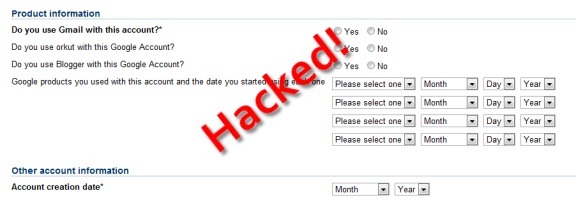
The answers to these questions are not simple to locate. The questions can be found on Google’s page for recovering a compromised account (you’ll need to select the “no” radio button to see the questions). You should consider locating and recording these answers now, as they’ll be hard or impossible to obtain if you don’t have access to your account. These are the questions:
- Do you use Gmail with this account? (required field)
- Do you use orkut with this Google account?
- Do you use Blogger with this Google Account?
- Account creation date (month and year) (required field)
- Last successful login date (month, day, and year)
- Last password that you remember (required field)
You also will be asked to identify four Google products that you use with your account (such as Docs, Reader, etc.), and the date that you started using each one. You can find a list of your accounts on the Google accounts page. Figuring out these dates is perhaps the trickiest part of the process. Here are a few tips for finding some of these dates:
- Search your Gmail messages with this phrase: congratulations google team. Many of the Google services use those words in the welcome message that you receive when signing up, so searching for those words will return those welcome messages (and the date on which they were received). Searching for just “Google” and “team” may help, too. My Wave invitation had those words in it.
- You can try to find the origination date of your Google Docs account by looking for the date of your oldest documents. Of course, if you delete old documents, then the date of your oldest current document won’t be much help.
- Do you have an Android phone? If so, find your receipt so that you can pinpoint when you started with Android.
- If you use Analytics on a web site, a review of your Analytics stats should give you a good idea of your account start date, simply by looking for the first date on which visits to your site were recorded.
- If you have a Blogger account, you could check for the date of your first post. Your blogger profile also has an “On Blogger Since” date, but that just lists a month.
- If you have a Picasa account, you could check the upload date of your first photo. This isn’t foolproof, if you’ve deleted photos or didn’t start uploading photos right away.
- Finally, you could also pick a service that you don’t use, and start using it today. Then, should your account ever get compromised, you’ll know the start date of that service.
If you write these dates down now, you may thank yourself later if your account is ever hacked. If you know of other methods for determining the date on which you started using a Google service, let us know in the comments.

Anthony Russo says:
Saved in Evernote.
Thanks Evan!
December 6, 2010 — 11:57 pm
Evan Kline says:
You’re welcome. (However, this info won’t help you much if you can’t get into your account, so you may want to figure out some of these answers now).
December 8, 2010 — 6:16 pm
Kosmo @ The Soap Boxers says:
Why not have a biometric (voiceprint or fingerpint) to reset the account? :) Make it so that if you enable a biometric, it would always be active as a possible reset mechanism (i.e. a hacker couldn’t turn it off) and that you’d have to pass a biometric test before being allowed to change any of the biometric artifacts.
Really, microphones are built into a lot of computers, and fingerprint readers are fairly cheap. And it would be optional, no Google users wouldn’t be forced to spend the money.
December 7, 2010 — 4:34 pm
Evan Kline says:
I don’t know much about biometrics. I know in the movies, fingerprint readers are high tech and all, but how foolproof are they?
December 8, 2010 — 6:13 pm
Kosmo @ The Soap Boxers says:
I don’t know a ton about it, but I’d think they are relatively safe with respect to long-distance hacking. Your roomate could get an impression of your fingerprint and fashion a mold from it, but a random long-distance stranger is going to be clueless, since they don’t know anything about your whorls and loops. It’s not as if they could just use a device that will transmit a fake Evan fingerprint to the device driver.
And if someone is close enough to you to get an impression of your fingerprint, they are probably close enough to you to use other trickey for a rest.
Our day care uses them to log into the system, and it’s pretty picky. You need to use the same finger you registered with, and needs to be angled pretty much the same way. If I put my finger on it a bit cockeyed, it doesn’t work.
December 9, 2010 — 3:14 pm
Kosmo @ The Soap Boxers says:
Now that I think about it, it’s not the reader itself that would need to be foolproof, but the backend code on Google’s side that does the comparison. The reader should just read the print and transmit – not make any decisions. It would be up to Google on how to do the comparisons.
December 9, 2010 — 3:19 pm
Evan Kline says:
Yea, that’s what I was getting at. I seem to recall reading that fingerprint readers aren’t 100% accurate (in that they will find a match when there isn’t one, in some instances).
December 9, 2010 — 5:06 pm
Kosmo @ The Soap Boxers says:
Well, if anyone can afford to develop/buy software that compares as many artifacts on the print to the stored record in as little time as possible, it’s Google. I’m not saying they can duplicate AFIS, but you’d think they could implement something that rivals the high end stuff in the private sector.
In the end, how precise does it need to be? If it’s 99.9% accurate (with the .1% being false positives), a perp would need to collect, on average, 1000 prints in order to crack your account that way. Not saying that it can’t be done, but it seems that there would be easier methods. Push it to 99.99%, and you’d need 10,000 prints for a random false positive.
December 9, 2010 — 11:05 pm
Suzanne says:
Your title confused me… Did you mean “Thank” instead of “Thanks”
December 9, 2010 — 12:25 am
Evan Kline says:
Yep . . . change made.
December 9, 2010 — 7:19 am
priyanka says:
hey … my account got hacked 1 year before … and now its hacked and i cant access it and all the recovery id and password are changed … i don’t remember the dates of joining gmail .. what should i do ?
September 13, 2013 — 3:33 am
Evan Kline says:
Hmm, that’s a tough one. If you don’t have cell phone recovery set up, I’m not sure what you can do, aside from the slim chance at getting a live body at Google to talk to.
September 13, 2013 — 12:31 pm