
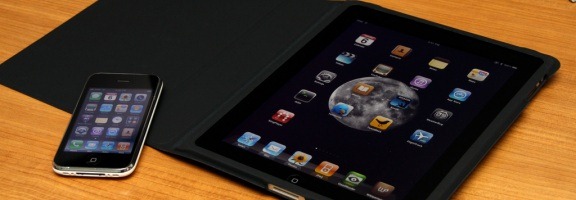
If you’re like me, you assumed that the iPad was pretty much identical to the iPhone, but bigger. The form factor alone opens up some new possibilities on the iPad, but there are other differences aside from size. Here are five differences that, while obvious, might be news to you if you’re thinking about purchasing an iPad.
Photo by Yutaka Tsutano
1. 6 Spots In the Dock
By default, the iPad, like the iPhone, comes with 4 icons in the icon dock at the bottom of the screen. These are the icons that are available on all icon pages. On the iPad, though, you can add two more icons, giving you six in the dock.
2. More Rotation Features
The iPhone is a bit hit or miss when it comes to screen rotation. While we’re past the early days when only a few apps supported screen rotation, icon pages still can’t be rotated, and there is no quick and easy way to turn rotation off and on. Conversely, I have yet to find a screen or even an app that can’t be rotated by simply rotating the iPad itself. The iPad also comes with a switch on the side that you can flick to lock the screen’s orientation.
3. Harder to Type
This one is a matter of opinion, but I find it harder to type on the iPad than on my iPhone, which surprises me. The iPhone is small enough that you can reach all of the onscreen keys with your thumbs. Not so on the iPad. The iPad is too big for thumb typing, but too small for traditional typing. I’ve resorted to pecking with my index fingers. Sometimes I’ll use one hand in the traditional typing position, and peck with the index finger on the other hand. Either way, it is a bit more cumbersome than typing on the iPhone.
4. No Mute Switch
Unlike the iPhone, the iPad doesn’t have a switch that you can flick to kill audio. In its place above the volume rocker, you’ll find the rotation lock. You can still mute the audio fairly quickly, though, by holding the audio rocker down for a few ticks. If you do so, the iPad’s audio will jump to muted.
5. Your iPhone Charge Cables Probably Won’t Work
If you have a drawer full of iPod or iPhone charging cables, your first instinct might be to use some of those cables around the house to charge your iPad. You may be in for disappointment. I’ve found that none of my iPhone or iPod cable/plug combos work with the iPad. Instead, I’m presented with an onscreen message advising me that the connection doesn’t support charging. I suspect that the cable isn’t the problem, but rather that the plug doesn’t provide enough juice to charge the iPad. Also, the iPad won’t charge via the USB ports on some older computers. There are some reports that the iPad will still charge slowly, if turned off, but I haven’t tried.
If you own both, what other differences, aside from form factor, have you found between the iPad and iPhone? If you don’t own an iPad, are there any differences that are swaying you one way or the other from making a purchase?

Klaus @ TechPatio says:
Odd that your old iPod USB cables doesn’t work for charging. I haven’t had any issues yet, though of course if I charge using my iPhone wall charger, it takes twice as long time to charge the iPad because the iPhone charger doesn’t output as much – but it works and if it charges overnight then it’s no big deal anyway.
September 8, 2010 — 10:15 am
Evan Kline says:
I guess it is possible that it might be charging slowly. I haven’t left it plugged in long enough to see if it does, after getting the warning message.
September 8, 2010 — 12:20 pm
Klaus @ TechPatio says:
I don’t see any warning message on my iPad, so that’s probably not a good sign if you are :(
September 8, 2010 — 12:22 pm
Holly says:
About the harder to type: I’ve been beating a rarely heard drum about FITALY a keyboard layout designed for one-handed character entry. It was originally developed as a Hack for Palm devices and was BRILLIANT for that use. I don’t understand why the user-friendly (?) folks at the big fruit haven’t picked up on this yet. Provincialism? Chauvinism? I don’t know but FITALY would help out a lot of ipad users.
September 11, 2010 — 9:45 am
Evan Kline says:
I hadn’t heard of Fitaly, Holly. Looks pretty interesting.
September 11, 2010 — 1:09 pm
Holly says:
They had a speed contest 6-7 years ago. Using the slide feature for capitals and common combinations, some people were consistently hitting 80 wpm or more. The QWERTY keyboard was never designed for speed, or for ease of use in any language.
September 12, 2010 — 10:31 am
Sarah @ Mum In Bloom says:
Thanks for the comparison. I’m in the market for a new cell phone and a laptop. Your post really helped :)
September 12, 2010 — 9:08 am
Evan Kline says:
Glad it helped you Sarah. There are lots of great choices in the cell phone market today, so good luck!
September 12, 2010 — 9:15 pm
Roberto says:
If I’m not mistaken, I think the QWERTY keyboard was design for typewriter machines. It had something to do with the mechanism of it, some English common words were thought out and the letters were arranged like that.
April 30, 2011 — 8:35 am
Evan Kline says:
I think you’re right, Roberto – or at least that’s what I remember from my high school typing class 27 years ago (back when they actually made typewriters).
May 3, 2011 — 8:09 pm
schill39 says:
iPhone and iPad has a big difference. But I think I still like the ipad better than the iPhone. You can do many things on an ipad than the iphone just like watching HD videos and it has bigger screen. Well its up to you to choose whether you like ipad or an iphone, I’m just stating my opinion.
Nice post you got there.
computer tablet reviews guru
March 22, 2012 — 3:14 am