

- 5 Alternatives to Microsoft Excel - August 20, 2009
- 8 Twitter Tools for Windows Mobile - August 6, 2009
Today, 40Tech is pleased to present a guest post from Srikanth from the Tech Inspiration blog.
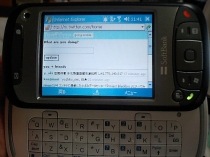 Just as with a Windows desktop operating system, you can install many types of applications on your Windows Mobile device. In fact, there are many applications available that are specifically designed for Windows Mobile devices, such as Twitter applications to enhance your Twitter experience. With these applications, you can stay updated with the latest tweets from your friends, and you can update your status by tweeting from your device. These applications are a great help and fun when you are traveling, as they allow you to stay in touch with your followers and friends. Some of these applications even will allow you to do more then what you can do from your PC. Here are a few of them.
Photo by kenjimori.
TinyTwitter
TinyTwitter is the most popular Windows Mobile Twitter application. Although it works on any java enabled phone, TinyTwitter is particularly popular with Windows Mobile users. It has a simple user interface. and has limited but essential functionality. Using this application, you can tweet directly to your friends and followers, view friends, and view a public time line in separate pages. This application does not allow you to follow new users, but apart from this you can do everything that you could do if you were sitting at your computer.
Twobile
This Windows Mobile Twitter client supports each and every service that Twitter provides. Twobile will work on Windows Mobile 5 and higher devices and works only on touch screen devices. This application runs when your Windows Mobile device starts. You have the option of downloading Twitter profile images or not, which is very useful if you want to save on data usage. You also can enable or disable images in the public timeline. Using this application, you can re-tweet by modifying the original tweet. Using your mobile phone’s GPS hardware, this application will automatically update your location. The user interface of this application is very handy, allowing you to separate pages and time lines in tab form. 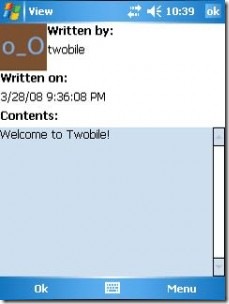
ceTwit
ceTwit is another Twitter client that can be used to tweet from your Windows Mobile device. This application is written in C programming language and runs on the .net compact framework. This application has many cool features, such as allowing you to separate or merge both friends and the public time line, and it automatically updates your status. You can store multiple accounts on this application, and launch the required account at any time. With one click, you can send direct message and reply to a tweet. This application also enables you to share photos with the support of Twitpic and ping.fm. Avatars in the time line are cached locally so that they do not reload every time you refresh the page, saving you bandwidth on your data plan. This application works fine on Windows Mobile 6 on HTC and the Samsung Blackjack.
PocketTwit
This is another popular Twitter client for Windows Mobile devices. PocketTwit works on Windows Mobile 6 devices with touch screen functionality. This application has all of the features that are available on the regular Twitter home page, and in addition has functionality such as a URL shortening service, photo sharing via Twitpic, GPS location updates, and the ability to use multiple accounts. The interface of this application is very interesting. It has three columns, and the user menus are available on either side of the screen, which makes tweeting very easy.
Twikini
This is a multimedia Twitter application, and is very easy to use, while still being very effective. Twikini is relatively fast compared to other Twitter applications for Windows Mobile. It is written in c++ code that enables faster load times and maximum performance. The user interface of this application is completely customizable, which allows you to have a pleasant Twitter experience on Windows Mobile. You can post tweets in a full screen mode, and you can also update your location using the GPS device on your mobile phone. You can share photos directly from your camera, or load photos from memory card to share with your friends. Like in the web browser, you can reply to tweets, retweet, and email tweets. This application integrates with the Windows media player so that you can tweet the songs and playlists to which you are currently listening. This application works on all kinds of Windows Mobile devices, including both touch screen and non-touch screen phones. 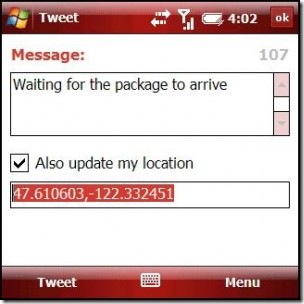
Jitter
Jitter is a Java based application that is sure to run on any Java enabled phone. Most Windows Mobile phones are Java enabled. This application is very simple and does not have any flashy features. It only supports text, so that you only can read and write text, and cannot view fancy Twitter avatars at all. Because of this, it works very well even on low bandwidth networks. This is very useful if you need to save on your data transfer plan.
TwitToday
TwitToday is a brilliant Twitter client for Windows Mobile devices. This application only allows you to read and post tweets, and does not have any extra features. This application is great if you want to get right to the point. It works on Windows Mobile 5 and 6.
Twitter Mobile Home
This is the official mobile web page for Twitter. It is useful if you don’t want to install a dedicated application on your mobile device. Just point your mobile web browser to http://m.twitter.com/login to login with your Twitter username and password. It is similar to the normal PC web version.
Guest blogger Srikanth writes on the Tech Inspiration blog about tips, gadgets, and technology. Check out his blog or Linkedin profile for more.

Stephen Hallam says:
Great article! I’d just like to point out though, that PockeTwit can be used very well by phones that don’t have touch screen functionality. I’d been using TinyTwitter (but got annoyed by the fact that it wouldn’t allow me to switch the profile pics off) and switch to PockeTwit on my Palm Treo 500. I’ve not had any problems with it since.
August 6, 2009 — 8:26 am
Bobby says:
In my many searches for Windows Mobile Twitter apps, I have found that PocketTwit is often the most popular, and is definitely the most powerful. The user interface is incredibly easy to use and it does work without the touch functionality, but the touch aspect is very responsive. The multiple screens and menus make for a great overall experience.
There are also Twitter widgets and integrations in browsers like Opera Mobile and Skyfire.
I should also point out that, while Windows Mobile apps have a tendency to be ugly (due to Windows, generally), some of these apps are not terrible to look at. PocketTwit and Twikini (pic here doesn’t do it justice) are good examples. — A good theme for Windows Mobile helps too.
August 6, 2009 — 11:49 am
Evan Kline says:
The article and your comments have me thinking that Microsoft really needs a centralized app store (am I correct that one is in the works?). It was only after I ditched my Windows Mobile phone (AT&T Tilt) that I started learning of all sorts of great apps, which I had no idea about. I’ve since learned that several apps I use on the iPhone do have WM counterparts. I know there are app sites out there, but they need to make it easy like Apple does.
August 6, 2009 — 11:56 am
Anthony Russo says:
I use PocketTwit. It’s a great interface and really simple to use on my HTC Touch Pro. I’ve been through a few clients and definitely recommend it.
Anthony Russo
anthony.russo10@gmail.com
http://www.anthonyrussoblog.com/Anthony
Skype: anth.russo
Twitter: @AnthonyRusso
August 6, 2009 — 12:06 pm
Bobby says:
There is a Microsoft central app store in the works, but it will be a bit yet. It just opened to developers recently. There is also another one I heard about recently that apparently “beat microsoft to the punch” but I can’t remember the name. I think it is in my ReadItLater list though, so I will post back if I find out more.
August 6, 2009 — 5:37 pm
Charles says:
What, no Kinoma Play? It’s Twitter app is probably the best Twitter experience on mobile.
August 11, 2009 — 12:06 pm
Ruchi says:
I have not tried most of them, i think tiny twitter is really famous , i will give it a try.
November 1, 2009 — 3:31 am
Nichole says:
Brillaint article. There was alot of good information in this. I have used Twikini before and it is excellent. I have never used the others but I will definitely give them a try. Thanks
.-= Nichole´s last blog ..Youtube to Mp3 =-.
July 2, 2010 — 3:21 pm
Devid Henary says:
Convert & download Facebook video to MP3, MP4 and many other formats. No software download. This also allows you to convert youtube video to mp3.
https://fbtube.biz
June 25, 2019 — 8:07 am