Menu Close

Tag: Android (page 11 of 12)

Do We Really Need 3D-Enabled Cell Phones?

Do We Really Need 3D-Enabled Cell Phones? | 40Tech

I may be one of the few left on the planet that is underwhelmed (and often annoyed) by the 3D-everything craze. I understand that it is the current reality of the video and gaming world, and I admit that 3D-TV tech is pretty cool, but I really don’t need all of my media to pop out of the screen at me. Plus, it hurts my sensitive, near-35 year old eyes — and I don’t like to wear the glasses. That said, it appears that Sharp is attempting to address at least the latter part of my whining with the advent of their new 3D cell phones.

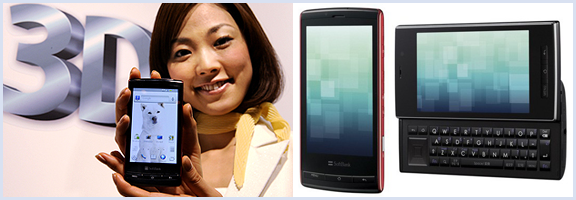
You heard me right, 3D cell phones. The Galapagos 003SH and 005SH are the latest iteration of the Android handset, and sport the nifty, no glasses, 3D-screen tech that is reported to be used in the upcoming Nintendo 3DS.

The tech itself is both innovative and awesome, there is no question of that. It uses a parallax barrier system that specifies where it directs light (to the left or right eye) via a series of vertical slits. This creates a sense of depth and allows for a 3D environment on an otherwise normal LCD screen — again, without special glasses. By all reports, the effect is stunning, and Engadget reports that there are already some mobile games publishers on board (Capcom will be bringing Mega Man, Resident Evil, and Ghosts ‘n Goblins to the new devices).

Like I said, this is some pretty cool tech — but is it necessary? PDA screens are already hard on the eyes. Do we really need to add another layer that will have people staring even harder at their screens? Is it even necessary to have 3D gaming on a cell phone — or anywhere? I mean, it’s not like its an interactive hologram or anything like that — though that is getting closer, too.

What do you think about the latest innovation in mobile and 3D technology? For? Against? Happily indifferent? Tell us why in the comments?


Two Free Android Apps to Control Your Computer (Windows, Mac, Linux)

Two Free Android Apps to Control Your Computer Windows, Mac, Linux | 40Tech

If you have an Android device and want to use it to control your desktop’s (or laptop’s) mouse and keyboard, two of your best free options are RemoteDroid and Gmote.

RemoteDroid is a minimalist’s dream — nothing fancy to its wireframe trackpad/button look — and is a little light on the feature side of things, but it is a great way to control a presentation or media PC. It also handles multitouch gestures, such as the two-fingered scrolling option of multitouch trackpads.

Gmote does a little bit more than RemoteDroid, such as allowing you to serve media content from your PC to your Android device. No multitouch trackpad support here, and there are some media playback issues when streaming, but playback to devices is still a beta feature, and the developer seems to be active with updates.

Both of these remote control apps require you to download a server program to your Windows, Mac or Linux machine, and both are available for free. If you need a way to generally control your desktop or laptop remotely, or want a convenient media centre remote control, then give these two a try.

Have you tried any alternative remote control apps for Android? How do they stack up?

RemoteDroid vs Gmote: Remote Control Your PC with Android [Tested.com]


My iPhone Just Killed My FRS – Hello HeyTell

My iPhone Just Killed My FRS -- Hello HeyTell

I used to love my FRS. I didn’t have to pay for anything; I could talk to people a fair distance away — and it always reminded me of playing with walkie talkies as a kid. Good times. Well, those days are gone. The iPhone/Android app HeyTell has put the proverbial smackdown on my FRS use — when it comes to other HeyTell users, anyway.

Read more


What Is Worse: Apple’s Restrictive App Store, or Android Bloatware That You Can’t Remove?

android bloatware vs iphone restrictiveness

Engadget posted an interesting article yesterday, pondering whether carriers are destroying Android, by preloading Android devices with “bloatware.”  The article compared this to what happened in the PC industry, where computer vendors loaded all sorts of crapware on machines, filling up the drive and slowing the system down.

It’s deja vu all over again for mobile phones. More and more devices I look at are coming installed with applications I don’t want, often popping up messages to try and upsell me on services I have no interest in. Even worse, unlike PCs where offensive applications can be removed or the OS reinstalled cleanly, there’s often nothing that can be done to get rid of unwanted mobile software without arduous work.

The iPhone certainly restricts what apps can get into the App Store, but at least the user isn’t forced to keep an undesirable program on the phone (aside from the basics, like the App Store app, the Photo app, Mail, etc.).  Or is it worse to not have access to certain apps at all, like on the iPhone?

You tell us – what is worse, a smartphone where you can’t even get certain applications because of a restrictive app review process, or a smartphone preloaded with garbage that you can’t remove?

Entelligence: Will carriers destroy the Android vision? [Engadget]

Photo by svensonsan.


Most Android Apps Are Free; Most iPhone/iPad Apps Are Not

iphone and android app prices

Last week, Pingdom parsed the data on iOS and Android apps, revealing an interesting difference.  Specifically, roughly 70% of the apps in Apple’s App Store are paid apps, while 64% of the apps in the Android Market are free.

Why the difference?  Are there more junk Android apps, since anyone can develop for it?  Or does Android foster a different culture, due to its open nature?  What do you think the reason is for this difference?

The mobile app divide: Free rules on Android, paid rules on iPhone [Pingdom]