
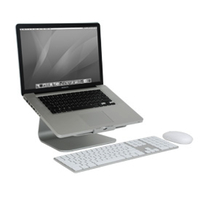
 Thank you, Tony Hue of LonePlacebo for helping me spend money. A couple of weeks ago, Tony wrote about the mStand, a monitor stand that almost looks like it could have been designed by Apple. I decided that I needed a stand, so I took the plunge and bought the swiveling version of the stand, the mStand 360, along with an Apple Wireless Keyboard and Magic Trackpad.
Category: Apple (page 17 of 38)
 You can learn from a toddler. My daughter, who is 16 months old, loves to play with remote controls. Every now and then, she’ll be playing around with the Apple TV remote, and the Apple TV will do something unexpected. I finally went in search of a comprehensive list of Apple TV Remote commands.
 When you use an iCloud-enabled app on your Mac, it may appear that you can only access that app’s documents from within the app itself. Actually, there is a folder structure on your Mac reflecting the location of your iCloud files, with a folder for each iCloud-enabled app that you use. You can find those folders and files outside of their native apps with a bit of effort, or you can make it easy with a free app called Plain Cloud.

Timesavers that I love, but don’t use enough, are an operating system’s keyboard shortcuts. OS X Daily recently covered four pretty basic ones involving the trash, of which I was unaware. Read more

Prior to Mountain Lion, if I wanted to switch my audio input or output from my speakers to a headset microphone, I used a free app called SoundSource. Unfortunately, SoundSource isn’t compatible with Mountain Lion. Fortunately, there’s an equally easy way to select your audio sources on a Mac, going back at least as far as Snow Leopard.