Menu Close

Author: Bobby Travis (page 32 of 51)

Bobby isn't 40-something, but is a strong supporter of the Grown-up Geek kind. He's a loving husband and father first, but is also a freelance writer, productivity nut, operatically trained singer, and (not-so) closet geek.

Check out his random thoughts, wackiness, and Instagram pics on Tumblr, Twitter, or Google+-- or just head over to bobby-travis.com.

Use “Niggle It” to Back Up and Track Contracts, Product Warranties, and More

Niggle It Backs Up, Tracks Contracts, Product Warranties, More | 40Tech

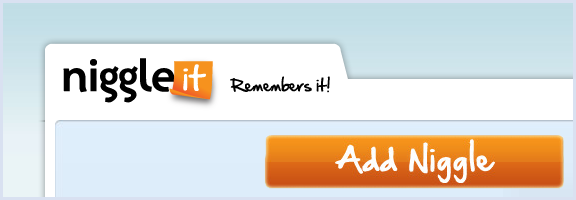
If you’re like me and have a tendency to lose track of your warranty information, Niggle It is a service with a singular purpose: to help you keep track of the details of all of your agreements, including warranties, business contracts — even those conversations that you have with your mobile carrier’s customer service agents. Niggle It will track anything you feel important enough to be reminded about, be it personal or business related.

You can add electronic copies of your documents to Niggle It by emailing in a scan or a photograph taken with a digital camera. You can also use any mobile phone capable of taking pictures and sending email — or use the iPhone app to create the entire Niggle on the go.

The value of Niggle It is the ability to create reminders based on contract dates, and to add additional information and documents to the file (Niggle) that is dedicated to that one item/contract. You have a dedicated, always on hand back up of the documents you need if something goes wrong, and a tool that is able to remind you to, say, get that last full service in on your car before the warranty runs out — just in case.

Niggle It guarantees that your information is always available from anywhere you can access the internet, and that everything is private and secure, with no personal information ever shared with a third party.

Niggle It is free up to five Niggles, and also includes the following pricing plans:

  • Basic: 70 Niggles, 300 MB, 5 MB filesize limit –> $24.95/year
  • Household: 200 Niggles, 800 MB, 10 MB filesize limit, and a Tax Deduction report –> $29.95/year

What do you use to track your warranties and contracts? [Niggle It]


UPDATE: The pricing page for Niggle It is somewhat unclear. I assumed it was per month, but it could, in fact, be $25 and $30 per year — much more reasonably priced.

UPDATE 2: The price is yearly — not monthly — and has been corrected.


7 Tips to Protect Your Email from Hackers

7 Tips to Protect Your Email from Hackers | 40Tech

In the spirit of yesterday’s security-focused post, I wanted to share with you some tips on how to protect your email account from getting hacked. This list was originally put together by the folks at MakeTechEasier and was focused on Gmail, but many of the items are relevant to any web email client, and many other services besides. I’ve reworked the concepts for general use – if you want the just-for-Gmail step by step details, please visit the original post.

original photo by Don Hankins

1. Always check the URL before logging in.

Fake login pages are a problem with any site that hosts sensitive information. Even Craigslist was having this problem just last month. Tread carefully before you log in.

2. Avoid checking emails at public places

This may be a bit much for anyone in this mobile-focused world, but this is geared more toward avoiding checking email (or any private account) from a public computer. You never do know what sort of spyware has been installed on someone else’s machine.

3. Create a secondary email account

If you absolutely must login to your email account on a machine other than your own, create a secondary email account (with different login credentials, of course) and forward a copy of all emails from your original account to the secondary. This way, if you get hacked, your original account should remain uncompromised. Be sure to empty this account regularly – don’t use it as a backup for your sensitive messages. Also, don’t use it for your password recovery account…

4. If you are able, regularly check the IP of the last login

This is a nice Gmail feature, and is offered by some other webmail email providers as well. If you don’t recognize the IP that last logged in to your account – especially if it comes up often – you may have been hacked.

5. Check for bad filters

If your email service allows custom filters, there is always the possibility that one of them could be forwarding your messages to someone else. Regularly check your filters to see if there are any that you don’t recognize.

6. Don’t click on suspicious links

This one should be highlighted in bold, flash, and emit dangerous beeping noises. If you don’t know what it is – even if it is from a friend – don’t click on it. If it came from a friend, send them an email or call them to ask if it was really sent by them. This applies to email, Facebook, Twitter, a sticky note, or any other way a link might have been sent to you.

7. Choose a strong alphanumeric password (and add other characters too)

Some services don’t allow capitals or special characters in your password – avoid these services if you can. Use of funky characters is a great way to increase password strength. If you can get a password up to 16 characters, all the better. I know that these are a pain to remember, but you can always create a password base to help with that, or use a tool like LastPass or KeyPass to remember the password for you.

As a final note, remember what Evan suggested in yesterday’s post on Firesheep and Blacksheep: the only real way to be sure you are at least as safe as you can be when you login is to use services that require https and/or to connect via a Virtual Private Network. The TOR network is a great service if you want a free VPN, and there is even a TOR toggle extension for Google Chrome called Proxy Switchy!.

How do you protect yourself when you login to your email (or other) accounts?


Spray-on Solar Power, Printers That Make Buildings & Generating Power While We Walk

Spray-on Solar Power, Printers That Make Buildings & Generating Power While We Walk | 40Tech

Green tech isn’t waiting on the sidelines while the rest of the tech world progresses. Innovations are happening daily as scientists and visionaries search for ways to tap cleaner, sustainable energy sources. Some of the things that are coming out of those big, green-focused brains are nothing short of amazing, and the folks over at Inhabitat.com have put together a list of inspiring examples. Check out the highlights below:

  • Remember when solar panels were big, ugly… panels? Well, now there is a transparent nano-particle spray that can generate energy across the surface area of an entire building — or the top of a car, or most anything else.
  • Freaked out at the cost of building materials? There’s a 3D printer in development that can print entire stone buildings out of sand — at less cost and with less waste than Portland cement.
  • What do you think about floor titles that convert the kinetic energy you expend walking into useable energy? Wouldn’t that be a neat way to power a subway system? What about mini-generators in the soles of your shoes? You know, to charge your cell phone or power some blinky lights while you run?

Me? I think this all sounds very, very cool. My one concern would be the energy needs and waste that would result from mass production of this kind of tech. After all, if you kill 10 fish in a pond just to catch one with a “humane” hook — next season will be rather slow, yes?  (* /metaphorical-wisdom *)

What do you think about these green tech advancements?

6 Inspiring Examples of Groundbreaking Green Technology [Inhabitat.com]


Do We Really Need 3D-Enabled Cell Phones?

Do We Really Need 3D-Enabled Cell Phones? | 40Tech

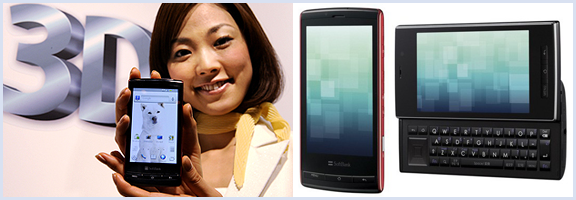
I may be one of the few left on the planet that is underwhelmed (and often annoyed) by the 3D-everything craze. I understand that it is the current reality of the video and gaming world, and I admit that 3D-TV tech is pretty cool, but I really don’t need all of my media to pop out of the screen at me. Plus, it hurts my sensitive, near-35 year old eyes — and I don’t like to wear the glasses. That said, it appears that Sharp is attempting to address at least the latter part of my whining with the advent of their new 3D cell phones.

You heard me right, 3D cell phones. The Galapagos 003SH and 005SH are the latest iteration of the Android handset, and sport the nifty, no glasses, 3D-screen tech that is reported to be used in the upcoming Nintendo 3DS.

The tech itself is both innovative and awesome, there is no question of that. It uses a parallax barrier system that specifies where it directs light (to the left or right eye) via a series of vertical slits. This creates a sense of depth and allows for a 3D environment on an otherwise normal LCD screen — again, without special glasses. By all reports, the effect is stunning, and Engadget reports that there are already some mobile games publishers on board (Capcom will be bringing Mega Man, Resident Evil, and Ghosts ‘n Goblins to the new devices).

Like I said, this is some pretty cool tech — but is it necessary? PDA screens are already hard on the eyes. Do we really need to add another layer that will have people staring even harder at their screens? Is it even necessary to have 3D gaming on a cell phone — or anywhere? I mean, it’s not like its an interactive hologram or anything like that — though that is getting closer, too.

What do you think about the latest innovation in mobile and 3D technology? For? Against? Happily indifferent? Tell us why in the comments?


Some Must-Have Toys to Combat Office Crazies

Rubber Band Gatling Gun | 40Tech

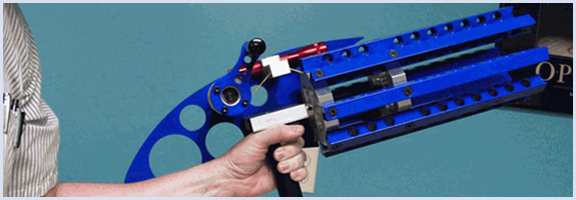
If you spend a lot of time at the office, you know that there are times when the fidgets and the soul rending cry of approaching crazy become one and the same. To alleviate that pressure, My Life Scoop has offered up a list of 10 awesome office toys that include everything from a portable iPhone projector, to mini-golf, to the Rubber Band Gatling Gun.

Not all of these toys are tech, but… who cares? There’s a Gatling gun that shoots 100 rubber bands, man! There’s a Marshmallow Blaster too! If you want to be a stickler, however — after all, you probably come to 40Tech to read about tech stuff that involves some sort of digital readout, remote control, or some such — then check out the electric tech highlights below:

MiLi iPhone Projector – This is a quick and easy way to project your iPhone’s videos on any surface. The display is up to 70″ wide, too.

Finger Drums – A full kit on the mini for those times you’re in your office and just need to rock out.

USB RC Mini Car – That’s right, it’s a remote control car… What? You can control the thing with your computer! How’s that for fun? I suggest checking out the range, and then adding a tiny wireless webcam and audio broadcast device for freaking out co-workers.

What do you use to keep from freaking out at work?

10 Must-Have Office Toys [My Life Scoop]