
Producteev won me over a while back with the smooth way they integrate into your already established workflow. The pretty helped too — pretty is a necessity for me when looking at a task list — but it was the Google Calendar integration, and the ability to interact with and create tasks from email, IM, and more that clinched it for me. As a Gmail user, I have access to a nifty widget, and Google Apps users get even tighter integration.
Enough about me and my Google services, though! We’re here to talk about you — and did you know that Producteev has just launched an Outlook plugin that let’s you single-click emails directly to tasks? And that’s not all… they’ve also announced a two-way sync with Google Tasks, and have some native apps on the way! You like? Read on for details!
Outlook Plugin
Outlook is powerful software, but it lacks mobility, which is a tough thing when you use it as your main task manager in this day and age. Producteev makes Outlook tasks portable by allowing you to take them to the cloud by way of a tightly integrated Outlook plugin. With the plugin, you can add emails to tasks in Producteev with a single click of the flag button, and with the integrated Producteev tab, you can assign it to others, add priority stars, etc. The plugin only allows you to sync with one workspace at a time, but you can choose for the sync to be two-way, Outlook to Producteev, or Producteev to Outlook only, and you can change workspaces right from Outlook, as well.
Here’s a link to the Producteev Outlook plugin screencast.
Google Tasks
I was honestly under the impression that people cared about Google Tasks about as much as they do about Buzz, Wave and Sidewiki. Or Orkut. Apparently, I was gravely mistaken, as Google is invested enough in Tasks that they went through the trouble of launching a Tasks API at Google I/O this month. Producteev was right there with them, and has created a two-way revolving door with the in-Gmail task manager.
It’s a pretty cool integration, actually. It allows you to create tasks in Google and have them sync to your Producteev workspace where they will have their own label (the list’s name) automatically assigned. It also works the other way, bringing your workspace’s tasks into Google where you can quickly check on them and interact with them without leaving your email. Yayy efficiency!
Check out the quick screencast on the integration, below:
http://www.youtube.com/watch?v=1yesX1I_KeI&feature=player_embedded
I advise you to be careful when using Google Tasks sync, however. It is, at this point, only designed to handle a connection from one Producteev workspace. If you use several workspaces concurrently, like I do in my Producteeev GTD setup, and you, say, I don’t know… connect them all… at once — well, let’s just say you will end up with an ever-growing and duplicating list of tasks as the workspaces sync them, and then re-sync them, one after the other, after the other, after the other. *grins* Thankfully, they all show up under one label and so were easy to delete.
If you do use multiple workspaces in your productivity setup, I recommend using only your most important workspace in Google Tasks sync. You could also use it for a priority tasks list, or to keep your Projects workspace handy at a glance.
Native Apps
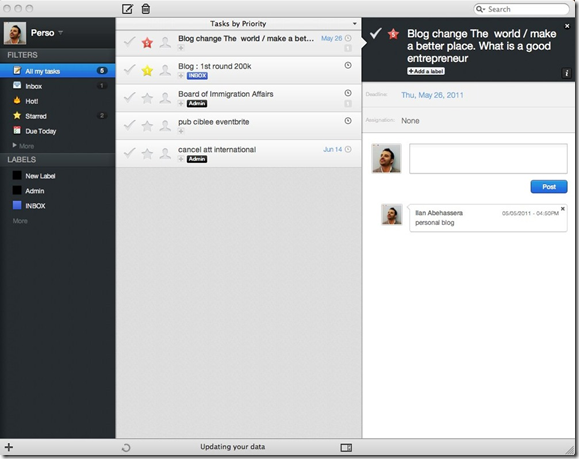
Producteev hasn’t forgotten about the users out there who prefer native apps. They have had them in the works for some time now, and that awesome little tree is about to bear its fruit. A Mac app is due to hit the mainstream by the end of this month, and Windows will get a native app in mid-June. That’s straight out of the mouth (well… email) of Producteev founder Ilan Abehassera, so doubt me at your peril! Ilan also said that a fancy new Android app will be available in early June, as well.
Here’s a look at the Mac app (from the Producteev Blog):
What do you think of Producteev’s new integrations?





BitCoin Digital Currency: Financial Revolution or Doomed to Fail?
I recently read a Gizmodo article about BitCoin, a new digital currency that is peer-exchanged — and generated — and aims to “revolutionize global finance.” It’s a nice idea, really, and some stores and services have already adopted it. According to Gizmodo, you can already trade BitCoin tokens for web designers, games, guns, and even drugs — yep… drugs. This sounds like the makings of real money to me, but how far will it — or can it — go?
Money is many things: the root of all evil, maker of spinning worlds, an absolute necessity to live in our society, yada yada. It also has a basis on which to trade — generally gold and silver repositories that give the coins and paper some degree of relative worth. Even our debit and credit cards, which are the primary ways of buying things digitally, are tied up in the worldwide economy of shiny valuable metals. This has been going on for thousands of years, ever since a few people decided that hoarding pretty things was a good way to live — and other people decided they wanted those same pretty things too. In a nutshell, anyway.
Can BitCoin stack up against all of that? It creates itself out of nothing! It’s an app on your computer that uses your machine to crowdsource the power to facilitate the currency’s transactions, all the while generating tiny bits of BitCoins for you. The creators have put some thought into it, sure, putting a cap on the creation of BitCoins (21 million in total) that will introduce scarcity, and therefore a basis for value, but what kind of potential does this new currency have against thousands of years of history? Not to mention that the wheels that turn the economy, like credit card companies, might have a thing or two to say on the matter – especially about the lower of fees, transaction limits, country walls, and other things that provide financial control over users.
I think BitCoin is a nice idea. I think it even has potential — at least to gain some sort of reasonable adoption over the long term. It will probably be a very long term, though, before any real revolution is seen. Everything we do is too tied up in regular currency. There are those out there who believe in BitCoin now, however — and they are trading the online currency at one BitCoin for $7.50. That’s virtual coins for real money — and not bought by someone who is looking to get a new castle or set of armour in their favourite MMORPG.
Think about it.
Is BitCoin revolutionary? Doomed to failure? Ahead of its time? — Or maybe all of the above? Let us know what you think in the comments.
What is BitCoin [Gizmodo]