Menu Close

Author: Evan Kline (page 113 of 164)

Hello, I'm Evan. I write about tech from my perspective – that of the average tech geek, sometimes with my lawyer glasses on. You can also find me on Twitter and at my real-life job as a lawyer.    MORE ABOUT ME.

LastPass vs. 1Password: Password Manager Shootout [Windows/Mac]

lastpass vs 1password

Password managers help you keep track of your passwords, which is vital if you want to use unique passwords on all sites that you visit. We’ve previously compared Lastpass, Keepass, and eWallet, and found that Lastpass came out on top. Those apps aren’t the only apps in the password manager field, though, and Lastpass just experienced a potential security issue. “Potential” is the key word here. There was no definitive indication that user data was compromised, but the LastPass team required all users to change their master passwords, out of an abundance of caution. Still, it seemed like a good time to compare Lastpass with another popular choice in the field, 1Password.

Read more


Magically Send Files to the Right Location On Your PC, With DropIt [Windows]

dropit header

Is your PC’s desktop or downloads folder cluttered with files? If so, and you’re feeling overwhelmed with the thought of getting your system organized, check out DropIt. DropIt is a free program that creates a big icon on your desktop, that can be thought of as a drop zone. When you drop a file onto the icon, actions will be performed on it depending on how you’ve configured DropIt. DropIt can help you quickly move files to the proper place on your PC, without having to manually select a folder for each file.

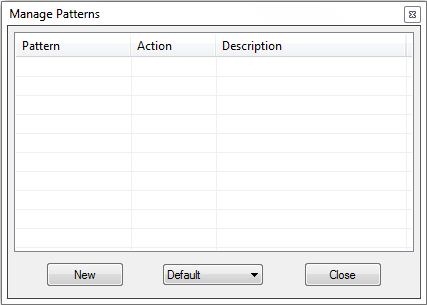
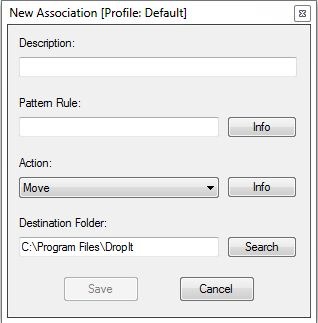
The filters that you can set up with DropIt are fairly basic, so you would be better off with something like Belvedere on Windows or Hazel on the Mac if you want advanced features for PC organization and cleaning. With DropIt, you can filter a file based on name or file type. For each such file, you can preset DropIt for one of the following options: Move, Copy, Compress, Extract, Open With, Delete, Exclude.
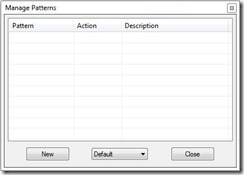
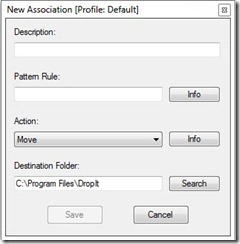
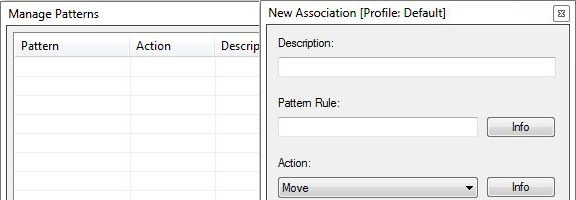
dropit manage patterns dropit new association

DropIt doesn’t seem to be intended to be a comprehensive organization utility, but does seem ideal for quickly going through your desktop or other folders, and moving files to preset locations. For example, you could quickly go through your desktop, and drop all of your image, video, and audio files onto your DropIt drop zone, and have them moved to your picture, video, or music folders, without taking the time to place each file in the proper location.

Do you have any apps that you use to organize your system? Let us know in the comments.

DropIt [via Cybernet News]


App of the Week: DoggCatcher Podcast Player [Android]

DoggCatcher

One of the much-ballyhooed strengths of Android is its openness and how much choice it gives users. Those strengths are illustrated well if you want to pick a podcast client for Android. The iOS landscape may have changed in the last few months since I switched to Android, but I always found the iOS podcast experience to be lacking. Not so on Android, if you use DoggCatcher, an excellent podcast client.

Read more


Free Up Space By Deleting Windows 7 SP1 Backup Files

service pack backup removal

Yesterday, we asked you how much disk space you’ve used up on your system. On a Windows 7 PC, some of that space can be taken up by Service Pack 1 backup files that you might never need. When you install Service Pack 1 for Windows 7, it creates backup files in case you have problems and ever need to uninstall the service pack. You can remove them, though, if you want to. Here’s how.


Read more


[Reader Survey] How Much Disk Space Does Your Computer Have, And How Much Have You Used?

disk space survey

Disk space is abundant and cheap. These days, you can get a 2 TB hard drive for under $100 from Newegg. I remember one of my first work computers, about 10 years ago, that came with a whopping 2 GB of storage. Those days are long gone. With the move to solid state drives, though, storage space is getting smaller, at least on a single solid state drive. My MacBook Air has a 128 GB drive, which would have felt humongous even a few years ago, but now feels small compared to my Windows 7 machine.

Read more