Menu Close

Author: Evan Kline (page 111 of 164)

Hello, I'm Evan. I write about tech from my perspective – that of the average tech geek, sometimes with my lawyer glasses on. You can also find me on Twitter and at my real-life job as a lawyer.    MORE ABOUT ME.

App of the Week: Check Your Battery Health With coconutBattery [Mac]

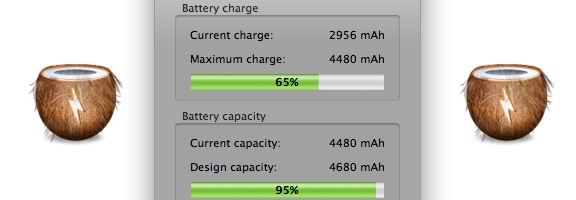
In the spirit of simplicity on the Mac, the App of the Week this week serves one function: it tells you the status and health of your Mac laptop’s battery. CoconutBattery doesn’t require any sort of fancy or complicated configuration. Just install it, and go. The screenshot in this post demonstrates exactly what information it gives you.

Read more


How to Combine Firefox’s Search Box and Location Bar, Just Like in Chrome

firefox omnibar.jpeg

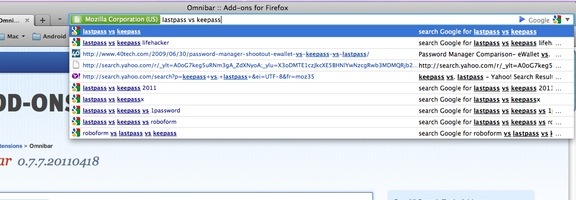
I was a long time Firefox user, but moved to Chrome when Firefox started to feel bloated. With the release of Firefox 4, I’ve gone back to using Firefox as my primary browser (although I still use Chrome quite a bit, too). When I’m using Firefox, one feature that I miss from Chrome is the Omnibar, Chrome’s combined location box and search box. Firefox’s Awesome Bar has some nice features of its own, but if space is at a premium on your machine, you can get Chrome-like Omnibar goodness with the Omnibar extension for Firefox.

Read more


Tell At a Glance Whether Your Current Document Has Unsaved Changes [Mac]

mac file saved indicator.jpeg

Sometimes, the simplest tips are the most handy. Such was the case with a recent tip over at OS X Daily, a site chock-full of Mac tips. This one was real simple, pointing out how you can tell when a document that you’re working on has unsaved changes, regardless of the app. See the two images below? The first one has unsaved changes, while the second one does not. What is the difference?

Check out the red circle in the title bar. If there is a dot in the title bar, the document has unsaved changes. If the dot is solid, the document hasn’t been changed since the last save.

Read more


Microsoft’s 10 Biggest Flops

microsoft flops and failures

All companies swing and miss from time to time. Apple, which seemingly can do no wrong, had its Pippin and Lisa. Microsoft has had its share of flops, too. Money.co.uk recently took a look at 10 of them.

Some of the choices are obvious, like Windows ME and the Kin. Some are obscure, like ActiMates (a creepy children’s toy). Missing from the list is Windows Vista, which has been the object of much scorn.

What’s number 1 on the list? I’ll give you a hint. He had big bubble-shaped eyeballs, and was integrated into Microsoft Office. Remember Clippy?

For the rest of the list, head on over to the source.

Is there anything missing from the list? Do you see anything on the list that shouldn’t be?


Sign and Send Faxes and Emailed Documents . . . Without a Fax, Scanner, or Printer

hellofax page

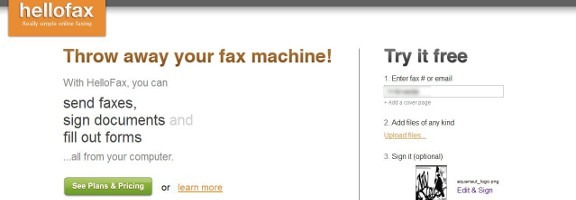
With the dominance of email and other forms of digital communications, the fax machine is dying a slow death. There are still times, though, where you’ll want to not only send a fax, but attach a signature to a faxed document. You can do so without a scanner, fax machine, or printer, using webapp HelloFax. HelloFax also supports the signing and sending of documents via email.

With HelloFax, you upload your document (so be forewarned if privacy is an issue) and enter the recipient’s fax number or email address. If you’d like, you can also add a signature or other marking to the document that you’re sending. The option box for this will appear after you’ve uploaded your document.

hellofax1

You have the choice of creating your signature with your mouse (probably quite difficult), uploading an image, or by taking a photo of your signature with your phone. HelloFax will process that, and isolate it for you. You can crop the signature image, as well as adjust the contrast. The background of this image will be transparent, so you don’t have to worry about it accidentally obscuring parts of your document. I found that my signature looked horrible by default, but I was able with to get it looking nice with just a bit of tweaking.

hellofax4

When you’re all done, just hit send, and your message will be sent. HelloFax allows you to send five faxed pages for free. After that, you need a paid account, which begins at $4.99 per month for 50 faxed pages. The sending of signed emails is unlimited.

How do you send faxed documents, if you don’t have a fax machine?

HelloFax [via MakeUseOf]