
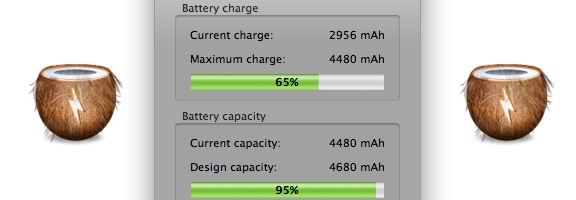
In the spirit of simplicity on the Mac, the App of the Week this week serves one function: it tells you the status and health of your Mac laptop’s battery. CoconutBattery doesn’t require any sort of fancy or complicated configuration. Just install it, and go. The screenshot in this post demonstrates exactly what information it gives you.

As you can see, it shows your current charge, both as a percentage of total charge and as Milliamp Hours. It also shows the same info for your battery capacity, and gives you some other basic information about your battery and your computer.
For me, the most useful information is the measure of my battery’s health – it is at 95% of the capacity at which it shipped. I also found it interesting to see that I’ve been through 86 load cycles. I use my Air extensively, so that doesn’t surprise me.
CoconutBattery is a free app, for the Mac. You non-geeks might be shaking your heads in pity at those of us who get interested in apps that dig into the more minute details of hardware, but many of you will understand. I hope. Otherwise, my wife is right about me. Anyway, if you use any tools to measure your system hardware and performance, let us know in the comments.

IT Support says:
Another Battery App. I think there are too many of these but I guess we can have one more.
June 8, 2011 — 6:48 pm
JoshS says:
Coconut battery is an awesome app. If you like apps like this one, you should also check out low battery saver. It makes sure your Mac sleeps before the battery completely runs out and let’s you set a warning to alert you that the computer is about to sleep. (http://itunes.apple.com/us/app/low-battery-save) It won’t fix your battery problems but you won’t lose your work, have to restart your computer etc.
January 30, 2012 — 3:46 pm
Evan Kline says:
Thanks for the tip, Josh!
February 3, 2012 — 4:35 pm
JoshS says:
Sorry, the correct link for low battery saver is this:http://itunes.apple.com/us/app/low-battery-saver/id480383312?mt=12
January 31, 2012 — 11:15 am