

Sometimes, the simplest tips are the most handy. Such was the case with a recent tip over at OS X Daily, a site chock-full of Mac tips. This one was real simple, pointing out how you can tell when a document that you’re working on has unsaved changes, regardless of the app. See the two images below? The first one has unsaved changes, while the second one does not. What is the difference?
Check out the red circle in the title bar. If there is a dot in the title bar, the document has unsaved changes. If the dot is solid, the document hasn’t been changed since the last save.

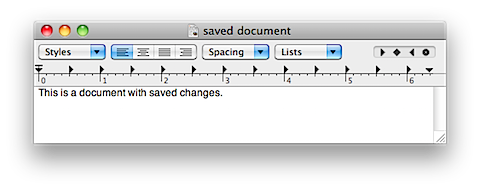
Some of you Mac pros might be saying, “well, duh!” right about now, but that was a Mac feature that I had never noticed. Do you have any tips that seem obvious, but might be new to others?
The Window Titlebar in Mac OS X Tells You When You Have Unsaved File Changes [OSXDaily]

Joshua says:
Well, things are already there, but people never seem to notice. Did you know that there is a duplicate remover tool in Microsoft Excel, so that you can check the reports sent by your VAs and find whether you are being cheated or not, if you handle large amount of links in reports.
June 6, 2011 — 1:44 am
Evan Kline says:
Pretty cool tip, Joshua. Thanks for sharing!
June 6, 2011 — 1:35 pm
Joshua says:
Thank you very much for replying to my comment. It really feels good to be appreciated as a part of your content. :)
June 23, 2011 — 8:01 am
Nicolas B. says:
It is not the toolbar, it is the title bar.
February 16, 2013 — 6:55 am
Evan Kline says:
Good catch, thanks! Making the change.
February 16, 2013 — 2:44 pm