

We’ve written about Launch Center for iOS, an app that lets you quickly perform tasks on your iOS device. Launch Center largely works with text in your clipboard, allowing you, for example, to add the contents of your clipboard to OmniFocus as a task, start a blank email with the clipboard contents as the subject, or send those clipboard contents to Twitter as a tweet. Drafts is a similar app for iOS, but with one key difference. Drafts is like Launch Center for text. You start with a blank page, enter your text, and then send that text off to one of several services.
The services supported by Launch Center include Facebook, Evernote, Tweetbot, Twitter, OmniFocus, Things, Simplenote, Sparrow, The Hit List, Echofon, Due, Byword, and Simplenote. You can also output the text to Mail, Messages, Events, or the clipboard, or even use it with iOS’s “open in” functionality. You can also save the draft for later use.
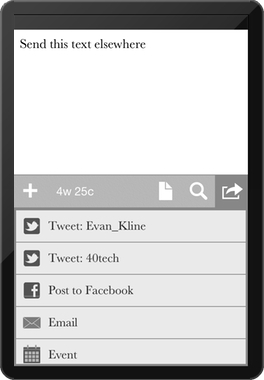
Drafts supports TextExpander Touch, and has a Markdown preview feature. It has a built-in dictionary/thesaurus, and allows you to pick from a few different theme and fonts. Drafts is an iPhone app, although it runs just fine on my iPad at 2X. You are stuck with the iPhone keyboard, though.
What’s your favorite method for getting text into your iOS device?
Disclosure: we received a promo code for Drafts to try it out, as opposed to paying the 99 cents it costs in the App Store.

Marc Anthony says:
WOW !! this is really fantastic . I like your points .. i will try it out on my iPad ..
June 8, 2012 — 9:17 am
David@theOnlyCog says:
Shame/Odd it is iPhone only.
Sure, it can run in the x2 iPad mode but the keyboard is just bad in this mode.
June 8, 2012 — 10:31 am
Evan Kline says:
I’ve been using it a bit on my iPad, but you’re right – I’d love to be able to use the native iPad keyboard.
July 1, 2012 — 7:00 am
skapa ett binance-konto says:
Can you be more specific about the content of your article? After reading it, I still have some doubts. Hope you can help me.
May 4, 2026 — 5:44 pm