

I’ve recently started having issues with my WiFi network, such as dropouts and slowness. One of the first steps I’ve taken to address the problem is to try to determine if I’m getting interference from other networks. To see nearby networks, and what channels they’re using, I’ve found WiFi Stumbler to be valuable.
WiFi Stumbler is a web app, in the form of a java applet. It works by scanning for nearby networks, and then listing their MAC address, radio type (B, G, N, etc.), channel, signal strength, manufacturer, and security used. As signals drift out of range, they are grayed out in the list.
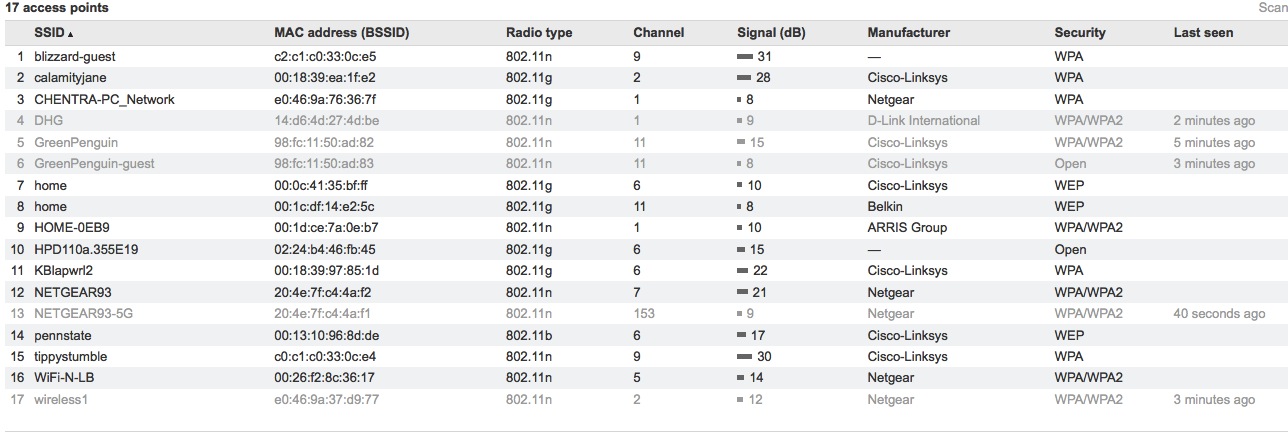
Using WiFi Stumbler, I picked an unused channel for my network that had the least amount of interference based on number of connections, nearby busy channels, and signal strength from surrounding devices on those nearby channels. My WiFi connection is much better now, although I still have a few more tweaks to make.
As an aside, what surprised me the most about WiFi Stumbler, and perhaps taught me a bit about how WiFi signals travel, were the number of networks at home versus at my office. I live in a fairly rural neighborhood, with houses that aren’t too close together, yet WiFi Stumbler picked up a total of 17 networks. Two of those were unsecured, and three were using the insecure WEP standard. I work in a downtown area, and assumed that I’d pick up even more networks, yet WiFi Stumbler detected only four WiFi signals, one of which was unsecured and one which was using WEP.
So, color me curious. Head on over and try out WiFi Stumbler, and let us know in the comments how many networks you pick up, and how many are unsecured or using WEP.

chuck says:
usually the best channel is ANY channel in the 5GHz range ;)
seriously, (some of) even the oldest gadgets support 802.11a and the best new ones support 802.11n@5GHz. but for reasons unclear no one seems to be using this band. which is great ;)
January 23, 2012 — 2:18 am
Evan Kline says:
I think that may be partially due to some of the drawbacks of the 5GHz range, such as not penetrating walls as well, and compatibility with 2.4 devices. My router supports both bands, but not both at the same time. I tried 5 for a while, but ultimately switched back to 2.4, as it worked better for my situation.
January 23, 2012 — 5:12 pm
Kosmo @ The Soap Boxers says:
Cool – I’ll definitely use this.
I’m surprised that you can pick up 17 networks at your country estate, thought.
How many of them are coming from your servants quarters, gov’ner?
January 23, 2012 — 8:55 am
Evan Kline says:
Har har.
Now that I think of it, 3 of those 17 were mine. 1 is my old G network, and then my N router has my main network and my guest network. I’ve thought about disabling the guest network and making the G network the guest network.
I also have a very tech-savvy neighbor across from me, so it wouldn’t surprise me if a few of them are his.
January 23, 2012 — 5:15 pm
Chas says:
I found 5 all secured with WPA2 (pity because in the past we’ve been able to use an unsecured network when our old ISP failed us) . for some reason my signal has dropped from 70% to 56% over the past hour even as the other 2 networks on channel 6 greyed out.
April 12, 2013 — 4:42 pm