

Now might not be the time to tout the benefits of Amazon S3, given the recent Amazon cloud storage outage. Still, it is hard to beat Amazon S3 prices. Amazon offers storage at 14 cents per gigabyte for the first terrabyte of storage, and additional charges for transfer in and out. You can get easy access to that storage using a modern FTP client, such as Transmit on the Mac, and even make your S3 storage space show up as a drive on your computer. Here’s how.
Start by creating a bucket in your S3 account console by clicking the “create bucket” button in the left column, then creating a bucket name and selecting a region. Then open Transmit, and, in the menu bar, choose File > Remote Browser. Then click the S3 tab.

Get your Access Key ID and Secret from the “Security Credentials” section of your Amazon S3 account page, and input them in the first two boxes. In the “Initial Path” box, input the name of the bucket that you created, above. Once everything is input, click on the blue “+” symbol to add your S3 space as a favorite, and click “Mount as Disk” to get the space to show up as a drive in Finder.
Your Amazon S3 storage will now show up as a mounted drive in Finder.
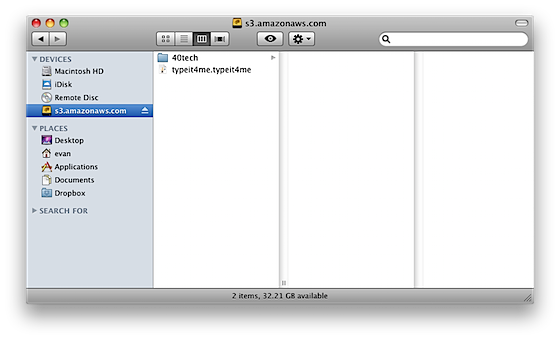
There’s one problem though – when you reboot, you lose your mount. We can fix that with a simple Automator action, like this:
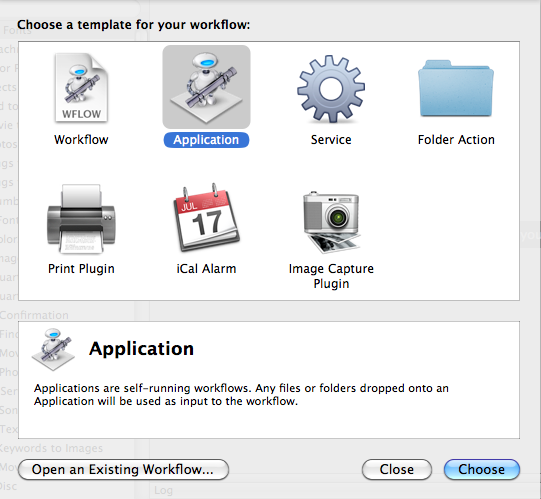
- Open Automator and choose “Application” as your template
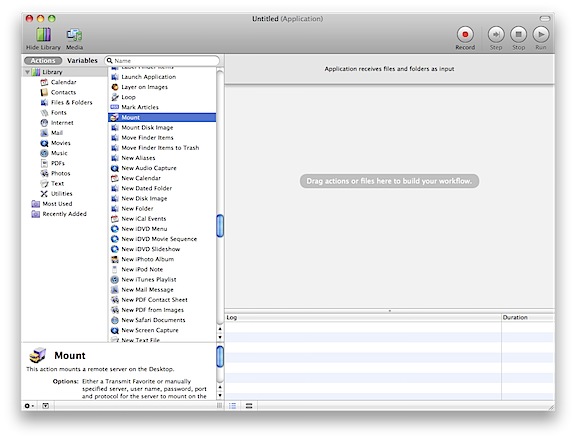
- Type “Mount” in the search box, and double click the “Mount” command in the list (the one with the little Transmit truck icon next to it)
- In the dropbdown menu for “Connect to,” select “Favorites.
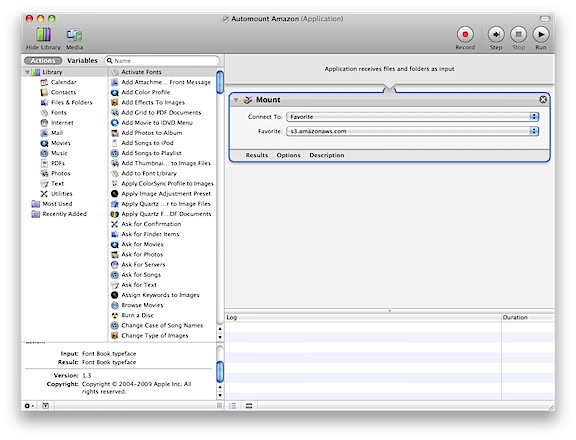
- Select your Amazon S3 server that you previously saved as a favorite.
- Save your Automator application (File > Save), and remember where you save it
- Open your Mac’s System Preferences > Accounts > Login Items
- Add the Automator application that you just made to this list, so it will run when your computer starts up.
That’s it! When you reboot, your Amazon S3 storage space should now automatically mount. My next step – trying to get specified files and folders to sync automatically to my Amazon space, using the mounted drive. I figure that I can just use a Hazel script for this, but we’ll see. Does anyone else use Amazon S3 for file storage? What’s your setup?
Credits:
This support thread was helpful in figuring out the Automator setup: http://support.brothersroloff.com/kb/under-the-hood/will-folderwatch-automatically-mount-server-volumes-for-me

Nathan says:
Love this, but do you have a windows alternative?
May 3, 2011 — 6:55 pm
Evan Kline says:
I haven’t tried it, Nathan, but take a look at TntDrive, for mounting Amazon S3 on Windows:
http://tntdrive.com/
The drawback is that it costs $39.95.
May 3, 2011 — 8:00 pm
juergen kemper says:
hello, love this too..
possible to use time machine with this?
br juergen
October 14, 2011 — 11:51 am
Evan Kline says:
I’m not sure, Juergen. I haven’t tried this with TimeMachine. I did a Google search, too, and haven’t found anyone doing it, so I have my doubts.
October 22, 2011 — 2:11 pm
Robert says:
Dear Evan,
Thank you so VERY much for this. I tried using ExpanDrive, but it was very unstable on my MacBook Pro. This is a great alternative.
Thank you 10000x over!
November 2, 2011 — 6:55 am
Evan Kline says:
My pleasure, Robert. I’m glad it was of help.
November 5, 2011 — 9:55 am
Marie Kyle says:
Evan, you are the man, thanks for this! It’s been years since I’ve used Transmit and I had no idea this was possible.
The backup solution I ended up going with was S3 and Arq (http://www.haystacksoftware.com/arq/), something I HIGHLY recommend as it has saved my life on more occasions than I care to mention. Arq is a one time $30 license, but it’s completely worth it. Gives you the ability to enforce your S3 budget, has fantastic file versioning, and gives you control over backup timing sched.
Hope this helps!
March 20, 2012 — 9:17 am
Evan Kline says:
I’m a bit late responding, but thanks for the suggestion about Arq. I’ve been tempted for a while to go with S3, even going so far as to research different apps to make it easy. I think I’ll wait until CrashPlan (I use the family plan now to backup our Mac and Windows machines) does something that causes me to sour on it, but it’s nice to see another good option out there.
April 26, 2012 — 3:17 pm
Paul says:
That’s fantastic, thank you.
I use ChronoSync (scheduled documents) to back up folders every 2 or 3 hours, and it now works as Amazon S3 mounts …
April 21, 2012 — 6:55 am
Evan Kline says:
Good to know, Paul. I use SuperDuper! for clone backups, so now you have me wondering if I could get an Amazon S3 mount working with that. Of course, I use CrashPlan’s online service, so I don’t have too much of a need for it, but it would be fun to try.
April 26, 2012 — 1:45 pm
Robert says:
As of a couple days ago this is no longer working for me??
Updated my S3 settings, generated a new key and bucket. Anyone have any insight?
I can mount the drive but am unable to copy anything to it.
April 25, 2012 — 5:11 pm
Evan Kline says:
I wish I could help you, Robert, but I haven’t used Transmit for quite some time now. Maybe somebody will see your question and be able to answer.
April 26, 2012 — 1:35 pm
Robert says:
Anyone know how to mount Google Cloud Storage in a similar manner??
April 26, 2012 — 3:21 pm
Evan Kline says:
I’d love to know the answer, Robert, if you find it elsewhere.
April 27, 2012 — 9:20 am