
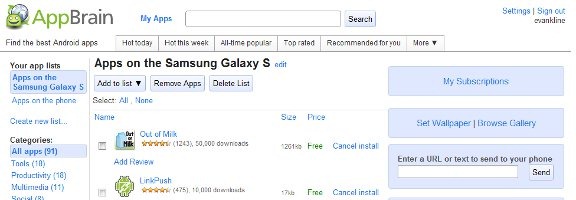
At first blush, the easiest way to find apps and get them onto your Android device is via the Android Market, which can be accessed via an app on your phone. If you want a great way to find apps, and keep track of them, there is another method. Check out AppBrain, a web service and Android app that lets you keep track of not only the apps that you have installed, but also to see what apps your friends are using.
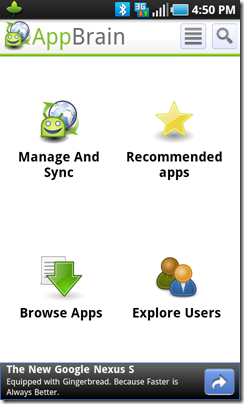
From the front page of the AppBrain site, AppBrain looks much like a market of its own. You can find apps categorized by genre and popularity, and AppBrain even makes recommendations for you.
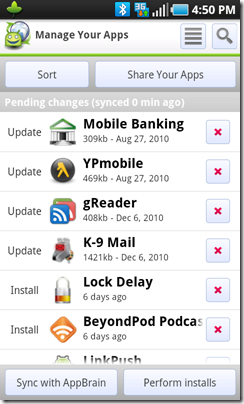
AppBrain is most useful though, in how it lets you see what apps you have installed on your phone, from the website. There doesn’t seem to be a corresponding way of using the Android Market to view your installed apps, short of looking on your phone. To get this to work in AppBrain, you need to fire up the app from your phone, click the “Manage and Sync” icon, and then click the “Sync with AppBrain” button. Your apps will then appear on your page on the AppBrain site.
Unfortunately, one of AppBrain’s coolest features seems to be gone with the most recent update to the Android Market. Previously, you could view an app on the AppBrain site, click the “install” button, and the app would be pushed to your phone (so long as you had AppBrain’s Fast Web Install app installed and activated on your phone). This never worked on Froyo (Android 2.2), but it was a nice bone thrown to Eclair (Android 2.1) users.
AppBrain also helps you to find and share great apps. You can follow other users so long as they’ve made their app list public, and see what apps they have installed on their phones. You can allow AppBrain to search your Facebook, Twitter, and Google contacts to find other AppBrain users.
How do you find your apps for your Android device? Are you using AppBrain?

Anthony Russo says:
I love AppBrain since I just got my DroidX. Another great feature is how easy it lets you update your apps also.
Feel free to follow me Evan, I’m interested in seeing what you keep on your phone. My username is AnthonyRusso
Anthony
December 20, 2010 — 10:40 pm
Evan Kline says:
Darn you, Anthony! Now you have me checking out your list and installing a bunch of apps! ;) Actually, you have some cool stuff there.
December 26, 2010 — 9:47 am
Quintin says:
While not the most intuitive methodology, you can see what apps you have install throu tha android market by using your menu key then going to Downloads.
Hmmm … I just double checked on my EVO and now it is menu then My Apps. They must have changed it recently.
The Android Market does leave a bit to be desired, though. I look forward to giving App Brain a try.
December 25, 2010 — 2:30 pm
Evan Kline says:
Thanks, Quintin. One of the nice things about AppBrain is being able to see what other people have installed, too.
December 26, 2010 — 9:48 am
Brian says:
I personally have an android phone myself and before this I was not aware of AppBrain’s features it has to offer. [ad removed]
January 12, 2011 — 11:19 am
Athena says:
I just switched from iPhone to an android. AppBrain looks like something I will have to check out!
February 1, 2012 — 6:38 pm
Gayle says:
Thanks for the information on AppBrain! It looks like it will be very helpful.
February 3, 2012 — 3:05 pm
Margaret says:
AppBrain is a MUST USE app! Thanks for this information.
February 3, 2012 — 3:06 pm
Marie says:
I’ve been searching for something like App Brain. I appreciate you sharing this information!
February 3, 2012 — 3:08 pm