

- Easy Access to US, UK Streaming Services From Anywhere - August 18, 2012
- 5 Fresh Android Games Released in 2012 - July 5, 2012
- Google Chrome Explodes On To iOS, Puts Desktop Experience In Your Pocket - June 30, 2012
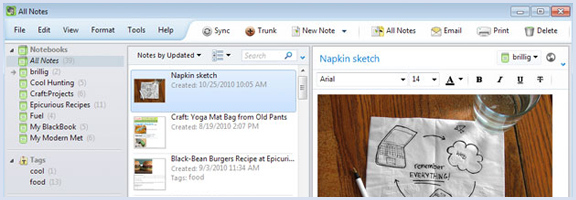
Last week, Evernote 4.1 for Windows was released for general consumption. 4.1 takes the giant leap forward that was Evernote 4 and makes it even better, adding more notebooks, notebook stacks, an improved note info panel, and more. If you’re not yet familiar with Evernote 4, it takes all the good of Evernote 3.5 — which took getting used to for some — and makes significant improvements to the user interface and overall functionality of our beloved notes tool. Some of the highlights include a more economical (and prettier) layout that suits Windows 7, a significant boost in load time and decrease in memory usage, better editing features, and more Windows 7 integrations like jump lists and geo-location.
I’m also happy to report that new windows once again automatically open when you start a new notes, which was a feature I, personally, missed (though the entire client still opens behind it for some reason). The new version also adds support for your local font files, makes it easier to hide things you don’t need to see, and improved clipping support.
For those looking for such things, there is still no social sharing capabilities, so don’t get too excited. All is not lost, however — you can always use Springpad for that.
For more detail on Evernote 4, look here
For more detail on the 4.1 update, look here
What are your thoughts on the newest release of Evernote for Windows?

Chase Mann says:
Just when you thought it was safe to go back to note-taking … I was just getting into a groove of using Outlook as my “inbox”, OneNote as my “desktop work area”, and Evernote as my portable, magical filing cabinet, then they do this to me!
I just don’t know what to use what for anymore!
No, actually it’s still working out really well for me with my new setup because I use a tablet pc and my way seems to be a natural work-flow for me.
The enhancements to Evernote have long been desired though and I’m thrilled to finally have them.
December 21, 2010 — 1:58 am
Bobby Travis says:
Hehe, I hear you Chase. Damn those companies and their constant improvements! :P
December 21, 2010 — 1:37 pm
Chase Mann says:
I was going to see if I could replace some or all of my system with ACT! by Sage and it seemed to be working great … then it crashed and I had to uninstall and re-install … twice; the second time was enough for me and I’ve decided not to use ACT at all. Too bad, seemed like a great productivity/communications tool.
December 24, 2010 — 5:10 am
Bobby Travis says:
Hmm — never heard of ACT. Might have to check it out.
December 24, 2010 — 12:50 pm
Roberto says:
I tried out 3.5 when it came out, and it was so different from what I was used to that I had to go back to 3.1, and still using it daily.
May 3, 2011 — 10:32 am
Bobby Travis says:
Originally, I felt the same way, Roberto. Especially when I realized 3.5 was hogging resources. After 4 was released, though, I upgraded. I found that I got used to it rather quickly, and now I actually like it better than 3.1.
May 3, 2011 — 2:08 pm
Mark Barrett says:
ACT! Is an excellent product with loads of 3rd party addons to get it to do pretty much whatever you want.
The newest version is out at the beginning of Sept 2011.
The installation can be a bit awkward, you need to shut down all AV’s when installing and it’s best to have as few unnecessary programs and services running.
I’m currently researching how to integrate Evernote with ACT!, make the most out of the best of both products.
August 17, 2011 — 1:06 pm
Bobby Travis says:
ACT! — the customer management software, right? I’m not very familiar with them. If you get a good integration going, I’d love to hear about it!
August 20, 2011 — 6:32 pm