Menu Close

Tag: Web sites (page 4 of 5)

Figure Out That File Extension

filext

Today, 40Tech is pleased to present a guest post by Keith from Computer Repair Vancouver.

File extensions have become a mainstay in the current computing landscape. Those two or three letter codes that follow a file name allow you as well as your operating system to determine what type of file is being dealt with as well as which programs should be used to deal with it.

Read more


Cook Up a Killer Domain Name with Bust A Name

bustaname domain name generator

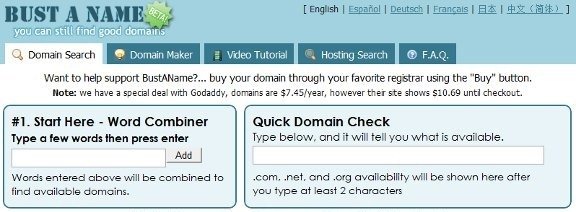
Finding the perfect domain name for your site can be challenge.  With a gazillion sites out there, the obvious choices are all taken.  Bust a Name can help you come up with something clever, when your brain fails you.

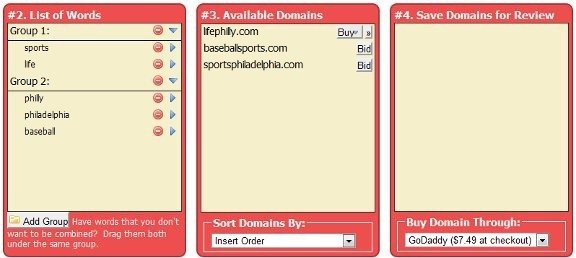
To use Bust A Name, you input words into what Bust A Name calls a “word combiner.”  You will then be presented with a list of available domains made up of combinations of the words that you input.  You also can organize your words into groups, so that only certain words are combined.  For example, when I started 40Tech back in 2009, I put “40” and “forty” in one group, and several geek-related words (tech, geek, etc.) in another group.  That ensured that I wouldn’t get results like 40forty.com.

bustaname domain name creator

Bust A Name also allows you to save the domains that you like for review, and to save your session to return to it later.  If you want to buy a domain, you can select the registrar from a dropdown list, and go right to the registrar’s site.

What tools do you use when you need to cook up a domain name?

Bust A Name


A Search Engine For Finding Similar Sites

similar site search

If you wish that there were an easy way to find sites that you like, then SimilarSiteSearch might just be what you’re looking for.  SimilarSiteSearch allows you to input the URL of a site, and then view a list of sites similar to that site.  Think of it as AlternativeTo, but for web sites.

You won’t get results right away for every site you enter.  For lesser known sites, SimilarSiteSearch will queue the query, perform its magic, and then add the site to its database.  If you return a few minutes later, you should then be able to run the search again and see the results.

When reviewing search results, you can give a site a thumbs up or thumbs down to indicate whether it is in fact similar to the site that you input.  Future searches for that site will then take the rating into account.

similar site search results

After getting results, you can fine tune your search by specifying tags that you want the search to include or omit.  You can also rate sites, and see a list of similar sites recommended by other users.

For another search engine that does much the same thing, also check out SimilarSites.  Do you know of any others?

SimilarSiteSearch [via MakeUseOf]


Improve WordPress Site Performance and Look Cool by Loading Images On Demand

Improve WordPress Site Performance by Loading Images on Demand | 40Tech

Have you ever gone onto an image-heavy site and marveled at how fast it loads; at how the images just “fade in” as you scroll down the page? Cool, yes? While it may seem, to the average Joe/Josephine, that this nice little bell and or whistle is the result of a fancy and expensive tool created just for big sites like Mashable —  it’s actually just a little jQuery script. It doesn’t take too much to install, either, especially if you have a WordPress site. In fact, there are at least two plugins for WordPress that make it extremely simple for you to do too.

1. jQuery Image Lazy Loader

No configuration required, this plugin is quite literally plug and play. All you have to do is install the plugin and activate it and every page on your site will be treated to faster load times and the awesome that is images that fade in on demand. The bandwidth you will save isn’t hard on your pocketbook, either.

2. Lazy Loader

Lazy Loader does exactly the same thing as jQuery Image Lazy Loader, but it gives you configuration options. For example, you can choose to only use the plugin on pages or posts, or even specific pages and posts, or by category. You can also choose a jQuery effect other than fade-in, a placeholder image, and more. This plugin is not available in the WordPress repository, so you have to download it from the source.

What experiences have you had with Lazy Loader scripts or plugins?

How to Improve Your Site’s Performance By Loading Your Images On Demand [MakeTechEasier]


Speed Up a Windows Install By Downloading and Installing Several Apps in One Bundle

ninite

Setting up a new or reformated computer can be a real pain in the neck.  Part of the difficulty comes from having to download and install numerous programs.  Tech and Life has a nice overview of three sites that make that process easier, by allowing you bundle programs for download and installation.  The sites are Ninite, AllMyApps, and Smart Installer Pack.  For example, you could decide to download Skype, Firefox, Pidgin, and Open Office in one take.  Head on over to Tech and Life for a look at the three services, including a tally of the number of apps available with each service.

Speed up a Windows install or reinstall with a software installer [Tech and Life]