
 Have you ever thought about trying out a piece of software, but had your eyes pop out of your head when you saw the price? Adobe’s Photoshop is a great example of this, coming in at over $650 on Amazon. That puts it out of reach for the average consumer. What to do? You could perform a Google search for "Photoshop alternatives," and pour over the results. There’s a better way to find software alternatives, though- head on over to AlternativeTo, and find other options as suggested by users.
AlternativeTo is a site that does just what its name suggests – it helps you find alternatives to software. It’s a simple matter of typing in the program that interests you (such as Photoshop), and selecting that program from a list of possible matches. For example, after searching for Photoshop, you’ll need to indicate whether you mean Photoshop, Photoshop Elements, Photoshop Express, etc.. Once you make your choice, you’re presented with a list of free and paid alternatives. In the case of Photoshop, for example, the first few results returned are GIMP (Open Source), Paint.NET (Open Source), and Pixelmator (commercial).
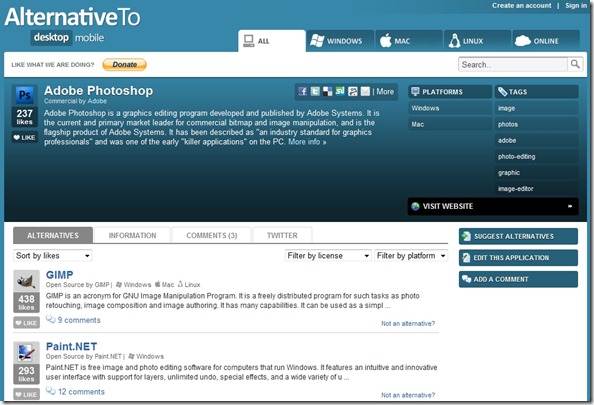
You can hone down your search with filters, either by license (Commercial, Free & Open Source, and Open Source), or by Platform (Mac, Windows, Linux, Online). Users of the site can also "Like" a particular program, which is like giving it a thumbs up. Results are sorted by the total number of "likes" by default, but you can also choose to sort by likes in the last 30 days, number of views, or alphabetically.
If you click on a link to view an alternative program, the page for that program will also include a list of alternatives. In addition to alternatives, a program’s listing in the AlternativeTo database includes a summary, tags, and an indication of the platform on which the program is available. Users of the site also have the option to leave comments about a program, and to search for Tweets about the program. Users can also suggest alternatives.
How do you find programs that you need?

Kosmo @ The Casual Observer says:
That’s pretty cool.
GIMP kicks ass. I use about 1% of the features, but I love it. I designed my site’s lion logo with GIMP in a few minutes – in spite of my lack of ability.
.-= Kosmo @ The Casual Observer´s last blog ..Why Did Stephen Strasburg Get Sent to the Minors? =-.
April 1, 2010 — 10:00 pm
Evan Kline says:
I use Paint Shop Pro on my main computer, but GIMP on all the others. I agree, it is a pretty killer app. Another one I use, primarily for things like batch resizing, is IrfanView.
April 2, 2010 — 3:19 pm
Kosmo @ The Casual Observer says:
I use a script for batch resizing. It’s a very simple script – resizes to one specific size. Just drag and drop :)
.-= Kosmo @ The Casual Observer´s last blog ..The Proxy =-.
April 3, 2010 — 12:55 pm
Bobby Travis says:
I think GIMP is great unless you are a familiar Photoshop user. Then it is a pain in the butt because the GIMP guys go out of their way to prove that they are better rather than work with what people already know. However, it is a beautiful thing that there are free alternatives to software that are so well thought out.
Great tool, Evan. I can see using AlternativeTo for many things — especially for programs on my linux machine.
April 3, 2010 — 5:58 pm
Kosmo @ The Casual Observer says:
I was familiar with Photoshop in 1993 … so the differences between PS and GIMP in 2010 don’t bother me much :) The price tag really helps, too.
(Holy crap – that was literally half a lifetime ago.)
.-= Kosmo @ The Casual Observer´s last blog ..Why Did Stephen Strasburg Get Sent to the Minors? =-.
April 4, 2010 — 12:12 am
Bobby Travis says:
I’m also a fan of Inkscape as an alternative Vector program to Illustrator…
.-= Bobby Travis´s last blog ..Godfinger is Evil =-.
April 3, 2010 — 7:42 pm