
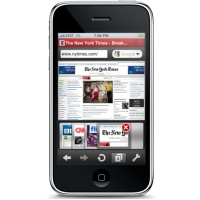
 When I heard, yesterday, that Apple had approved the Opera Mini browser for iPhone, I was a bit more than surprised — I was shocked. Apple’s track record in rejecting any app that might interfere with their business plans or control over their userbase seemed to scream that there was absolutely no way they would let a competitor browser into their little empire. It was an exciting prospect: a blazingly fast, low data-impact, full-featured browser? With features that Mobile Safari is painfully lacking like on-page search? Oh I had to see this for myself! In my testing, I discovered a lot of cool features — unfortunately, though, I came away from my first few runs of Opera Mini more than a bit disappointed.
Tag: Applications (page 15 of 19)
 Your browser start page, also known as your Home Page, is a launching pad of sorts. The first page that you see when you open your web browser, your start page can impact your browsing session in a couple of ways. First, the type of page you use as your start page can impact the speed with which your browser starts. Your choice of a start page also affects how quickly you get down to business even after your browser is open, as it can help you access other content faster. With those two sometimes competing interests in mind, let’s take a look at five types of browser start pages.
 Following up on the first and second what’s on my iPhone posts, I continue my micro-reviews of my rapidly expanding app list, proving that my app addiction knows know boundaries. I have no idea how the fact that iPhone OS4 will allow some 2160 apps on the iPhone will affect me. My wife may steal the thing and hide it on me… In any case, this instalment will feature my Reading-for-Entertainment, General Info-Gathering, Alternative Communications (as in: I don’t use them very often), and Other-Stuff-I-Use-But-Not-a-Lot iPhone apps. Micro-reviews, all – enjoy!
Here’s Page 3:
 There are many reasons why you might want to access your home computer while away from home. You may need to access a program or file on that machine, or you may need to browse to a website that is blocked in your current location. Fortunately, there are free options available that let you access your home PC. Today, we look at two of them- LogMeIn Free, and TeamViewer. The two applications have similar functionality, but go about things differently. Read on for a comparison between LogMeIn Free and TeamViewer.
 Following up on the first what’s on my iPhone post, I continue my micro-reviews of my rapidly expanding app list, supporting my rapidly deepening (and apparently serious) app addiction. This time around, I am going through the second springboard page — as always, discounting the possibly useless search page. Page two is, in some semblance of a nutshell, my utilities and multimedia page. Sort of. Read on and judge for yourself.
Here’s Page 2: