![App of the Week: PressReader [Mobile] | 40Tech](https://www.40tech.com/wp-content/uploads/2011/07/image11.png "App of the Week: PressReader [Mobile] | 40Tech")
Traditional newspapers are struggling. We’ve all heard this, time and again, and know that they are having the same problem that the music and other “olde world” industries have: namely, that the people in charge don’t truly understand the medium of the internet, and are too wrapped up in either complaining about it, trying to figure out how to control it, and suing people to recoup their perceived losses to take advantage of it. Some newspapers have embraced the web, openly or behind paywalls, and some of these websites and mobile apps are actually good, presenting their content well, and occasionally adding a bell or whistle here and there.
What if you have simpler tastes, though? What if, all you want to do is read your favourite newspapers, in their full, original, cover-to-cover glory, from the comfort of your iOS or Android device? How about from your Blackberry? If this is a dream of yours, then Newspaper Direct’s PressReader is your new best friend. Hell, you and your new buddy might even save a tree or 10.
PressReader is fantastic. If I had to use one word to describe it, that would be the one — that or awesome. There are over 1900 newspapers (though the app still says 1700) from around the world available (92 countries, 48 languages) for your reading pleasure, updated daily. These are, as I said, available in full, just the way you would pick them up from the news stands, including all ads, classifieds, the funnies, sections and stories. They are downloaded directly to your device (you can choose download by Wi-Fi only, if you like) so that they are available even when offline.

Newspaper Direct, who are also the purveyors of PressDisplay (the web version and precursor to PressReader), have license agreements in place with all of these newspapers, receiving daily .PDF scans which Newspaper Direct then process to add all sorts of fun interactivity.
An Interactive Newspaper (the Really-Real One)
What sort of interactivity, you say? Well, for starters, all headlines are clickable. You can swipe through the pages as you like, in portrait or landscape mode, and can double-tap, pinch, and zoom to your heart’s content to read the stories — but if you want to see something that’s formatted for easy reading, then tap any headline and you will get a pop up version of only that story. While in the pop-up, you can change the text size and move to the next and previous story, as well, making for a customizable reading experience.
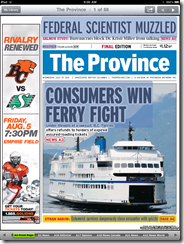


The story pop-up also allows you to print the story in plain text or with full graphics, and has sharing features as well. At the moment, you can share a story via email, Twitter, and Facebook. The Facebook share is a bit ugly with it’s long, title-less hyperlink, but all three methods link you to the full article on PressDisplay.com. In my tests, I was able to access the shared article on the web and mobile safari (the mobile web app is pretty cool, too), without having to log in, or pay for access. That could be the case for all, or just for the papers I was using.
Newspapers That Read to You
The best feature, by far, of PressReader (and PressDisplay) is yet another gem that’s available in the pop-up when you touch a headline. It’s not the ability to search within nearly 2000 papers, and it’s not the Top Stories or Favourites feature (all available from the main menu-bar, not the pop-up) — it’s the cute little headphones icon in the bottom right. Touch this button, and PressReader’s built in text to speech functionality will read the story to you! This is a beautiful thing! If you are on the go, driving, or busily working, your newspaper story can be read to you, keeping your hands and eyes free for more important things — like not killing yourself while driving. I’ve seen more than one moron on the road that was reading a newspaper while in motion — and I’ve called the cops on the idiots, too. I’m no snitch/narc/derogatory tell-tale word of the day, but I’m on the road with my kid and you are not going to cause an accident that hurts her. If you like the paper while driving… get PressReader and save us all the trouble.
Slight digressions about morons aside, I highly recommend PressReader to anyone who enjoys the full newspaper experience (plus more) while on the go, or is interested in saving a few trees (NewsDirect claims to have saved 173,824 trees, and counting). You can get it on the iPhone, iPad, and iPod Touch, as well as on Android (Gingerbread and Honeycomb devices), Blackberry (no Playbook yet, but it’s on the way), Windows 7 Slate, and even Windows Mobile 5 (go figure). No mention of Windows Mobile 6 (5 should still work) or 7 yet, but it is likely on the way. You can also download Pressreader for your PC or Mac, iRex Digital, WebOS is on the way, and you can access PressDisplay via the web or even on your Kindle and other eReaders.
What it Costs
The PressReader app itself is free, but newspapers cost $0.99 each, or you can get an unlimited subscription to everything (all 1900 papers) for $29.95 per month. If you want to try before you buy, PressReader comes with seven free newspaper downloads of your choice, and you can give the Top News feature a whirl as well. If you want to try and offset the cost a bit, head over to your account on PressDisplay and check out the referral widget. This is a beta tool that can get you 10% of each subscription that comes through you.
NOTE: My only problem with PressReader, is that the papers you choose to subscribe to don’t sync in your account and therefore have to be re-downloaded for each device. What I am not certain of, as I am using a trial of an unlimited account, is whether or not you would have to pay for that paper on each device. I’ve asked the people at News Direct and expect them to get back to me shortly.
UPDATE: According to my contact at NewsDirect, as well as a comment by Gayle, who also appears to work for them, you can download your newspaper issues on up to six different devices, unless there is something that precludes that in NewsDirect’s licensing deal with a particular publisher.
Also, for those worried about download size and data on your mobile, go into settings to change how long you want PressReader to keep a paper, and to set your PressReader app to download via WiFi only.
PressReader



Scientists Just A’Wanna Have Fun [Random Tech Videos]
Ok, look — I don’t know if these are real scientists or what, but a bunch of song and musical-style parody videos where the subject is crazy science concepts and gear that even I (in my extreme geekiness) know almost nothing about, well… let’s just say I was too busy giggling to find out. And that was one hell of a run-on sentence – but hey! It’s another long weekend up here in Canada, and when I get a long weekend post, I like to loosen up the reigns a bit.
Seriously, though, if you want something that will boggle your brain, and maybe make you laugh to the point where your loved ones and co-workers look at you funny (not talking about myself here… really!), then you need to take a look at these!
Here are three of the videos for your viewing pleasure! And here’s a link to the entire 11 video playlist put together by BioWorld Today.
A Little GTCA and DNA to the Tune of YMCA
Monitor Cell Impedance with Motley Crue (I know…)
http://www.youtube.com/watch?v=HVnTUN1Fn1g&feature=view_all&list=PL880AF6B6904C868D&index=1Boy Band Pipetting Madness
And last, but not least:
Building Blocks of Cell Biology Done to the Black Eyed Peas – in LEGO Animation!
Thoughts? Giggles? Sardonic Messages?