I’ve found myself plenty busy lately. The new job, new baby, and newly four have been making it difficult to get sleep, let alone writing time. As a result, however, my obsession for to-do apps has flexed its brawn and muscled its way back to the forefront of my thoughts — especially after I accidentally discovered Any.DO.
The other night, I glanced over as my wife was using her laptop in bed. I couldn’t help but notice a number that jumped out at me: 7000+ unread items in her email inbox. I think my wife uses her inbox as a holding pen for her messages. She also isn’t too strict about using a second email account as a bacon address for her less important messages. While never as, um, interesting as my wife’s email practices, my inbox was out of control last year. Four changes helped me bring sanity to my email inboxes.
I’ve been a big fan of Toodledo ever since I first reviewed it back in 2010. Recently, though, I’ve been unfaithful. I’ve abandoned Toodledo as my task management app of choice, and moved on to OmniFocus. While there are some reasons not to switch, a few compelling reasons helped me to decide to make the move. Here are some reasons to switch, and some reasons to stay put.
One of our readers previously wrote about Getting Things Done with 2Do and Toodledo. That great writeup focused on using Toodledo through 2Do, an iOS app. I have been using Toodledo ever since I first was blown away by it, although primarily through the web app (albeit via Fluid, a Mac app that turns a web page into a standalone application). Over time, I’ve developed a system of my own to implement some GTD methodologies within Toodledo. Here it is.
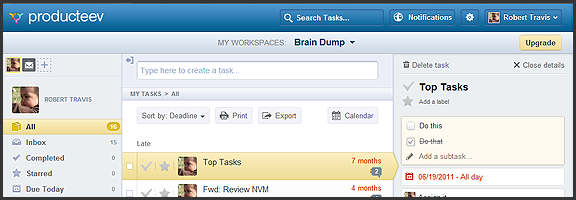
Producteev, one of our favourite — and one of the best — to-do apps, has released a massive upgrade that includes some long-awaited features and platform updates. The web and iPhone apps have gotten a makeover, the much clamoured-for Android app has finally arrived, and there is now a Windows 7 desktop app to balance out the Mac version. Even the logo has been updated (bye bye Tasky the beaver)!
To top it all off, Producteev has added a few new features into the mix — and yes (drumroll), that does include sub-tasks…
Check out the video below for the overview of some of the new functionality in the multi-platform task manager.
There have been usability and visual enhancements across all apps, improvements to some of the main Producteev feature-set (discussed in previous posts), and some brand new features such as integration with TaskRabbit (a service for crowdsourcing small tasks), the ability to print tasks and export them to CSV, as well as the aforementioned sub-tasks.
Now, I know many of you have been waiting patiently for sub-tasks, but don’t get too excited. At this time, sub-tasks are really nothing more than a checkable list added to the top of the main task’s detailed view. There is no way to interact with them outside of that view, or to add specific dates, labels, or anything else. Also, they don’t appear to work in the mobile apps yet, either. Hopefully, there will be improvements, and soon, especially in the case of the missing mobile integration.
The Android app is great. I can now use Producteev with my wife’s phone just as easily as my own, and with an interface that’s nearly identical to the iPhone’s. As Producteev mentions in this post, however, Android users should be aware that the new app is in beta. Don’t expect an error-free experience, just yet.
As always, Producteev is free to use for workspaces that have one or two people. If you want to collaborate with larger teams, unlimited people and storage space can be had for $20 USD per month (it gets cheaper the more workspaces you buy).
Update: Google Calendar integration has been temporarily disabled due to stability issues. It should be back up and running within the week — and it will be better than before. Two way task-sync with Gcal, folks!