
If you follow tech news, it’s been hard to miss mention of Mailbox. Mailbox, as described in some glowing reviews, looks to be a new way to handle email, with a focus on Gmail. The general concept behind Mailbox is to help you get to inbox zero by letting you perform full and half swipes to the left and right to archive, delete, and defer messages. The current problem with Mailbox? There’s a long line to get it. Read more
Category: iOS (page 15 of 35)
Katie Floyd is the host of one of my favorite podcasts, the Mac Power Users, and over on her blog she highlights an app that could help you out if you ever lose your iPhone or iPad. Contact Lockscreen Info is an app that makes it easy to add your contact info to the lock screen of your iOS device.
 After a couple of years as a mostly satisfied Android user, I recently switched back to the iPhone (the reasons might someday be the subject of another story). I was eager to try out location-based reminders, which reminded me of a stripped down (but easier) version of Tasker on Android. I liked the idea that I could use Siri to say, “remind me to take out the trash when I get home,” and I’d have a reminder added to my list in the Reminders app. Thanks to geofencing in iOS, that reminder would automatically fire when I pulled into the driveway. Read more
 At this risk of sounding like a snob, I can say that user reviews of certain iOS apps seem to miss the mark at times, because of uninformed users. This often seems to occur with subscription-based apps, such as LastPass, where users don’t realize that a subscription is required to get the full features of the app. Other times, this happens when users don’t seem to understand the limitations of iOS, and the workarounds that these limitations require of developers. One example of this is EverWebClipper, an app that makes clipping web pages into Evernote much easier on iOS devices, but somehow has received many low reviews.
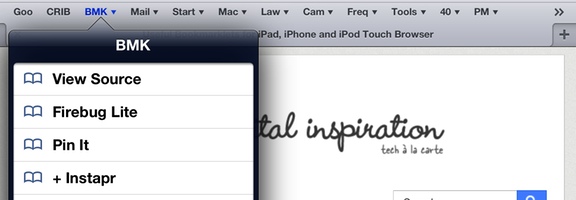
iOS devices are handy, but limited. I’ve written previously on some workarounds I’ve come up with to address these limitations, such as how to download full resolution images from Dropbox to your iPad. Another way that you can “hack” your iPad is to set up Safari bookmarklets, which are bookmarklets that run code and let you perform a variety of actions, such as sending a page to Instapaper, clipping content into Evernote, and more.