Menu Close

Category: iPhone (page 6 of 19)

Quickly Get Your Ideas Down, and Out to Various Services, With Drafts [iPhone]

Drafts for ios

We’ve written about Launch Center for iOS, an app that lets you quickly perform tasks on your iOS device. Launch Center largely works with text in your clipboard, allowing you, for example, to add the contents of your clipboard to OmniFocus as a task, start a blank email with the clipboard contents as the subject, or send those clipboard contents to Twitter as a tweet. Drafts is a similar app for iOS, but with one key difference. Drafts is like Launch Center for text. You start with a blank page, enter your text, and then send that text off to one of several services.

Read more


Best Free Movie Apps

image

40Tech is pleased to offer a guest post by Carlina Yepinski

Even though rising industry costs are pushing tickets prices higher and higher, movies are still one of the cheapest forms of entertainment in America. There are tons of free apps that provide any kind of movie information you seek.

Whether you want to know what movies your favorite star is likely to appear in next or get recommendations on your next DVD rental, there’s an app for that. Here are a few free ones that will provide you with an instant movie fix on Android or iPhone.

  • IMDB – The Internet Movie Database app offers all the search features of the full site, including names, shows, movies, and even TV schedules. The front page displays two or three of the latest news stories and allows you to keep up with things you want to see with “Watchlist.”
  • Hitfix – This entertainment news site’s app offers the latest in movies, TV, music and sports as well as feature articles. You can view by category or date posted and can even check out local stories.
  • Movies by Flickster, With Rotten Tomatoes – Find movies near your current location, check our trailers and read reviews courtesy of Rotten Tomatoes before heading to the theater all in one app. You can even rate titles you’ve seen.
  • Fandango – As long as your theater uses Fandango for online ticketing, you can find show times and order tickets directly from your phone. Don’t forget to double check the theater’s official site to verify show times.
  • Get Glue – This social network app lets you share all of your entertainment interests with your friends. Check in to TV shows, movies, music, podcasts, books, even video games. For movie fans, in particular, you can get recommendations for what to watch next based on your likes.
  • Redbox – The Redbox company, famous for its $1 DVD rentals, now has an app that does for rentals what Fandango does for theatrical releases. The app searches for kiosks near you and lets you browse each kiosk’s inventory. While you cannot watch trailers, you can view ratings, runtimes, genres, cast and plot. Reserve the title you want on your phone to make the checkout process even quicker at the machine.

Carlina Yepinski is the primary researcher and writer for networkmonitoring.org. Her most recent accomplishments includes graduating from Kentucky State with a degree in communications and computer science. Her current focus for the site involves server monitoring tools and application monitoring.


Print From Your iPhone or iPad to Any Printer, With Fingerprint [Windows/Mac]

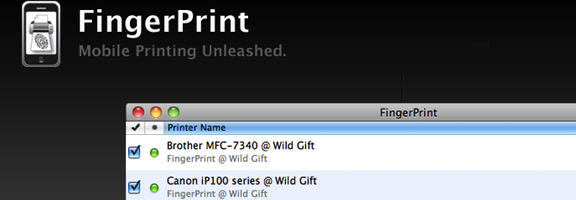
Fingerprint banner

One of the limitations of the iPad is that it normally can’t print to just any old printer. If you want to print from your iPad, you usually need an AirPrint compatible printer. If you’re like me, and bought your printer before Apple introduced AIrPrint, or if you just own a printer that isn’t AirPrint compatible, there is a way to print from your iPad to your current printer.

Read more


Should This Android Lover Switch Back to iOS?

android versus iphone

17 months ago I abandoned my iPhone and embraced Android. At the time, iOS was a much different operating system than it is today, and I had grown increasingly frustrated with its limitations. Now, I might be ready to move back to an iPhone. Should I?

Read more


Sparrow Comes to iPhone, Gmail iOS/Web App (Finally) Adds “Send Email As” Feature

Sparrow Comes to iPhone, Gmail iOS/Web App (Finally) Adds "Send Email As" Feature | 40Tech

40Tech’s Big Kahuna, Evan Kline, fell in love with Sparrow a while back. It was — and is — the ultimate Gmail client for him, and his post on it left me jealous that it wasn’t available for Windows (yeah, yeah, Apple Fanboys, I see your lips moving, but no sound is coming out). Thankfully, the keen developers on the Sparrow team have seen fit to bring the Ultimate Gmail/Email Experience over to the iPhone.

They do a good job of it, too. The Sparrow for iPhone app is the best email client for iOS to date — with only one potentially deal-breaking problem.

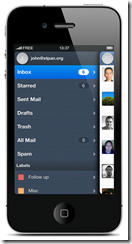
Sparrow (iOS 5 required) utilizes some of the best features of other mobile designs like Twitter, Facebook, Gmail, and the better features of Mail to bring a fast, super-easy to navigate email client to the iPhone that has the added benefit of being pretty. It has swipe-able overlapping panes, Facebook profile photo integration, pull down to refresh, labels, and a swipe-for-context-menu that gives you the ability to instantly deal with an email without actually having to open it. And that’s just for starters.

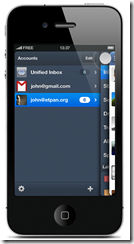
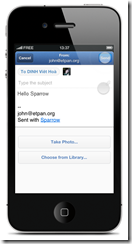
Sparrow for iPhone also has a fantastic threaded message UI that allows you to see an entire email chain at a glance, a sweet unified inbox for multiple accounts, send-from aliases (works with your verified Gmail “send email as” emails), and the ability to add images to an email at any given point — you can even take them on the fly, if you like.

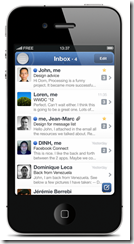
Some Screenies from the Sparrow Site
imageimageimageimage

What Sparrow doesn’t have — and this might kill it for power users — is push notifications. This is unfortunate as, for many people, push notifications are an integral part of their mobile life. However, the lack of push comes with good reason: in order to offer it, Apple would require Sparrow to store your email address and password on their own servers. This is a responsibility that Sparrow doesn’t feel prepared to handle — and I say more power to them. Better they remove the feature and recognize their own limitations than to offer push notifications, get hacked, and leave thousands of users’ private email accounts floating in the winds.

Sparrow did attempt to use the same push notification API that Apple offers to VOIP apps (Skype, etc.). This API goes through Apple’s secure servers and would allow the Sparrow app to be “always on” and securely deliver email notifications to you. Unfortunately, Apple rejected the app for utilizing this feature. Sparrow encourages users to contact Apple in the hopes that the policy might be reconsidered in the near future.

Sparrow is also missing POP email account support — it’s IMAP only, for now. Hopefully, that will change in coming updates. Some things that are definitely on the way are landscape mode, localization, a built-in web browser, and “send and archive.” I would also like to see “mark as read” added to the context menu.

Even without POP or push notifications, though, Sparrow is easily the best email client available for the iPhone. It is much easier to use than iOS Mail, and it kicks the crap out of the Gmail app — which I am still happy exists, but would like to see a little lovin’ happening.

Speaking of Gmail, if you are in need of both push and the Gmail “send email as” feature (and don’t utterly loathe the iOS app), the Gmail mobile app has recently been updated to include said feature. You don’t even have to update your iOS app as it is basically a fancy box containing the mobile app’s functionality. Personally, I’m glad to see this feature incorporated, and have no idea why it took so long to do so. As was said above, you can use Sparrow to do this — but Sparrow for iPhone costs $2.99, and Gmail is free. Your call.

What are your thoughts on Sparrow for iPhone? Does the lack of push kill it for you?

Get Sparrow for iPhone