Menu Close

Category: Google (page 9 of 21)

App of the Week: Move2Picasa (now called Move Your Photos) [Chrome]

App of the Week: Move2Picasa [Chrome] | 40Tech

Our last post on Google+ was a question on what you thought of the hype surrounding it. We’ve had a chance to play with it now, and so have many of you — and all in all, we like it. That’s not what this post is about though. This post is about taking advantage of Google opening up unlimited storage in Picasa as a result of Google Plus, and how you can use that, and a handy migration tool called Move2Picasa to backup your Facebook photos — whether you plan to use Google’s new social network or not.

UPDATE: The creator of Move2Picasa has changed the URL to the Chrome extension (the correct one is now in the post), and has changed the name of the Move2Picasa extension to Move Your Photos.  Thanks to Peter Pawlak on Plus for catching that!

Note on Unlimited Storage: Google has opened up storage in Picasa, in general. Plus users have free, unlimited storage for photos that are a maximum resolution of 2048X2048 pixels (and videos that are a maximum of 15 minutes), and 1GB of free storage for larger resolution photos. Anything over the 1GB (or whatever you have paid for additional storage) will be automatically resized down to the maximum free resolution. Non-Plus users get basically the same service, but their maximum resolution for photos is only 800X800 pixels.

Move2Picasa started as a website-based tool put together by Aman Kumar Jain, a web developer from Pune, India. It was leapt upon immediately by many of the early adopters of Plus, and the servers were quickly overloaded to the point that the site wouldn’t even load. Aman worked to solve the issues, and has now migrated Move2Picasa to a Google Chrome Extension .

The extension works beautifully! I copied over 1600 photos from Facebook to Picasa in less than an hour, and I barely had to lift a finger.

Here’s how it works:

After installing the extension from the Web Store, click on it to log in to Facebook. You will be presented with a page that, after a minor load time, has all of your Facebook photos broken down into albums. The top left of the page shows a legend that identifies the coloured boxes surrounding the photos, which are yellow for “In queue,” by default. The top right of the page provides some simple tools to select or deselect all, pause and close to come back later, and to logout from the tool completely.

Each album has check boxes directly below the album name that allows you to make quick choices to Upload All or Upload None of the photos of that album. You can also click on individual photos to select or deselect them for uploading, which is handy, because you may have certain photos that you want to weed out before they are copied to Picasa. Like the yellow boxes, Upload All is selected by default.
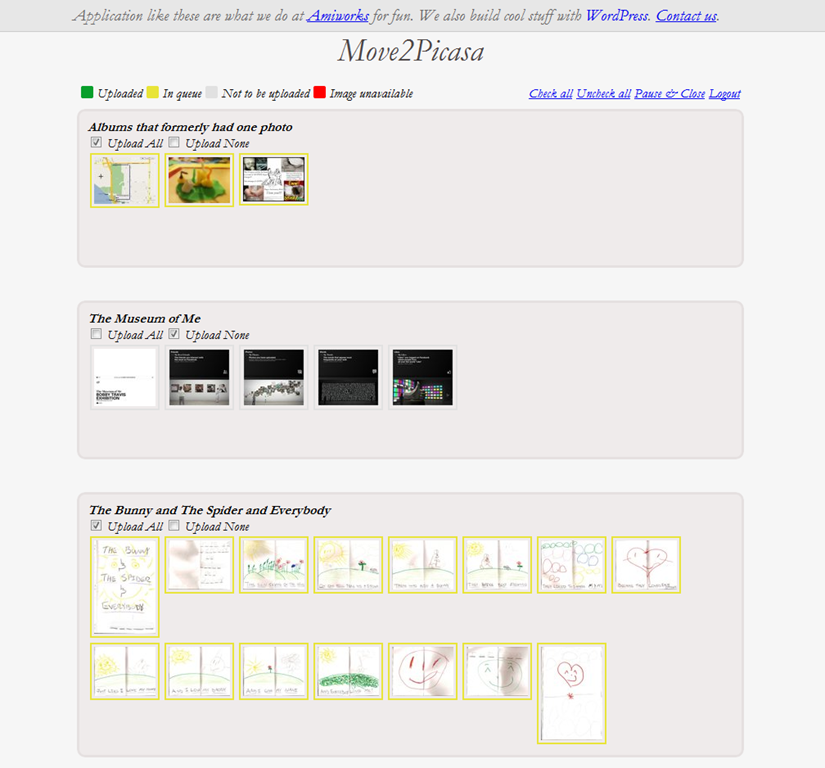
Move2Picasa | Copy Facebook Photos to Picasa, Google Plus | 40Tech

NOTE: At this point you may notice one weirdness: some of your albums may not be showing any pictures. Don’t panic. This is either because there are no pictures in that album, or because the albums have only one photo. Hopefully, this minor bug will be fixed soon — in the meantime, you may want to head to Facebook and add those errant solo photos to a combined album (you may have to log out and log back in to Move2Picasa to see the changes), or simply download them manually from Facebook and upload them to Picasa without the tool.

Once you have chosen the photos you want to copy over to Picasa, click the Upload button on the bottom of the page, and sit back and let Move2Picasa do all the heavy lifting for you!

When I did it, I didn’t notice any extra load on my computer, and had no problem doing whatever else I needed to do while it ran in the background. Some people have reported the occasional error pop-up that breaks the operation (this happened to me, too), but Aman posted to my thread on Google+ (find me here, we can add each other to our respective circles and you can read it) that the issue had been fixed. It was barely a problem, in any case, as all I and the other users who had the problem needed to do was click the upload button again, and the handy countdown picked up right where it had left off.

Before you know it, you will have complete duplicates of your Facebook albums living in Picasa, ready to do with as you please. The only caveats I have discovered so far is that the images appear to be the Facebook-resized versions only, as opposed to the full-res photos Facebook supports now (though I would love for someone to confirm otherwise), and that Move2Picasa does not support caption importing. That last bit is too bad, but hopefully will change at some point in the future. Move2Picasa as a Chrome Extension is only a couple of days old, after all.
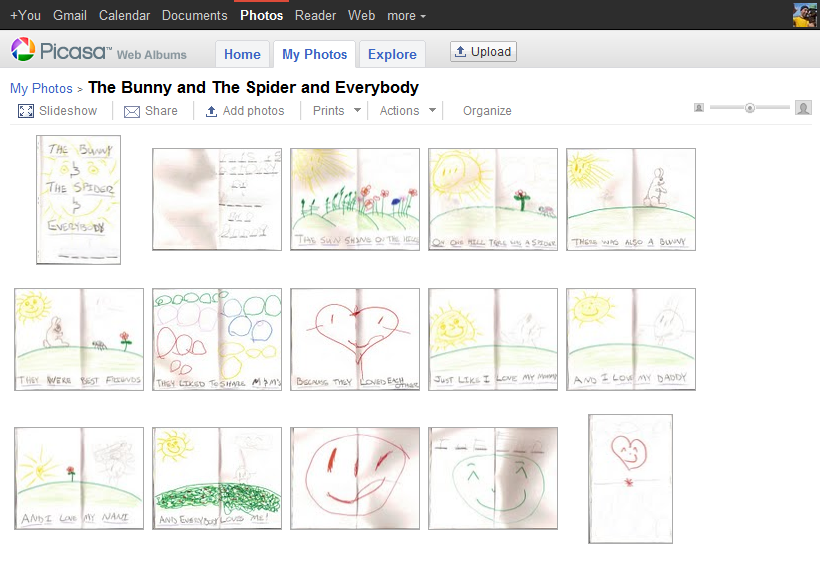
Facebook Photos Moved to Picasa, Google+ with Move2Picasa | 40Tech


Why Bother?

Some of you may wonder why you should care. You may have no use for Google+, or Plus, or whatever people want to call it, and think that it is just another hyped Google product that will crash and burn. And it might; you never know. The fact that Plus has already surpassed 10 million users (though many are probably not active — but then, neither are bulk of Facebook’s hundreds of millions) indicates otherwise, however. The efforts that Google is putting into design and to integrate Plus into its overall offerings — possibly making it the connecting flagship of Google’s main products — is another strong reason to think Google+ may be around for a while yet.

Whichever way Google’s social efforts go this time, it is unlikely Picasa is going to fizzle away anytime soon. Take it from someone who lost the entire first year of photos with the lovely lady who is now my wife (due to a backup hard drive falling off of a bloody coffee table!), it never hurts to have another backup of your precious photos. The fact that this is an online backup with practically unlimited storage, an interface that allows easy viewing and sharing, and a built-in photo editor doesn’t hurt either. So why not use it?

If you still don’t want any part of Plus, Picasa does offer unlimited storage for everyone, now, but, as mentioned in the note at the beginning of the article, you will only be allowed to upload photos that are 800X800 pixel resolution, as opposed to the 2048X2048 resolution offered to Plus users. If you go that route, though, I’m not entirely sure Move2Picasa will work for you. I don’t see why it wouldn’t, but I haven’t tried it that way. Why would I? Whether I stick with Google+ or not, I’m definitely ok with having dust bunnies swarm over my account if the trade off is the unlimited storage and backup of higher resolution photos.

How about you?


Get Your Google+ Invites Here [Update: INVITES NO LONGER NEEDED. GOOGLE+ IS OPEN TO ALL]

Google Plus

9/20/11 UPDATE: Invites are no longer needed, as Google has opened up Google+ to everyone, as of September 20, 2011. If you’re looking for someone to follow, you can follow Evan Kline or Bobby Travis from 40Tech.

We’re on Google+, and invites seem to be working – at least for now. If you’d like an invite, post your Gmail credentials here. You can mask it to avoid the spambots (for example, yourname[at]gmail.com), or you can use our contact form to get in touch with us (but that might take longer for us to approve). Fill out the comment form with the email address you want to use with G+ (might have to be a Gmail address), along with a request to be added, and we can add you. If there are many requests, we’ll do our best to keep up. There’s no telling how long Google will keep the invites open, so this might not last for long. If you want to thank us, please consider following us on Twitter or Facebook, or subscribing to the RSS feed.

UPDATE: I’ve gotten word that the invite links are once again not working, so I’m closing this thread for now. Invites appear to be open again, so I’m reopening this thread. Add a comment with your address if you want an invite. As long as you add your address to the email field in the form box, I can send you an invitation. Invites might not be instantaneous, though, depending on whether we’re by our computers when you request an invite.


Google+ Envy? Or Are You the More Cautious Type?

Google+ Envy? Or Are You the More Cautious Type? | 40Tech

Google+ is all the rage among the tech-geeks of the world right now. It’s the tech geek — and social geek — media equivalent of a major presidential upset or natural disaster. And with a new Google product, it could end up being either. It really depends on your level of cynicism when it comes to Google launches. Their efforts in the social tech space, while fantastic from the innovation perspective, have fallen flat repeatedly when it comes to adoption. And when I say flat, I mean a fall from a tall, tall building that ends with something reminiscent of a pancake. Or a crêpe.

So I’m curious: where do you stand on the Google+ front?

For me, I’m definitely interested and excited to try it out if and when it ever gets to me. However, I’m more than a bit cautious when it comes to the “Google+ will change social media and business as we know it” spiel. Sure, it’s possible that Google may kill, or at least finally be able to compete with Facebook and Twitter, but we’ve heard all of that before. Hello Google Buzz — and damn you Google Wave.

Frankly, I’m a bit tired of tech media spinning new products like this out of proportion. I’m tired of hearing about unproven products that are destined to kill proven products, especially when the creator has a poor track record of success and their only real merit is that the creator is a tech giant. What has been proven, time and again, is that — if you’ll excuse the age-old, multi-layered saying — size doesn’t matter.

So, what do you think? With the failures of Google Wave, Buzz, Orkut and Sidewiki drag Google down yet again? Is Google+ as amazing as it sounds? Even if it is, do you think it has a prayer of taking on Facebook and/or Twitter? Let us know in the comments.


Find Updates, Files, Connections Quickly: Search Your Personal Cloud with Greplin

Greplin: Find Updates, Files, Connections Quickly: Search Your Personal Cloud | 40Tech

With all of the information, files and, well… stuff we have stored online, it can be a bit complicated to sift through it all when you need to go back and find something. Greplin makes that sort of search a whole lot easier. It indexes several of your online accounts, not the least of which are Facebook, Dropbox, and Gmail, and works like your own personal Google.

Greplin Using the Twitter Search Filter | 40Tech

Greplin has been around since the latter part of 2010, and entered public beta in February of this year. Since then, they have been adding more and more services, and have even developed a Chrome extension that plugs them right into your Gmail — for a search experience that is arguably better than Google’s built in functionality.

Greplin is free to use for the most part, indexing up to 10GB worth of data from services like Twitter, Gmail, and other personal Google services like Gcal, Docs and Contacts, as well as Facebook, LinkedIn, and Dropbox. If you want to index accounts like Evernote, Google Apps, and business-related services like Basecamp and Salesforce, however, you will need a premium subscription — which is only $4.99 per month ($49.99/year). There are also a few services that are unlockable via recommendations to friends, such as Tumblr, Google Reader, and Del.icio.us.

Greplin Indexes, Searches Gmail, Facebook, Twitter, Dropbox, and More | 40Tech

If you have a need to search through your online files and life in general, it doesn’t get better than Greplin. The interface is fantastic, the instant search feature saves time, and it actually performs better and faster than Google even in the search giant’s own services. The Chrome extension is a nice touch, as well, as it also plugs into the Omnibar, allowing you to search your data by simply typing the letter g, followed by a space and your search term.

Check it out here.

Want to help me unlock the unlockables? Get Greplin via this link.

What do you think of Greplin?


Timer Tab Turns Your Browser Into a Simple and Beautiful Timer, Alarm Clock, and Stopwatch

Timer Tab Turns Your Browser Into a Simple and Beautiful Timer, Alarm Clock, and Stopwatch | 40Tech

Chrome’s Web Store houses all manner of apps — but they don’t have to be complex to be effective. Timer Tab is really nothing more than a simple countdown timer, alarm, and stopwatch built into a web page (accessible in any browser, including mobile Safari) — but the integration it enjoys with Google Chrome makes it incredibly useful. Time is a commodity that we’re all a little short on, and Timer Tab helps you manage it simply and easily.

The interface of Timer Tab is a minimalist’s dream. It’s uncluttered, functional, and oddly pretty as it basks in its own emptiness. The functionality speaks for itself: enter a time to count down, or an alarm time, and press the start button. The stopwatch doesn’t require any entry at all, just a press of the button, followed by a click on the pause/resume button as needed. Even the options are simple — there are only three, and you get to them by rolling the mouse over the the “more” link on the bottom of the page.

Timer Browser StopwatchTimer Tab Browser Alarm Clock

Timer Tab’s Chrome integrations allow for two important functions: desktop notifications and the flashing of the mini-version of the time that hangs out in the title area of the browser tab. This is a fantastic way to make sure your attention is brought to the alarm you set, and is especially helpful if you are trying to keep track of how much time you spend doing something on your computer, or to remind yourself to take a break. Notifications can be enabled or disabled with a single click in the options area, and if you want to, you can add a link to an image or a YouTube video as your alarm.

Theoretically, you should be able to add a YouTube video at a particular time index by adding something like &t=2m18s to the end of the link. Unfortunately, I haven’t been able to get that to work properly. If you have better luck, let me know!

Timer Tab is a simple, effective, and completely free/good looking way to keep track of time sensitivities when you are in the browser or just on the computer — which is often for so many of us these days. I recommend using it with any browser, but install it in Chrome to get the most out of it.

Timer Tab was created by Romuald Brillout, who also made Time Tab (a minimalist clock and calendar app), dooity.com (a light and simple list manager), and inboxn.com (a light hub for social communications).

What do you think of Timer Tab?