
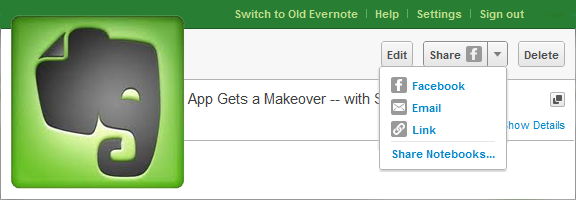
Normally I try to avoid doing Evernote posts every week, but this latest update is too big to pass up! It marks an end to Evernote’s stoic insistence that its service is strictly for capturing information, not sharing it — and if that wasn’t huge enough, the overhaul to the web app makes Evernote a pleasure to use on machines and OS’s without a desktop version. Excited yet? If you’re an Evernote fan, you know you are! See below for details.
UPDATE: The recent pre-release version of Evernote Desktop for Windows (4.3.0.4293) has added social sharing features, including Twitter, which is not yet included in the web app. Word and character counts have also been added, along with a few other niceties and bug fixes.
The first thing you will notice when you log into the web app is that the new interface refreshingly familiar, adopting a three-panel approach that is very much like the desktop version. Notebook stacks are also included, as well as snippet view — which provides a preview of the note’s content to speed up browsing — and the ability to CTRL/CMD + click multiple notes and drag them to notebooks, tags, or trash. The easy to use updated interface also includes a handy toggle to control auto-save — a handy feature when writing in shared notebooks.

While the update is impressive, it’s not perfect yet. For example, some of the more advanced functionality, like filtering, printing, attaching files, viewing note history, and creating saved searches, is still only available in the older version of the web app. If you want or need any of these features, you will need to switch back to the archaic mode for the time being.
I love the work that Evernote put into the new version of the web app, but am absolutely thrilled by their decision to include some social sharing capability! Until now, I honestly thought that the only way to share notes I collected would be using tools like Springpad and Shelfster, but Evernote’s inclusion of Facebook sharing, with plans to add Twitter in the near future, gives users the added freedom they need in today’s social web. It would be nice to see them open up sharing to the same extent that Springpad has, but baby-steps, yes? Sharing to Facebook, (soon) Twitter, via email, or by adding a link into your social platform of choice will have to be enough for now. You can also revoke shares at your discretion, which is handy. The Evernote blog promises that the new sharing features will find their way into their other apps in future updates.
So how excited are you about Evernote’s foray into the modern web — and its revitalized web app too, of course?


The No.1 Reason I Won’t Be Using Amazon Cloud Drive
Amazon recently launched its Cloud Drive service offering users 5 GB of free online storage, with very competitive plans that essentially amount to yearly subscriptions of $1/GB, going up as high as 1000 GB. When combined with the Amazon Cloud Player (US-only), which allows you stream your music files from any computer or Android device, and doesn’t count Amazon MP3 purchases against your subscription limit, the Amazon Cloud Drive seems like one hell of a deal! The Amazon servers are some of the best out there, and unlike services like Microsoft’s SkyDrive, there are no limitations as to what can be uploaded as long as you own the files and their contents, don’t violate any laws by storing them, and agree not to upload anything that could be potentially dangerous.
All very reasonable and expected, no? Be a law-abiding and conscientious citizen, use the service responsibly, and you’re golden, right? Right — unless you enjoy the possibility of your privacy being infringed upon at the whim of a large corporation.
My problem with the Amazon Cloud Drive service, no matter how good it might be, all boils down to a single clause in their terms of service — which I hope that everyone who signed up for the service (or any service) read thoroughly. In section 5.2 of the Terms of Use, Amazon clearly states the following:
Giving a corporation and its designated appointees the right to access, keep, use, and share both my account information and my personal and business files is something that I’m simply not comfortable with. I understand the concept of limited access to files for the purposes of technical support, and I even get holding them on the order of a court of law or government body, but the use of the phrase “as we determine is necessary to provide the Service” is playing a bit too fast and loose for me. I have no idea what they might determine is necessary — it’s completely arbitrary. I am reasonably certain that, if there were victims of some sort of foul play resulting from that phrase, a court of law would be able to find in favour of those victims, but who wants to be a victim, even potentially? Don’t we have enough problems with digital privacy already?
The Amazon Cloud Drive is promising, but for a service that is fending off criticisms from the music industry by touting itself as a personal hard drive, they certainly don’t provide the end-user with anything even close to resembling the right to privacy that is inherent in a true personal hard drive. I hope that users read and thoroughly understand the fine print before they decide to upload their lives to this service!
What do you think of the Amazon Cloud Drive and its terms of use?