
Menu Close

Author: Bobby Travis (page 5 of 51)

Bobby isn't 40-something, but is a strong supporter of the Grown-up Geek kind. He's a loving husband and father first, but is also a freelance writer, productivity nut, operatically trained singer, and (not-so) closet geek.

Check out his random thoughts, wackiness, and Instagram pics on Tumblr, Twitter, or Google+-- or just head over to bobby-travis.com.

Awesome App Updates: Flipboard, Zite, PressReader (iOS)

Awesome App Updates: Flipboard, Zite, PressReader (iOS) | 40Tech

We’re always looking for a better way to filter and experience all of the content we discover on the web. Thankfully, there are a ton of great feed readers and news discovery apps out there. Three of the standouts, Flipboard, Zite (which we somehow never wrote an article on, directly), and PressReader, have recently received some significant updates. Some might even call them game-changing. Either way, they’re significant enough that we feel the need to share them with you, so read on! Enjoy! And comment, of course…  


Flipboard and Zite

When Flipboard came out, it blew people’s minds. All of your Google Reader content boiled into a pretty, personalized magazine? Awesome! Especially when you consider that it would do the same with your Twitter and Facebook feeds.

Then Zite came out. It wasn’t as flashy as Flipboard, but it had a nice, minimalist feel to it, and a fancy learning algorithm that helped it to feed you the content you would find most relevant. Aside from Feedly, which came to iOS later (but had been a web app since before the iPad existed), there was really nothing that could compare with Flipboard and Zite for stylized delivery of your favourite content. And all for free, too.

Both of these apps did what all good apps do: they kept updating. Mostly, they kept adding more ways to share content and more ways to bring new content in — everything from Tumblr to Instagram to their own suggested feeds organized by topic could be added to your magazine. Flipboard and Zite weren’t just for organizing your own content, they were discovery engines as well!

There was only one problem… with all of the updates, the one that everyone wanted never came. Where, oh where was the iPhone app? Yes, yes, Android users, I know the Android app was wanted, as well, but this is an iOS post — it says so in the title. :P

Well, the updates that people were waiting for are in and both Flipboard and Zite are now available for the iPhone. To make things cooler (and make sure that you stay engaged with their apps), Flipboard and Zite both offer a way to synchronize your feeds between devices. All you have to do is sign up for their free accounts.

Flipboard Cover on iPhone | 40Tech  Flipboard for iPhone | 40Tech  Flipboard Article on iPhone | 40Tech

Zite for iPhone | 40Tech   Zite Article on iPhone | 40Tech   Zite Article Options on iPhone | 40Tech

If you love the look of Flipboard but wish it had the same learning ability of Zite, then you’ll be happy to hear that the iPhone version does do something very similar. The iPad should get that feature soon. Zite still has a slight edge for massive content consumers, however — or for shared iOS devices. The app allows for multiple accounts, which makes it easy to set up and switch between magazines for work, pleasure, news, food, different people; you name it.

Sync Flipboard to iPhone, iPad | 40Tech  Sync Zite to iPhone, iPad, with Multiple Profiles | 40Tech


PressReader (by NewspaperDirect)

I love PressReader simply because it is a fantastic use of technology. It allows people to experience their local newspaper — and newspapers from all over the world — right on their iPhone or iPad (it’s on Android and the web as well). It’s fantastic. People who aren’t ready to part from their traditional means of reading the news can still have it. In many ways, the experience is enhanced, as well; most especially with the sharing features of the app, and the text-to-speech capability that allows your iPhone or iPad to read your paper to you on the go.

PressReader’s most recent update not only brings the app up to date with iOS 5, but it also adds a bevy of new features that make the experience even better. The most notable is the (iPad only) SmartFlow technology that visually optimizes the newspaper for the iPad, much in the same way that Flipboard and Zite prettify content feeds. This feature can be turned on and off in settings, and enabled per article and page from the nifty new press and hold menu. It’s a bit intense for the first generation iPad, so it is off by default. I found it worked well enough with mine, though, with only the occasional crash.

PressReader Smartflow | 40TechPressReader Before SmartFlow | 40TechPressReader After Smartflow | 40Tech

PressReader has also added push notifications so that you can know right away when the latest version of your favourite paper is out. It’s like it’s got a built in paperboy — or maybe paperperson?

Finally, the added ability to copy and paste articles directly into note taking applications is a nice touch for those of us who use Evernote and friends (see: Us).
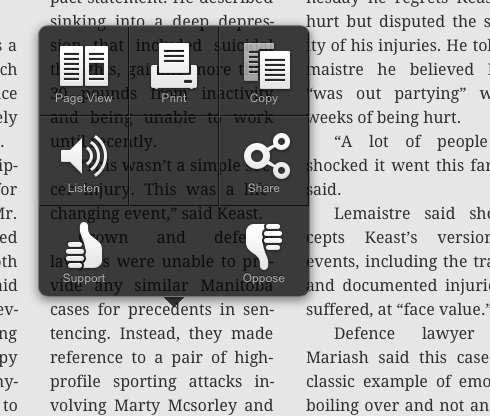
PressReader Press, Hold Menu | 40Tech  PressReader Article Copied to Evernote | 40Tech


I’m loving the updates to PressReader, Flipboard, and Zite. They are, in a word, Awesome. I think you should get them and you should love them. If you are using a first generation iPhone or iPod Touch, though, don’t get the PressReader update. Your tech will not like you.

What are your thoughts on these recent Awesome App Updates? 


My Daughter Ate My Stylus — So I Learned How to Make a New (and Even Better) One

My Daughter Ate My Stylus -- So I Learned How to Make a New (and Even Better) One | 40Tech

My little girl is three. Three-and-a-half, to be exact — and before now, we never had to worry about her putting things in her mouth. I’m not sure what changed, really, but now we have to watch her like a hawk. And we do — but, unfortunately, it was already too late for my iPad stylus. For both of them…

The first one, she chewed on. It was pretty much a write-off. The second one, she decided it would be fun to see what the business end tasted like. Now I’m down two pens. They were the cheap kind, thank the tech gods, but that’s still about $40 down the drain! So I decided: the next stylus will be one of my own making. One that will cost me nothing to make, and that I can easily repair. And thanks to the wonders of the internet, making that happen was easy peasy.

There are several articles on the subject of the DIY touchscreen stylus. The ones that caught my eye were those talking about using a real pen. The basic touchscreen stylus isn’t exactly known for it’s ergonomic feel, so working one up from a real pen seemed like a good idea. I found a few iterations, but the basic concept can be traced back to a video on Make Magazine’s Makezine Blog. All you have to do is connect some light-gauge wire to some conductive foam — which can be found in the packaging of computer and electronic components such as microchips and CPUs — feed it through the empty body of a comfortable pen, and then wrap the wire around the outside, where your hand will come into contact with it. Trim the conductive foam tip to desired size and shape, and voila: instant iPad stylus.

The whole project can be done very quickly, and you can spruce it up a bit by drilling small holes to lock the wire inside the body of the pen, so that you don’t have to use tape. If you happen to have a pen with a metal body, even better. All you’ll need in that case is the conductive foam and you’re good to go! The wire method isn’t so bad, though. It’s not always pretty, but it works.

Here’s a (somewhat blurry) shot of my rough prototype:

image

I made this on a whim, entirely from things I had on hand. I was able to use the original stylus head for the conductive foam, which was nice — we caught her before she swallowed it. I also used some very light speaker wire (all I had, at the time), and the head of an old 1/4 audio jack to provide support for the tip. It fit snugly into the point of the pen, once the pen’s original head was taken off. Note that the wire is only on one side of the pen. I did that because speaker wire is ugly, and wrapping it all the way around would have been a total atrocity, potentially involving metal splinters. The way I hold a pen would have me almost always in contact with it, anyway, and the next round will be prettier.

Looks notwithstanding, due to the ergonomic grip of the pen, I’ve already found that the DIY iPad stylus is much more accurate than those that are up for sale. I’ll never go back.

Looking for a fun, easy project? Make your own stylus! Then tell us all about it. Post pictures, even!

Collin’s Lab: DIY iPAd Stylus [Make]


What’s The Deal With Pinterest? Even My Wife Likes (Obsesses Over) It!

image

So, Pinterest… It’s received a lot of coverage in the past year — it’s even received in the realm of 37 million in funding — but I had trouble seeing the appeal. I wasn’t sure the world needed another social bookmarking site. I wasn’t sure the world needed another way to share, well… anything. I admit, most of this feeling had nothing to do with Pinterest, per se, it was really more about social media overwhelm. I’ve seen a ton of social sharing services go up and down over the past few years, and, as much as I love Google+, I think it maxed me out. Besides, you can do things similar to Pinterest using tools like Evernote and Springpad, right? Right?

Then my lovely wife — a person who has no real interest in tech, barely any interest in social networking, and who only got a smartphone because it was free and I “was bugging her about it” — was somehow inspired to try it out. No prompting from me, or anyone else — she came to it entirely on her own. Now… she’s obsessed. Seriously. For example, I see her awake at 3AM and think that she’s feeding the baby, or something — but no. What’s she’s doing is maniacally pinning and re-pinning things to her boards, and often giggling like mad as she does it. There is apparently a lot of funny on Pinterest…

Title Image clipped from Pinterest Comic

image

Recently, she’s taken to sharing some of that funny with me, and I’ve discovered that a good portion of it is Star Wars based. This confused the hell out of me (though I still shared some of it with you here and here). My wife has no interest in Star Wars. She’s one of the few people who has never even seen the films, and (horrifyingly) will actually say things like “What’s a hansolo?” I still love her, though. She’s that awesome. She’s beginning to make me see value in Pinterest, too. Anything that could inspire my wife to share seriously awesome Star Wars stuffs with me has got to be pretty powerful.

image  image  image

image

I checked it out a little more thoroughly. I wanted to know what the deal was. Was there a secret sauce? How did it hook her? What I discovered was four things:

Pinterest is incredibly simple.

Pinterest is to sharing fun and useful images what Evernote is to easy, accessible note-taking. It focuses on that one thing, and makes sure that it is the absolute best at it. It doesn’t overwhelm the user.


Pinterest is visual — and good at it.

Everyone loves a good picture and everyone loves a good photo gallery. Funny and beautiful pics have been making the rounds since the internet was able to support them. People like to look at the images they like again and again.  And share them, re-share them, and re-share them again, as well. Pinterest makes this easy, but it also makes it beautiful. The designers have done a fantastic job of taking something that could be overwhelming, both in general and visually, and making it joy to experience.

My Wife's Pinterest Categories


Like crafty things? This is your home.

There are a ton of cool things to discover on Pinterest, but it really seems to have taken off with the crafty and DIY crowd. This is what ultimately hooked my wife. She loves to see things that people have made, especially if it involves baking or making something cool out of something else. She knows I like that sort of thing as well, and has not only shared some cool Star Wars crafts with me, but also a lot of DIY upcycling and repurposing projects. It’s how I came across Homestyler, actually, which was the topic of my previous post. There is some very cool stuff on Pinterest, and more is pinned every day.

Some of My Wife’s Pins

image  image  image  image


It connects to the real world. It useful.

Pinterest is more than just a place to store and share images. The images link back to the site you found them on — and if we follow the crafty and DIY point from above, you end up with well-organized, very visual bookmarks back to sites that contain information that you might actually use in your real-world life. This makes Pinterest more than just a random bookmarking service, and more than just an image-sharing service. It makes it a tool that is useful to you both on and offline. It helps you to find, share, save and use things that are of interest to you.

image


We’ve all heard that “<insert service> makes it easy to collect and organize what interests you on the web.” Pinterest actually does it. My wife is living proof. Anything tech-based that can make her go gaga is definitely worth taking a look at. It’s still in beta, but getting an account happens pretty quickly. I recommend giving Pinterest a try. You’ll probably love it.

What do you think of Pinterest? How do you use it?


Redesign Your Living Space Online With Homestyler [App of the Week]

Redesign Your Living Space Online With Autodesk Homestyler | 40Tech

I stumbled across this completely by accident. I was looking at some very cool ideas for creating furniture from shipping pallets (my lovely wife’s new obsession), and I saw that one person had done a mock-up of what she wanted her living room to look like. Then I saw the little “Autodesk Homestyler” branding on the bottom of the image and gave an audible “Heyyyyyyyyyy!”

What followed wasn’t pretty. Picture me — or yourself, if you don’t happen to know what I look like — wandering about my house with a tape measure, measuring every wall, window, doorframe, article of furniture, you name it. I was approximating angles, imagining what changes I might like, and constantly running back to my laptop so I could re-create — and then improve upon — my living space. It was obsessive, it was zen-like, and it was surprisingly effective.

Sure, sure, there were a few little glitches, like, in the panoramic or high definition snapshot 3D rendering of my living room, dining room, and kitchen, things like tables and desks  — and my stove — liked to turn invisible. There were conflicts with some of the models, too — my TV sitting inside my TV-stand, for example, or things just refusing to sit over or near each other, even when I had the placement rules disabled. Also, there is simply no way to change the dimensions of some of the models, or (most annoyingly) the height of the walls. (See images, below.)

These things created a need for that special sort of approximation creativity that we all sometimes have to draw on, but the end result was more than adequate for me to see what it would look like if my living room had a sectional couch, and maybe a mirror on the wall (the mirror even reflects when the panorama is rendered!). I now have a reasonable working model of my living space that I can go to and mess with before trying or buying anything — and it was all free! Free, dammit! Even if the entire app is in Flash, and there is no iPad app, I’m completely down with Homestyler. Once you try it, I bet you’ll love it too.

Here’s a few shots of me working on my place — all done within a few hours of mucking about:

image image  image  image  image  image

image

And here’s a link to my panorama (no iframes hereabouts, sorry).

What are your thoughts on Autodesk Homestyler? If you know of anything comparable, tell us about it in the comments!

Autodesk Homestyler


Happy New Year — and Some Sweet Star Wars Awesome!

Happy New Year -- and Some Sweet Star Wars Awesome! | 40Tech

Bye bye 2011. We hope everyone had a great and safe night last night, and we wish you all a fantastic and prosperous 2012 — filled with happiness, good times, and 366 (Leap Year) days of awesome geekery.

To start you off, look below for some sweet geekiness. They’re not tech… but they’re definitely tech-inspired and will get you close to your nerdy heart!

Star Wars Cookie Cutters, Sandwich Cutters, and Pancake Molds from Williams-Sonoma!

image  image  image

image  image  image

They’ve got some Spider-man comic book and Marvel super hero cookie cutters, too!

Have a super-geeky 2012 everybody!