Menu Close

Author: Bobby Travis (page 29 of 51)

Bobby isn't 40-something, but is a strong supporter of the Grown-up Geek kind. He's a loving husband and father first, but is also a freelance writer, productivity nut, operatically trained singer, and (not-so) closet geek.

Check out his random thoughts, wackiness, and Instagram pics on Tumblr, Twitter, or Google+-- or just head over to bobby-travis.com.

Collaborate on the Fly with Google Shared Spaces

image

If you were a fan of Google Wave’s integrated gadgets, or just need a place to set up some easy real-time collaboration, then check out Google Labs’ new Shared Spaces. Shared Spaces uses Wave’s technology to provide private collaboration spaces that you can invite others to via a provided short link. There are about 50 gadgets already available, such as the Map Gadget, Draw Board, WaveTube, yourBrainStormer, Napkin Gadget, and a few games. Once you choose the gadget that suits your needs, you simply click Create a Space and your window will open, complete with a chat area, link, and buttons to invite others via Email, Buzz, or Twitter. Once you’re finished, spaces can be deleted simply by selecting the Delete this Space button.

Each gadget on the list has a short description, and can be opened in its own page, where users can leave comments via Disqus, which will help others decide if the gadget will work well or not. This will be especially good if Shared Spaces catches on with the JavaScript programming community, and a ton of new gadgets start appearing.

You need to be logged in to your Google Account to use Shared Spaces, and authorize it for access. It should also be noted that, as of yet, it doesn’t appear to be working in Internet Explorer.

EDIT: According to the Google Blog, you can also log in via Twitter and Yahoo accounts.

What are your thoughts on Google’s Shared Spaces?


Tron-ify Your Stuff With EL Wire

image

Back in October, there was some geeky gushing going on about the Tron sequel. It was happening here on 40Tech – and the culprit might well have been me. I’m not saying it was… but it’s a definite possible kind of a certainty. Well, Tron Legacy has hit the box office, and even though I haven’t had a chance to see it yet, you might have – and you may well have been impressed enough to wish that you, too, could look all glowy and blue.

Ladyada and Becky Stern can help you out with that.

Check out the video and links below. If you’re feeling a little creative this holiday season, and aren’t afraid of a little EL wire and some solder, you too can be Tron-ified.

Go on, then. Get your geek on.

Tron Bag with EL Wire (Tutorial Link)


How-To: Tron Bag with EL WIre [Make:]


Google Wave Isn’t Dead After All, Just Changing Hands

In case you missed the announcements last week, Google Wave will live on, and quite likely prosper, in the open source development hands of Apache. In November, Google made a proposal to the Apache Software Foundation to take over development of Wave, hoping to keep the potential of the project alive and bring new blood to its development. The proposal mentioned several weighty companies (including the US Navy) that are still actively using Wave, which was originally set to shut down at the end of 2010, and listed people willing to commit to the project from both within and outside of Google.

Prior to talks with Apache, Google had already made a standalone version of Wave available to interested developers. The end product was named “Wave in a Box” and maintained much of Wave’s functionality. It was even able to import Wave data and communicate with other Wave in a Box installations through a federated protocol. Apache is essentially installing Wave in a Box to their servers and adding it to their Incubator projects as a means to gather a community that will continue active development. I’m not sure whether all existing Wave data will come with it, or not, but it is always possible that the new Apache Wave will offer importing of your Wave data at some point. If you want to act now, there is already a button in each single Wave that allows for exporting to HTML, or PDF with attachments, and Google is apparently working on a tool to export large amounts of Waves at one time, as well as a way to access your Waves in Google Docs.

At any rate, for those of you who were following our Wave Alternatives posts, there is definite hope on the horizon for a better, stronger, and ultimately more useful Wave in the near future.

Keep tabs on the Wave Incubator project here.

What are your thoughts on Apache Wave?


Evernote 4 — and Now 4.1 — is a Giant Leap Forward in Note Taking Goodness

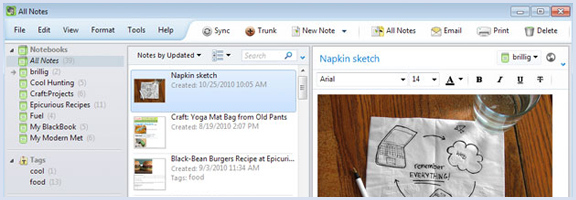
Evernote 4 and 4.1 update

Last week, Evernote 4.1 for Windows was released for general consumption. 4.1 takes the giant leap forward that was Evernote 4 and makes it even better, adding more notebooks, notebook stacks, an improved note info panel, and more. If you’re not yet familiar with Evernote 4, it takes all the good of Evernote 3.5 — which took getting used to for some — and makes significant improvements to the user interface and overall functionality of our beloved notes tool. Some of the highlights include a more economical (and prettier) layout that suits Windows 7, a significant boost in load time and decrease in memory usage, better editing features, and more Windows 7 integrations like jump lists and geo-location.

I’m also happy to report that new windows once again automatically open when you start a new notes, which was a feature I, personally, missed (though the entire client still opens behind it for some reason). The new version also adds support for your local font files, makes it easier to hide things you don’t need to see, and improved clipping support.

For those looking for such things, there is still no social sharing capabilities, so don’t get too excited. All is not lost, however — you can always use Springpad for that.

For more detail on Evernote 4, look here

For more detail on the 4.1 update, look here

What are your thoughts on the newest release of Evernote for Windows?


Brain + Computer = Mad Science at its Best

Mad Science at It's Best

Ever wanted a computer to interface directly with your brain? Come on, we’ve all watched science fiction flicks where the mad scientist puts something akin to a noodle-strainer outfitted with wires, resistors and other electronics on top of his head (or on the head of an unwilling victi– err, participant…), and then proceeds to interface with a machine that can control space ships, the weather, or defense systems. Well, Paul Sadja has decided it would be cool to take us there for real.

Enter the C3Vision — Cortically Coupled Computer Vision.

Image by J.J. McCullough

Paul Sajda is a Columbia University professor of Biomedical Engineering and Radiology at the Laboratory for Intelligent Imaging and Neural Computing (who knew that even existed…?), and had this to say about his new toy:

“(The C3V) uses an electroencephalogram cap to monitor brain activity as the person wearing it is shown about 10 images per second. Machine-learning algorithms trained to detect the neurological signals that signify interest in an image are used to analyze this brain activity. By monitoring these signals, the system rapidly ranks the images in terms of how interesting they appear to the viewer. The search is then refined by retrieving other images that are similar to those with the highest rank.”

Basically, he has created a means to tap into user’s brains and, as Curt Hopkins of Read Write Web states, “realize what’s bugging them before they consciously know they’ve been bugged” — and then take action, of course.

What’s most interesting about all of this is the similarity to contextual search and social recommendation engines — and, of course, the possibility that Paul Sadja might really be The Riddler. You know… Batman Forever?

I’m just sayin’.

Your Next Computer Might Be Mad of… Brains! [Read Write Web]