
Excited to sign up for Apple News+ so I can add to the backlog of 893 items in my free reading queue that I’ll never get to
Author: Evan Kline (page 3 of 164)
Hello, I'm Evan. I write about tech from my perspective – that of the average tech geek, sometimes with my lawyer glasses on. You can also find me on Twitter and at my real-life job as a lawyer. MORE ABOUT ME.
In addition to attending great sessions and meeting interesting people, I presented two sessions at the ABA TECHSHOW in Chicago last week. One of them, Mac Mastery: Top Mac Workflows Used By Real Attorney, featured a few automation workflows and other processes I use in my practice. I shared a link to a page during the presentation, and indicated I would later publish downloads of the various workflows to the page. That page is now populated with the downloads and other information:
You can never own too many text editors. Okay, I can never own too many text editors. I recently splurged on BBEdit, the venerable HTML and text editor for the Mac. There’s something pleasurable about tweaking BBEdit to use it as a blogging tool. One such tool I hacked together is an AppleScript to send a post from BBEdit to MarsEdit for final publishing. Here’s how you do it.
Paste the following text into the Script Editor app on your Mac (warning: I’m no coder, and did this through trial and error based on other scripts, so this script probably contains some completely unnecessary code):
on run
	tell application "BBEdit" to set theFile to file of document 1


	set appleScriptPath to theFile as text
	set currentURL to POSIX path of appleScriptPath
	set currentURL to ("file://" & currentURL)

	tell application "MarsEdit"
		activate
		make new document
		tell document 1
			set body to theFile
		end tell
		activate
	end tell
end run
Compile then save the AppleScript. For the final step, you need to move this AppleScript to the BBEdit scripts folder. Get there by clicking on the Scripts icon near the far right of the BBEdit menu, and choosing “Open Scripts Folder.”
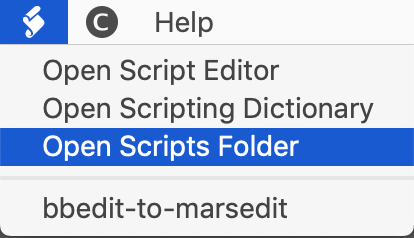
Once the AppleScript is in place, it will appear at the bottom of the dropdown when you click on the Scripts icon. Selecting it will take the text in BBEdit, and open it in a new MarsEdit document. I wrote the initial draft of this post in BBEdit, before using the AppleScript to send it to MarsEdit for final edits, adding of the image, assigning tags and categories, and sending off to WordPress.

Whether you’re a tech geek or not, you should consider attending the ABA TECHSHOW if you want to make your practice more efficient. It’s not just for lawyers, but for anyone in the legal field. In addition to the dozens of CLE sessions to choose from, you can also visit the EXPO hall and check out products to improve your practice. We discovered my firm’s case management system in the TECHSHOW EXPO hall a few years ago, which then led to the discovery of our document management system and phone system. All were big improvements over our old systems.
Speaking of sessions, I’ll be back in Chicago this year presenting two sessions:
- Tame the (Data) Chaos with Your Mac, with Heidi Alexander.
March 1, 2019, 8:30 a.m. - Mac Mastery: Top Mac Workflows Used by Real Attorneys, with Julie Tolek
March 1, 2019, 4:15 p.m.
If neither of those topics are for you, check out the 2019 schedule for a complete listing. I always have a hard time narrowing down the choices, although I plan to hit most all of the sessions in the Mac Track. A few of the sessions I have my eyes on:
- Automation Tools for Law Firm Operations
- An Insider’s Tour of Office 365 and Office 2019
- We Don’t Need No Stinking Server (or Do We)?
- Using Document Automation To Improve Efficiency And Reduce Errors
- Default Settings in Office Every Law Firm Should Know
- Showtime in the Courtroom
- Do Unicorns Exist? The Paperless Law Office
- Get Your Mobile Ninja On: Top iOS Tips, Apps, and Gear
- Using Practice Management Systems to Streamline Processes
- Mac and iOS Security: What You Need to Know
- WOW! Videos, Photos, & Audio that Impress Clients and Juries
- Strengthen Your Core: Add-ins for Microsoft Word and Outlook
In addition to learning from Heidi and Julie, I’m looking forward to seeing other topnotch speakers like Brett Burney of Apps in Law, David Sparks of Mac Power Users and MacSparky, Jeff Richardson of iPhone JD, and many more.
If you attend, please say hello.