Menu Close

Author: Evan Kline (page 127 of 164)

Hello, I'm Evan. I write about tech from my perspective – that of the average tech geek, sometimes with my lawyer glasses on. You can also find me on Twitter and at my real-life job as a lawyer.    MORE ABOUT ME.

Stay Hip to the Latest Internet Memes With Know Your Meme

chubby bubbles girl meme

From the Star Wars Kid to the Red Shirt Guy, certain items or ideas gain traction on the Internet, and reach the hallowed status of Internet meme.  If you’re like me, you’re not exactly hip to the latest memes.  Fear not!  Know Your Meme has you covered, helping you stay abreast of the latest memes on the Internet.

In its own words, Know Your Meme is “a web series and online database dedicated to documenting Internet culture, one scientismic investigation at a time.”  Know Your Meme is more than just a meme database, as a visit to the front page will reveal.  For example, you can find blog posts discussing memes in greater detail.  One recent example is a look at the basics of a distributed denial-of-service attack, which can help you to understand the Anonymous attacks on PayPal, Visa, and others this past week.  Know Your Meme also highlights trending memes, and even has video episodes that dissect certain memes.

For me, though, the most fun is just browsing aimlessly through the site.  In the Meme database, you can find a list of popular memes, many of which are worth a chuckle.  Chubby Bubbles Girl anyone?  To get the full effect of some of the memes, you need to check out the images at the bottom of each page.  Some meme pages also contain graphs that track the interest in the meme over time.

What’s your favorite Internet meme?

Who Are You, Anyway? A Look At 40Tech Reader Demographics

40tech visitors

We know that we all like tech, or at least that we recognize the necessity of it.  But beyond that, how much do we have in common?  If you wonder how you match up with the “typical” 40Tech reader, here are some stats for you to chew on.  These numbers are for the last 30 days, and are gathered from Google Analytics.


Nationality

48% of you are from the U.S.A.  The next closest is the U.K., whose residents make up 7.2% of the visitors here, followed by Canada, at 6.3%.  Australia has 3.2%.  Only the Netherlands, Germany, and Spain exceed 2%.  Of our U.S. visitors, 8.64% of you are from California, 4.02% are from New York, and 3.66% are from Texas.


The Browser Wars

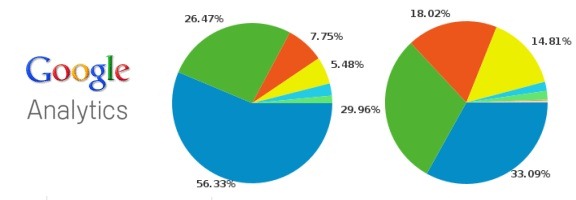
Chrome has almost caught up to Firefox as the browser of choice among 40Tech readers, but isn’t quite there.  Firefox accounts for 33.09% of the visits, with Chrome registering 29.96%.  Safari is a distant third at 18.02%, with Internet Explorer at 14.81% and Opera at 1.8%.


Operating Systems

64.77% of you use Windows, while 20.21% of you use Macs.  The other operating systems that had numbers worth noting were iPhone (4.2%), iPad (3.92%), Linux (3.58%), Android (2.13%), and iPod (0.52%).  (Don’t tell Google that iPhone, iPad, and iPod aren’t actually the names of operating systems).  All totaled, mobile devices make up 10.93% of the visits to the site.


Screen resolutions

You folks sure do use a wide variety of screen resolutions, including 1280×800 (16.41%), 1680×1050 (11.17%), 1440×900 (10.98%), and 1280×1024 (10.26).  Several other resolutions rounded out the rest of the stats.


Odds and Ends

About 48% of you are using a version (or older) of Flash player that was outdated back in September, and has security vulnerabilities.  Check your version, and update if you don’t have the current version.

Most of you use are on a high speed connection, although 12.28% of you are using dial up.  To you, we apologize.  We don’t test 40Tech on slow connections, so hopefully the site speeds are tolerable.

How do you fit in with the rest of the crew?  (And did we miss any exciting stats that interest you?  Perhaps screen colors excite you?  We’ve got stats on that, too.).


Record This Info Now, Thank Us Later If Your Gmail Account Is Ever Compromised

gmail hacked

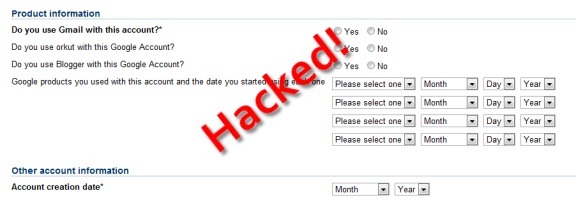
Last week we wrote of an important step that you should take to secure your Gmail account – associating a cell phone number with your Gmail account, so that you can receive a recovery code via text message.  As we pointed out, that’s not foolproof – a savvy hacker could change the cell phone number associated with your account.  Then what?  Google does offer an account recovery process, but it requires you to know the answer to several questions. Read more


The Fatal Flaw That Will Keep You From Using Google Voice as Your Single Phone Number

google voice tall

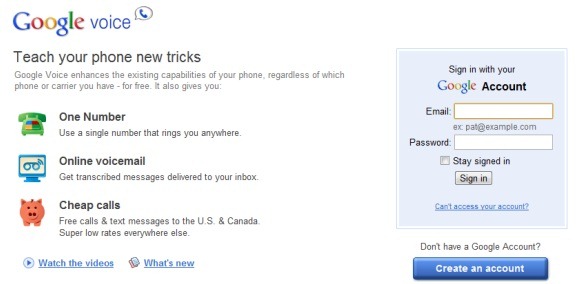
Google Voice has been touted as the one number to use in place of your others, since a call to your Voice number will ring all of your phones.  Indeed, between that feature and several others, Voice is handy.  For full details on Voice, check out our Google Voice Primer.  Google Voice isn’t without shortcomings, though.  We covered five of them last year (a couple of those have since been fixed).  Somehow, though, we missed Voice’s biggest shortcoming, that will prevent it from ever being a replacement telephone number for many people.

Voice’s biggest shortcoming is that it doesn’t support the sending of photos by text message (MMS).  Did you know that?  I didn’t, until recently.  I finally ordered an Android phone, and was excited to start telling everyone that I had a new phone number – my Google Voice number.  A day before my new phone arrived, someone tried to send me an MMS message, so that I could open it at my computer via the Voice web interface.  That message never arrived.  Worse, neither I nor the sender were alerted to the fact that it had failed.  The message fell off into a black hole, never to be seen again.  Sure enough, a quick look online revealed that Voice doesn’t support MMS.

MMS?  Isn’t that what those kids use today?  Why would I ever need that?  That’s probably what many of you are thinking.  I fall into that category, too – about 98% of the time.  I only receive a handful of MMS messages a year.  When I do receive them, though, they tend to be important, and not just for kicks.

My recourse is to not use Voice as my primary number, or to tell people that I have one number for calls and normal text messages, and another for picture texts.  I’m still undecided, primarily because I love Voice’s other features so much.  The risk is that I then need to trust that other users will remember that I have a separate MMS number.  If they forget, they’ll never know that I’m not getting their messages, and I won’t even know they’ve been sending them.

What would you decide?


WordPress Backup to the Cloud, Made Easy

updraft

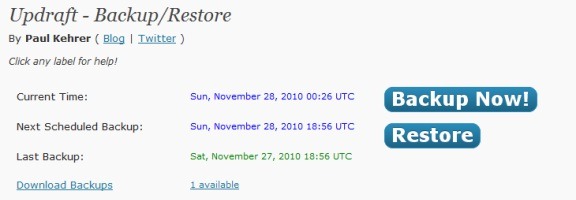
Earlier this month, we took a look at 4 ways to backup your WordPress blog.  That post covered steps you could take to backup your site, including the use of WordPress plugins.  We’re always on the lookout for better ways to get things done, and when it comes to backing up a WordPress blog, we’ve found a gem.  Updraft is a dead simple plugin that will backup the contents of your site to the cloud (such as Amazon S3) or to an FTP server.  You can even have the backup emailed to you.

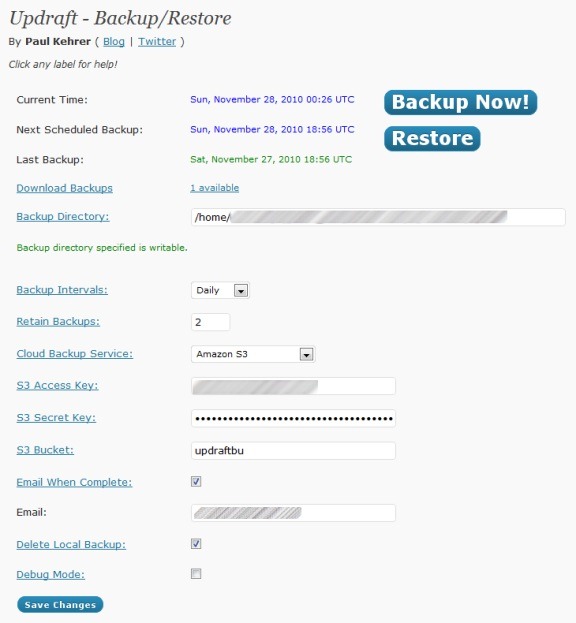
What makes Updraft so awesome is how simple it is.  When I set it up for 40Tech, it automatically set a backup directory on the server.  I only had to set the backup interval (daily, weekly, monthly, or manual), and fill in my Amazon S3 account details.  When I log into my S3 account, I can see the backup files sitting there.

You can set Updraft to email you when a backup is complete, and to delete the local backup on your server (prior to uploading the backup to the cloud, Updraft generates it in a folder on your server).  You can also specify how many backups to keep.  Perhaps the best part of Updraft is that your backup can be restored with the click of a button.

updraft backup

One word of warning: if you’re using Amazon S3, don’t use any non-alphanumeric characters in your bucket name.  When I first set up Updraft, the backups were sitting on the server, and not being transferred into S3.  I had been using a bucket that had an underscore in the name.  When I changed that to a simple name, the backups started working as intended.

Updraft is pretty awesome.  Have you found anything better?

Updraft [via MakeUseOf]