Menu Close

Author: Evan Kline (page 124 of 164)

Hello, I'm Evan. I write about tech from my perspective – that of the average tech geek, sometimes with my lawyer glasses on. You can also find me on Twitter and at my real-life job as a lawyer.    MORE ABOUT ME.

What Freemium Services Have You Decided To Pay For?

freemium services.jpg

The “freemium” business model is very popular among tech companies today. A freemium model is one where a company offers most features of a service for free, but also offers additional features for a price, often in the form of paid premium accounts. Some services offer so many features as part of a free account, that I wonder what the incentive is for users to get a paid account. I suspect the idea is one of pure numbers – if the free version is so useful that it attracts a gazllion users, a company only needs a very small percentage of those users to actually purchase the premium version.

Off the top of my head, the services that I pay for are Evernote, Toodledo, Lastpass, and Xmarks. What freemium services or apps have you found to be so useful, that you shelled out money for a paid version? Or maybe you didn’t even need the premium version, but wanted to support the developers? Let us know in the comments, below. If we get enough of a response identifying popular freemium services, we’ll run a poll in the future to see which paid services are the most popular.

10 Tips for Mac OS X Beginners


After many years of being a Windows user, I’ve gone back to my roots. My first computer many years ago was an Apple IIe, and now I’m the owner of a Macbook Air (although, to be honest, it is a secondary machine for me). The transition from Windows to Mac is much like learning a new language. Here are a few tips that would have made my transition easier had I know them from the start. Hopefully, they will help some of you who are also making the switch. Read more


How To Turn Your Kindle Or Nook Into an RSS Reader

google reader for Kindle and Nook

The Kindle and other eReaders are great for reading books, but you don’t have to stop there. With a bit of initial work, you can turn your Kindle or Nook into a competent reader of your RSS feeds from Google Reader. G:RSS-Web is a service that allows you to access your Google Reader feeds in your eReader’s web browser, in a format designed for your device.

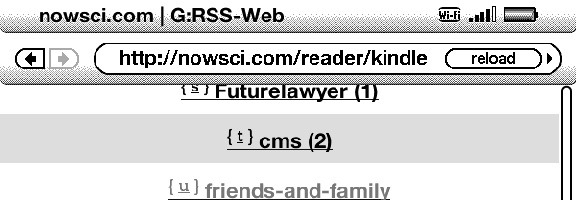
Go to a G:RSS-Web address in your device’s browser (on the Kindle, you can find your browser in the Experimental section), where you’ll be walked through setting up your account. G:RSS-Web uses OAuth for accessing your Google account.  On the Kindle, the device that I’ve used with G:RSS-Web, you use keys to navigate through your feeds. Typically, each link on the page has a keyboard letter associated with it. Hit the key, and load that link.

google reader for Kindle and Nook full

G:RSS-Web won’t have you rushing to throw away your computer or your mobile phone, but it is definitely serviceable. It is also free.  Do you access Google Reader on your Kindle? If so, let us know how in the comments.

G:RSS-Web


How to Reset the Furthest Read Location On Your Kindle

kindle whispersync reset furthest location

UPDATE 4/26/12: Amazon now offers a way to reset the furthest page location from within your account. For details on this new method, check out our post. According to some commenters, below, the new method only works on Amazon-purchased books. So, for imported books, the method below could still be helpful.

One of the great features of Amazon’s Kindle eReader is Whispersync, which will sync your reading progress across multiple devices.  For example, you can stop reading in the Kindle for iPad app, and pick up where you left off in the Kindle app on your Android device.  A problem arises, though, when you want to reread a book that either you or someone else has already read.  Whispersync will remember the end of the book as the “furthest read location,” defeating your ability to pick up where you left off.  It takes a one-time workaround, but you can reset the Kindle’s “furthest read location.”

Read more


Measuring Our Happiness With Twitter

measuring mood with Twitter

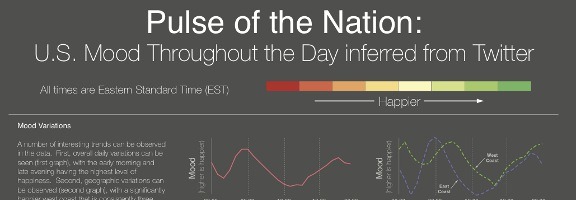
People use Twitter to connect with others, to publicize projects, and to catch up on news.  Now, a group of researchers have used Twitter to measure the mood of the United States.  As discussed on Business Insider, researchers from Harvard and Northwestern tracked three years of tweets to gauge the mood of the U.S. on a minute by minute basis.  The results are interesting, but not surprising.

According to the study, people are the happiest in the early morning and in the late evening, and on Sunday mornings.  They’re the least happy on Thursday afternoons.  Also, people on the west coast are significantly happier than folks on the east coast.

The study was based upon 300 million tweets from September of 2006 through August of 2009.  The mood of each tweet was inferred using ANEW word list.

Here is a YouTube video depicting the U.S. mood throughout the day:


For a more thorough breakdown, hit the link below.  What’s next?  Can we expect researchers to have more fun with this, such as correlating the results with political leanings, weather, the success of sports teams, and more?  Or is a study like this a waste of time?

Pulse of the Nation: U.S. Mood Throughout the Day inferred from Twitter [via Business Insider]