The revamp that Twitter rolled out on the Twitter website a few months ago was, by and large, a nice upgrade. The sidebar is now pretty useful, and the whole experience is a bit more streamlined and efficient. One feature that many people don’t like, though, is how the new Twitter handles retweets. The old method of retweeting (the “RT @” method) allowed you to editorialize a bit, if you wanted. Under new Twitter, the retweet button simply rebroadcasts the original tweet, unedited. You no longer have the ability to add any thoughts to the tweet, short of starting a new tweet. Google+, and the way it fosters interaction, has shown us that geeks love discussion and editorial, if the topic is right. If you want to bring back the classic RT to Twitter web, you can. Here’s how.
Author: Evan Kline (page 106 of 164)
Hello, I'm Evan. I write about tech from my perspective – that of the average tech geek, sometimes with my lawyer glasses on. You can also find me on Twitter and at my real-life job as a lawyer. MORE ABOUT ME.

Mac’s latest update to OS X, Lion, is geared toward trackpads. You can use your trackpad to launch Mission Control, to swipe between full screen apps, and even to navigate in Safari. If you want, though, you don’t have to stop there. With a free tool, you can assign even more gestures to perform certain actions.
Control Multiple Computers With One Keyboard and Mouse – and No Extra Hardware [Windows, Mac, Linux]

If you have more than one computer sitting on your desk, and don’t want extra mice and keyboards cluttering up your workspace, take a look at Synergy. Synergy is free and open source software that lets you control multiple computers with one keyboard and mouse, using your home network. Each computer will need its own monitor. Once you’ve set it up, you can drag your cursor from one computer’s screen, right off the edge to the other computer’s screen.

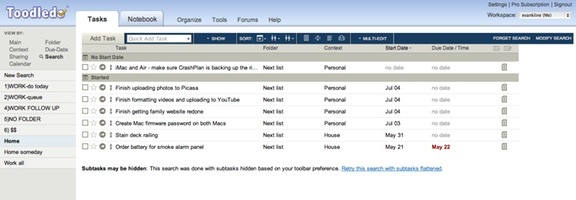
No sooner do we write about how to spruce up Toodledo with User Styles, than Toodledo goes out and spruces itself up with a new user interface. Earlier today, the interface was rolled out. The bad news? The interface conflicts with the user style I was using, and probably others as well. The good news? The default user interface is pretty nice on its own.

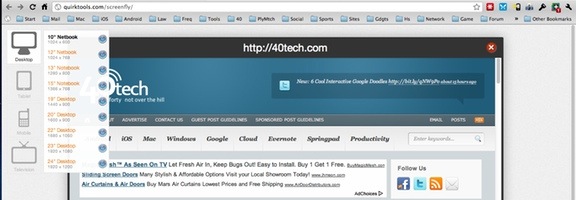
If you run a website, you’ve probably run into issues trying to figure out what your site looks like on various devices. If you want a quick way to figure it out, check out Screenfly, a site that lets you see how your site appears on different devices, including desktop, tablet, mobile, and even television. Within each of those categories, you can choose from a variety of devices. For example, if you choose tablet, you can pick between the iPad and four other tablets, including the Motorolla Xoom. Even the desktop selection allows you to choose between several screen resolutions.