

RSS is a great tool for keep tracking of updates to a web site. Twitter can be used in a similar fashion for those sites that announce updates via Twitter. It's a sad fact, though, that not all websites have RSS feeds or Twitter updates. Don't give up hope, though. Here are four other methods for being alerted when a site is updated.
Website monitoring service
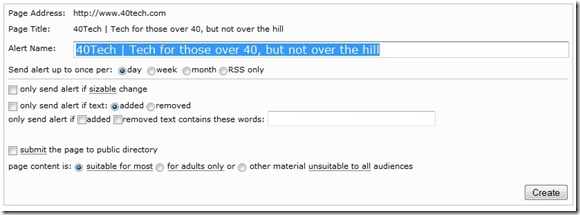
The easiest non-RSS method for tracking website changes is to use a service that specializes in website monitoring. There are several such sites out there. Most involve simply inputing your email address, along with the address of the website that you want to monitor. Note that some of these services may send you ads, either within the notification messages, or as separate messages.
Here are just a few free options:
Browser Extensions: Update Scanner for Firefox; Page Monitor for Chrome

If you're a Firefox or Chrome user, you can monitor sites for updates using extensions: Update Scanner for Firefox, and Page Monitor for Chrome. Both work similarly, installing an icon on either your toolbar, or your status bar. Click the icon to open an interface that allows you to designate a page for monitoring, view pages that have been updated, or force a scan for updates. Both extensions allow you to specify how frequently your sites will be scanned for udpates.
Google Alerts
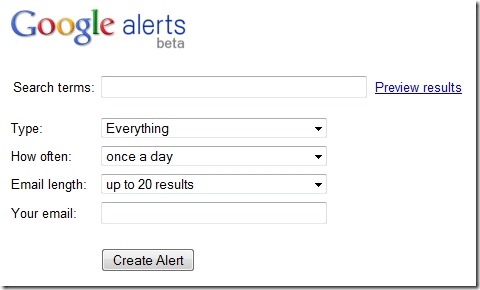
We've previously talked about using Google Alerts to find out when websites talk about you. You can also use Google Alerts to monitor a site for updates. To do, simply use the "site:" search term, along with something unique to the website, such as the header text on article postings, or a term in page titles. For example, all page titles for posts on 40Tech have the characters "| 40Tech" in them, so the following search term could be entered into Google Alerts to monitor 40Tech for updates:
site:40Tech.com "| 40Tech"
40Tech does have an RSS feed, but you could use a similar trick for sites that don't have feeds.
Yahoo! Pipes
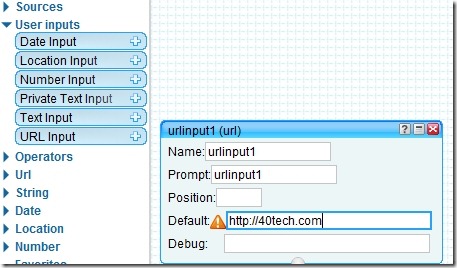
Yahoo! Pipes is a tool from Yahoo! that allows you to build data mashups of feeds, web pages, and other services using a graphical interface. Pipes is truly a geek tool, and instructions on using it are beyond the scope of this article. However, Pipes can be used by end users to create feeds for sites that don't have RSS feeds. JalaJ P. Jha has a thorough, although complicated, writeup on how to build a feed using Pipes, if you are so inclined.
AND ONE MORE METHOD! (added August 4, 2010)
If you check out the comments, below, you'll see a tip from Daryl. He pointed out that Google Reade will offer to generate a feed for you, if the page you input into the “Add Subscription” box doesn't have a feed. So, count that as method #5, and perhaps the best method of all if you use Google Reader regularly. Thanks, Daryl!
How do you monitor sites for updates? Are there any tools that we missed?

Tony says:
I never using RSS feed readers. That said, I stick with Twitter to stay updated on all my favorite site, including this one!
August 3, 2010 — 9:06 pm
Evan Kline says:
I still use Reader, but I do find that, more and more, Twitter is the place I look to first for updates.
August 4, 2010 — 8:40 pm
Daryl says:
Assuming you do use GoogleReader already, you can whack the page URL (nb PAGE url, not just the domain name) into the “Add Subscription” box.
You’ll get a message saying ” does not provide a feed. We can create a feed for you, notifying you when the content on the page updates”.
More info (and proviso’s) here: http://www.google.com/support/reader/bin/answer.py?hl=en&answer=172963
I only recently discovered it and it’s a godsend for me as I do use Reader all the time.
August 4, 2010 — 4:53 am
kosmo @ The Soap Boxers says:
Very nice.
It’s definitely a sad fact that some sites don’t use RSS or Twitter to announce updates – especially the small sites that are trying to grow an audience. They WANT to follow you – make it easier for them.
Long ago, someone asked if I could provide an email version of my RSS feed. This is easy enough to do in Feedburner, so I did. For months, this one person was the sole email subscriber … but every follower counts :)
.-= kosmo @ The Soap Boxers´s last blog ..Kosmo’s Writing Status =-.
August 4, 2010 — 12:33 pm
Evan Kline says:
We don’t have many email subscribers either – so much so, that a year ago I got an email from someone asking why the email subscription feature didn’t work. I had broken it somehow, and who knows how long it took for me to realize it.
August 4, 2010 — 8:41 pm
kosmo @ The Soap Boxers says:
I actually subscribe to the email updates just to make sure I know if it breaks. So, technically, there were TWO subscribers during the first few months.
August 5, 2010 — 12:32 am
Evan Kline says:
Great tip, Daryl. I was not aware of that feature of Google Reader. I’ll add a mention of it to the article.
August 4, 2010 — 8:39 pm
Name (required) shweta says:
well Daryl, I had been using google reader’s force feeds till like last week. Its been taken off by google. That is how i came to search for more options. They have started Page 2 RSS. I dont think it works as good as G reader. Any other suggestions?
October 3, 2010 — 3:24 am
Daryl says:
Shweta – I was quite surprised when I heard that they were going to be removing that functionality from GReader, but they didn’t publicise it much so I guess it shouldn’t really be much of a shock…
I too have converted my page feeds to Page2RSS, having heard of them previously and, I think, Google suggested them. It’s too early to say whether they’re any worse than Google’s own tool was just yet, but mine at least have created an RSS feed which is a good start.
Are you having particular problems with Page2RSS?
October 4, 2010 — 4:23 am