

- Easy Access to US, UK Streaming Services From Anywhere - August 18, 2012
- 5 Fresh Android Games Released in 2012 - July 5, 2012
- Google Chrome Explodes On To iOS, Puts Desktop Experience In Your Pocket - June 30, 2012

Some have you may have noticed our minor obsession with productivity applications here at 40Tech — particularly with task management apps. In the past, we have written on GTD in Evernote, Action Method Online, reQall, Dial2Do, ToodleDo vs Remember the Milk, and more. We also briefly made mention of Producteev, then a promising but still incomplete service focused on cross-platform task management and communication. Now Producteev is back and swinging out hard with Producteev 2, promising one of the best personal and business task management apps to hit the web. Producteev's goal is to enable you to work with their task management system without requiring you to make major adjustments to your current workflow. Producteev 2 is powerful,highly flexible, and free for individuals.
"Producteev’s solution connects email and tasks with a broad range of popular communication tools and seamlessly brings them into a user’s work environment, without requiring them to change their work preferences."
Cross-Platform
Producteev has put together a really slick and easy to use web application — but you don't actually have to log into it at all, if you don't want to. You can fully interact with Producteev using only your preferred communication tools, including email, Gtalk, Yahoo and Windows Messenger, AIM, ICQ, and Twitter, with more services planned and on community request. Producteev uses Facebook connect as well, which allows for extremely simple sign in (for you and people you want to invite in) and they are planning more robust Facebook integration in the future. By "interact fully" I mean that you can add tasks (including full email messages, deadlines, labels, and workspace tags), receive tasks, and receive and act on notifications from any of the services mentioned above that you choose to connect to your workspaces.

Workspaces and Task Sorting
You can set up multiple workspaces in Producteev, with variable settings for each one. Essentially, you can have multiple task management ecosystems set up for projects, businesses, personal use, groups, or whatever combination thereof that you choose, with each one having its own specific communications and notification settings, labels, teams, filters, etc. You can work with all workspaces separately or as one (using the Overview tab), easily maintaining your entire life's tasks, as well as viewing them through their specific microverse for a more granular look at what you need to do. For an even more specific view of your tasks, you can sort them by Manager/Owner, Deadline, Label, Last Changed, Assigned To, Team Member, and more. There is also a calendar view for timelining that will sync fully with your Google Calendar. Once tasks are in a workspace, they aren't by any means stuck there. If you need to transfer a task (or multiple tasks) from one workspace to another, you can do so easily by accessing the Bulk Actions menu that appears when you select a task's checkbox, or by clicking on the workspace area within the task itself. Drag and drop functionality is being looked at as a future update.

Task-Specific Features
Each task can be set up for public or private visibility, easily assigned to someone else, have multiple labels attached, deadlines and reminders set up and changed, and keeps a running and dated list of actions and changes on the task. You can also send tasks directly to Google Calendar as well as add notes directly to the task, complete with any attachment. I have tried attachments of various sizes (one was 17MB) and file types and haven't had a problem yet.

GTD Methodology
The entire system of Producteev 2 has a strong basis in Getting Things Done methodology and should be very easy to adapt to your GTD workflow. Tasks sent from anywhere and anyone are automatically added to your Recipient Inbox in close to real time, and you can then set the task up for action (or set it up right when you send it to Producteev using hash tags) by adding deadlines, appropriate workspaces, and labels/tags. You can also take advantage of Producteev's Star and Smart Filter technology, as well as the learning algorithm of the Producteev Hot! list to help you maintain a grip on your most important tasks.
Gmail and iGoogle Integration
Producteev 2 has a gadget that plugs directly into your iGoogle and Gmail account for a quick and easy visual management of your tasks right from the popular start page or email platform. You can work with Producteev via any email system, but the gadget provides a nice top-down overview right from Gmail. For general email use, you can forward emails to Producteev yourself, in their entirety or with edited notes, turning them into tasks that will remind you of their existence at the time you set (and clearing the clutter from your email inbox); and you can even set up filters in Gmail (or any email client with filtering capability) to have emails with certain flags automatically sent to Producteev as a task.
Browser Integration
As a part of its mission to provide you with the ability to add and manage tasks from wherever you are working, Producteev 2 is including extensions for Google Chrome and Firefox. No direct word on integration for Internet Explorer, but, if there is a strong call for it, either Producteev or someone else will likely make it happen. As an interesting side-note, however, the folks at Producteev have done the unprecedented and have created Producteev 2 to work very well with Internet Explorer — in fact, they are even working on *gasp* IE6 compatibility!! For that alone, I salute them.
Social Gaming in Producteev Academy
An interesting feature in the new version of Producteev is their social gaming functionality through Producteev Academy. Now, some might say that gaming is the exact opposite of productivity, but the Academy provides an interesting approach that is meant to challenge team members to out-do each other in their use of Producteev, ultimately increasing their productivity as they race to get things done. This badge-focused "game" also has the convenient side-benefit of providing team managers with data on productivity. If anyone finds the concept of social gaming toward productivity just too alien, not to worry – Producteev Academy can be simply turned off.

The Producteev 2 iPhone App
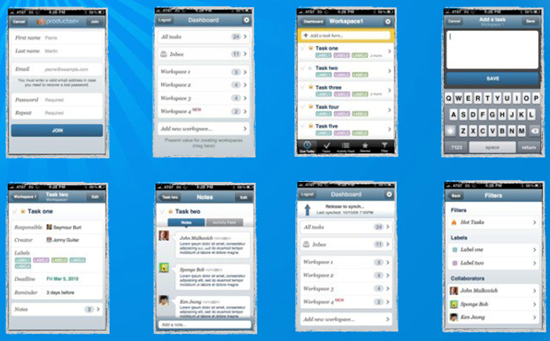
Producteev 2 has launched with a new (and astronomically better) free iPhone application. The UI is much improved over the previous version and gives you access to most features of the web app. The new iPhone app also adds the wonders of Offline Sync and Push Notifications to make your life and task management easier while on the go. I've been playing with the pre-release version, and have found it easy to use, understand and navigate; though I would say it may be a good idea for the Producteev team to add the ability to create a task immediately, as opposed to the current workspace selection screen. Anything that can be done to speed up task entry will only improve the iPhone app's usefulness. Down the line, it would be great to see the adoption of voice entry for tasks (a la reQall), as well as integration with other services. In my tests, I have had a bit of trouble with a delay in syncing, but that could have more to do with the fact that I am using a beta app than anything else. I have not yet spoken to Producteev's support on the matter, so don't take it to heart.
Coming Soon
In the immediate future (meaning this month), Producteev will be releasing a desktop version for Mac OS. The desktop app will also have Offline Sync, and will have access to all of the features of the web app. A Windows version may be available in July, but there is no Linux version planned. For mobile: Android, Blackberry and Windows Mobile 7 versions are in the works for possible release this summer as well. All future desktop and mobile versions of Producteev will come at the convenient price of Free. Other integrations, such as plugins for email clients, sales tools, and various web-based productivity services are planned for the near future. Producteev will also be releasing an API for pretty much everything, which is great news for third party integrations into even more services (such as Evernote…). When asked about Evernote integration, the CEO of Producteev, Ilan Abehassera, said that it is a distinct possibility. As with any new feature, though, it will depend on user interest. The more people shout for it on the Producteev support forums, the more likely and the more quickly it will happen.
Pricing
Pricing for Producteev is based on both features and workspaces. Users can have as many workspaces as they like, both free and otherwise, and can even mix and match pricing packages as the workspace needs require. Producteev has designed their packages based on the needs of individuals and businesses, providing individuals with a Free account that is limited by only allowing three users to participate in the workspace, as well as having no smart filters, no reporting, no support outside of the forums, and only eight file attachments. For businesses (or people who need a bit more) there are the Premium, Bronze, Silver and Gold packages respectively. Premium workspaces are $9/month each and allow four users, two filters, reporting, 15 file attachments, and email support. The rest of the packages bring an increase in users, filters and files at $29/month each, $54/month each, and finally, the Gold workspaces are $84/month each, and provide for up to 40 users, five filters, reports, 1000 files, and phone support. I imagine they could be talked into custom packages for any business that needed more than that.

As the pricing is set monthly, workspaces can be up or downgraded as needs require, and once again, you can have as many workspaces, mixed and matched, as you need, including multiple free workspaces.
Producteev 2 In Action (10min Screencast by CEO)
http://vimeo.com/12218396
Conclusions
Producteev 2 has taken the original version and reworked it practically from the ground up. They have focused on ease of use, adding and managing tasks without major learning curves or disruptions to your current workflow (by integrating with things you use every day like email, IM, mobile), and otherwise attempting to bridge the gaps left by other task management services. Producteev has an ambitious and robust development plan and schedule and offers a decent amount of service for free, with a trial business version also available. There are definitely a couple of bugs in this release, as it is just coming out of beta, but at the core, Producteev 2 works very well and is definitely worth a try – with all of the newness and awesome packed into the service, I can’t see why you wouldn’t want to!
Let us know what you think of Producteev 2 in the comments!
UPDATE: Producteev has simplified their pricing. See below.
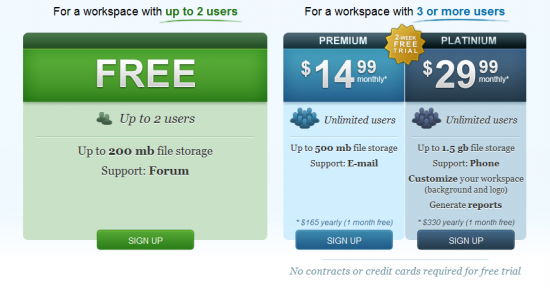
All plans now come with unlimited tasks, labels, SSL protection, attach files to tasks, free apps (iPhone, Gmail gadget), notifications via IM and email, Google Calendar sync, and Producteev Academy.

David says:
Hi thanks for the heads up on this site. Just looked it up and initial impressions is that its very easy to use, more so than RTM but that could be just me not knowing the ins and outs of how RTM works. So far I’m kinda impressed so I’m going to play with this for a while, see how it goes.
June 7, 2010 — 1:42 pm
Bobby Travis says:
My pleasure David, thanks for reading! I definitely prefer Producteev over Remember The Milk — for its interface alone, not to mention the functionality. It can just do things I need it to that RTM can’t.
After you’ve played for a while, hit us back and let us know what you think!
June 7, 2010 — 3:53 pm
David says:
HI Bobby I will. I’m going to try move over this, it really is quite nice. Now if only someone would make a Fire-fox add on so that it sits on the right of my page like the RTM one.
June 7, 2010 — 6:18 pm
Bobby Travis says:
Awesome! Glad I was able to help you out and I hope Producteev meets your needs.
There is supposed to be a Firefox and Chrome extension for Producteev, but it looks like they are not released yet. I have sent a message to Ilan, the CEO and founder, to ask for an ETA on the browser extensions. Hopefully soon!
June 7, 2010 — 6:31 pm
Bobby Travis says:
So Ilan got back really quickly and advises that the browser plugins for Producteev will be available for end of June! :D
June 7, 2010 — 6:42 pm
David says:
Sir thank you for finding that out, that’s great news.
all the best.
June 8, 2010 — 4:13 am
Bobby Travis says:
Glad to help man!
June 8, 2010 — 9:27 pm
DJ Lein says:
Bobby, great review on what appears to be a fantastic task management solution.
I deal with a lot of project management at work and have been looking for a solid, flexible tool that also looks good. Hopefully Producteev is my meal ticket.
What do you think is the best way to manage projects? Using tags? Workspaces?
Love to hear your thoughts.
July 10, 2010 — 11:20 am
Bobby Travis says:
Thanks DJ Lein. :)
I use Producteev to manage multiple projects from different organizations to personal and I have been enjoying it so far, especially in conjunction with Google Docs (they should do an integration!).
I find that using workspaces for different businesses and tagging by project works well enough for me, as I take a general GTD approach to tasks — but I think that larger projects that have multiple facets may be better suited to a workspace. It really depends on how visual and compartmental you are — and how many different people you work with.
If you need to see each project separately and manage tasks and subtasks by label, for example, I would take advantage of the unlimited workspaces.
Bear in mind, though, unlimited workspaces only means you can have as many as you want — if you need paid features on many projects that are related, you are better off financially to use one workspace and implement a seriously awesome tagging system for organization.
Hope that helps! :D
July 10, 2010 — 2:14 pm
Maarten Robben says:
Wow! Producteev seems great. I am going to give it a try.
I am currently using Nirvana (www.nirvanahq.com) which is one of the best GTD apps I have seen so far (I can recommend a review), but is lacking an iPhone app (though they are working on it).
July 12, 2010 — 4:38 am
Tom S says:
On a review (on this site) comparing Toodledo & RTM, one of the “cons” for RTM was that it did not have sub-tasks.
I haven’t found any sub-task support in Producteev. Producteev seems impresive so far, but I’d like to be able to break tasks down. How important do you think that feature is?
July 13, 2010 — 1:40 pm
Bobby Travis says:
Hi Tom,
You can actually manage subtasks already by using labels. You can add as many labels as you like, add a colour scheme and sort by them as well! Very handy!
July 13, 2010 — 2:02 pm
David says:
Hi Bobby,
Can you give a quick example of how you would use that system? Maybe a line or two as I’m a little confused. Would this be the same a nested folders in Gmail?
Would love to have proper subfolders tho.
July 31, 2010 — 5:52 am
Bobby Travis says:
Hi David,
Are you speaking of the last comment about subtasks with labels? If so, you can take advantage of the unlimited workspaces and dedicate an entire workspace to a project, using labels (and a clear naming and colour convention) to filter tasks and subtasks.
Project = iPhone App
Label = User Interface (colour choice)
Sub-task Label = SUB-UI (same colour, or different, whatever works for you to kill visual clutter)
That help?
August 1, 2010 — 8:35 pm
rgucci says:
I am not sure I get how you are doing the subtasks.
So when you define label SUB-UI for subtasks, how does that link them to the main task?
And how is the main task completed? Will one have to look at the subtasks and manually complete the main task if all the subtasks are done?
Thanks for the great review.
August 8, 2010 — 3:50 pm
Bobby Travis says:
The sub-tasks really are nothing more than filter labels. It allows me to easily sort them. If it makes more sense, the main task could be the name of the label, and the sub-tasks would be everything under that filter.
That help? :)
August 9, 2010 — 3:16 am
Chris C says:
Hey Bobby,
Your RTM vs. Toodledo analysis was great.
How would you come out on Toodledo vs. Producteev? Which would you pick (or would you somehow use both in different ways?). Looking for a final recommendation.
thanks.
August 4, 2010 — 6:25 pm
Bobby Travis says:
Hi Chris,
Evan actually did the Toodledo and RTM post. I looked at Toodledo, but decided I like Producteev much better, as it sits better with my style of working (integrates with my email, unlimited workspaces for keeping things visual, etc). I also wasn’t a fan of the Toodledo interface, but haven’t really given Toodledo a chance. to be honest. Evan likes it alot and has implemented his own GTD-style workflow into it, though.
August 5, 2010 — 5:47 pm
Erik says:
Hi Bobby, thank you for the heads up. I am moving my tasks away from Outlook as it lacks support for my Android (or vis versa). I find Outlook’s recurring task invaluable and I have yet to come accross an online app that supports this. I like Producteev UI. It’s just so pleasant to work on. I am discarding RTM and others just on this merit alone. I like the calendar view of tasks (hard to find one with this support). I like the sync with Google feature, and also the respond via email feature. I am not sure your suggestion of using Labels for subtasks is a good one. It is just a work around isn’t it? Having all the praises, then there are the lingering frustrations like so many of these apps that takes iPhone as the precedence over Android. Although the interface is lovely to look at, for a first timer, getting around Producteev is not so easy after all. Maybe I am thick but I think we need more intuition here. I can’t create a label easily on the Workspace, or I would have thought that configuring my connections will be in Settings but that is not the case. And why create a new calendar in Google calendar? I already have three calendars and having another one confuses the whole lot. The email respond to overdue tasks is promising but it didn’t work for me. Perhaps I am in the UK and got my date format wrong. Nonetheless, Producteev sounds like something I might move into when they give Android some thoughts.
August 24, 2010 — 6:30 am
Bobby Travis says:
Hi Erik,
To answer your question, yes the labeling method is only a workaround. I believe that subtasks are on the Producteev roadmap, but am not positive. You will find their support team very responsive though!
August 24, 2010 — 11:59 pm
Rick Francis says:
great thread. I suggest you guys check out dooster.net. If you want ease of use and a range of great features
We started using it a few weeks ago and it rocks
Tdooster.net
September 9, 2010 — 11:17 am
Bobby Travis says:
Thanks for the tip, Rick. :)
September 9, 2010 — 6:45 pm
Tony Mobily says:
Hi,
I’d love yo read your review on Apollo, http://www.apollohq.com
We worked really hard to combine project management and CRM. We added to the mix a powerful calendar, timers, and CRM functionalities like Cases&deals.
Let us know!
Merc.
July 18, 2011 — 9:11 am
Bobby Travis says:
Thanks for the note, Tony. This is the first I’ve heard of AppoloHQ, and it looks pretty cool, if a tad expensive for my taste. Please do feel free to contact me via email if you would like to request/set up a review.
July 19, 2011 — 8:52 pm
Tony Mobily says:
Hi,
OK done!
BTW, we tried our best to have the best prices possible… especially considering that we offer a very cheap solo plan, and that we include a CRM.
What’s the best email address I can contact you on?
Thanks!
Merc.
July 20, 2011 — 3:18 am
Bobby Travis says:
Hi Tony,
So as to avoid my being spammed, I won’t post the email here. You can reach my contact form by my name, however.
July 21, 2011 — 3:55 am