

- Easy Access to US, UK Streaming Services From Anywhere - August 18, 2012
- 5 Fresh Android Games Released in 2012 - July 5, 2012
- Google Chrome Explodes On To iOS, Puts Desktop Experience In Your Pocket - June 30, 2012
 Credit given where credit’s due, Ubuntu, and other Linux distributions based on Ubuntu (like Linux Mint and Jolicloud which we will cover soon), have made massive strides in terms of features and usability. The features and raw speed of Ubuntu’s latest release (10.04), Lucid Lynx, are very enticing to the tech curious, especially those who like software alternatives and getting stuff for free. Be warned, however, if you are not familiar with the background workings of Linux (Ubuntu or otherwise), even a shiny new integrated help manual may not be enough to get you to jumpship.
Lucid Lynx offers several great new features:
Integrated Social Apps, Contacts and Chat
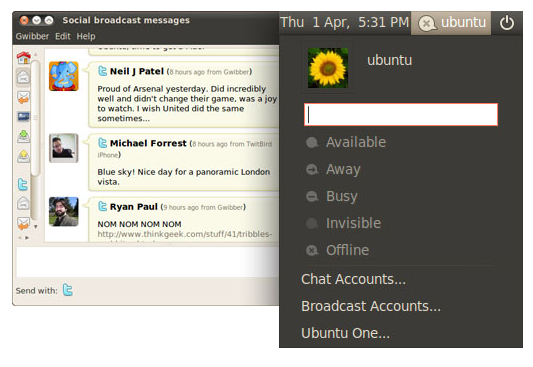
Integration of Gwibber and Empathy does a nice combination of Digsby and Threadsy, allowing you to interact with Twitter, Facebook, Flickr, FriendFeed, email, and multiple Chat services. Multiple accounts on services are possible and you can configure notification popups, as well as quickly broadcast messages to your services without even opening a web browser. The fact that these services are served as (essentially) part of your operating system makes them incredibly convenient – all OS platforms should have such features in this day and age. Ubuntu One is also included – see below for more info.
Ubuntu One
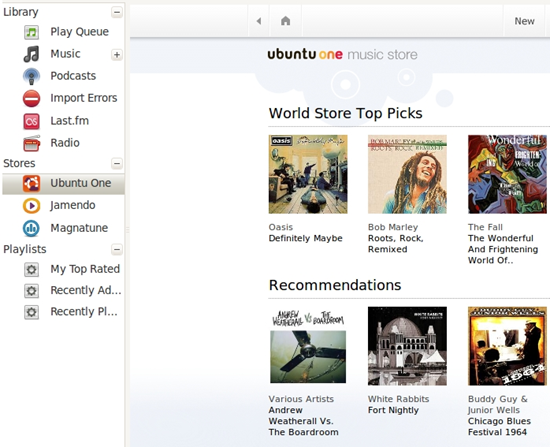
Ubuntu One is a cloud service that offers 2GB of storage and syncing capability, much like Dropbox. The cool thing about Ubuntu One is that it has its own, DRM-free music store that can automatically sync your purchased tracks with your Ubuntu One account and then allows you to download those tracks to three other machines that are not running Ubuntu One. You can also (though there are still issues, I understand) sync contacts across platforms, including mobile. This is built off of Funambol, which is a well tested, open source contact-sync service. Unfortunately, though, this feature will cost $10/month after a 30day trial – this is something I find a bit odd on an open source, free platform, but I suppose the bills must be paid, yes?
The Ubuntu One Music Store is also integrated with Rhythmbox (pre-installed music player for Ubuntu 10.04) and works very much like the iTunes store. It should also be mentioned that every track purchased will help to save the endangered Iberian Lynx.
Less Default App Confusion
One of the problems with previous versions of Ubuntu, at least from a newer-user perspective, was the amount of pre-installed and often not-so-user-friendly apps that came with the OS. Too much at once tends to lead new users down the garden path of confusion and overwhelm, and so the good folks at Ubuntu stripped down the pre-installed apps, removing the super-powered and utterly stupefying (to new users, I said, so flame elsewhere…) GIMP and the like; providing mainly “core function” types of programs to make the strain of the new much less obvious.
Fancy New Help Menu
This is probably the best thing the Ubuntu team could have conceived of, especially if they are trying to encourage new-user adoption. The manual is part of the system, so you don’t have to download it, and you don’t have to wade through forum posts you only understand a quarter of. The Help Menu is easy to understand and navigate, and includes handy install links to software that it tells you to install. This makes life somewhat easier in Ubuntu and leaves one with a much nicer taste in one’s mouth when things go awry. All in all… yay!
Speedy!
Ubuntu 10.04 is probably the fastest loading (full) operating system I have ever come across. That alone nearly inspired me to switch from my Windows 7 OS, which runs mysteriously slower since I upgraded from the Release Candidate to the full operating system. Lucid Lynx loaded from scratch almost as fast as my Windows OS loads from standby.
…but still Linux
Linux is still Linux, no matter the facelift. The moniker “It Just Works” is a sham. Really, Linux “Just Works Until It Doesn’t.” There are still driver issues with bluetooth (even on new machines) wifi (on old and new machines – along with an inexplicable hatred for WPA security), graphics acceleration issues, etc. Many of these things can be fixed, but generally – and help menu or no – users need to seek out tutorials containing code fixes they don’t understand, following instructions that they are never sure will work, why they work or don’t work, and could potentially screw up their machines.
Ubuntu has always done a good job of making the front end more useable than most Linux Distributions, but average-user unfamiliarity, backend complexity, and the fact that much of the easily downloadable software just doesn’t work the way that people are used to (without at least a few hoops to jump through) will still keep the average user from going too far with Ubuntu Lucid Lynx.
The greatest thing about the more recent Ubuntu distributions, Lucid Lynx included, is that users who want to give it a try can install and uninstall it directly from Windows (using Wubi). Just run the installer and reboot, choosing the Ubuntu boot option. This goes a long way to getting people to at least give it a go to see if Ubuntu is their cup of tea. When you’re done, you can uninstall Ubuntu from your windows control panel, no messing with partitions, no annoyances. You can download the Windows installer here.
What do you think of the new features in Ubuntu 10.04 Lucid Lynx? Willing to give it a shot?

Daryl says:
Nice article Bobby. Articulates pretty well my annoyances when trying previous versions of Ubuntu – and I would class myself as a “go-to” tech person.
In my opinion, the best opportunity for Ubuntu was Windows Vista. Ubuntu made big strides, especially when compared with Vista. However Ubuntu is, as you say, still buggy and the support is considerably more limited than that available online generally for Windows products. The release of Windows 7 has restored a decent OS to consumers new PC’s and the fact that it is Windows holds some additional assurance, as well as being somewhat innovative.
P.S. I see you’re planning a future article on Jolicloud, so am mentioning that I am happily running it on my (excellent) Samsung NC10. My *only* complaint with it when comparing it to Windows (XP) is that the battery life seems to be shorter on Joli than XP. Other than that, would be happy to be contacted for the article (email/twitter/whatever). No worries if you don’t – I look forward to reading what you say about it in any event.
May 5, 2010 — 4:48 am
Bobby Travis says:
Glad you enjoyed the article, Daryl! I always hope that Linux distributions will be better than they are. They are great for me, as I said, until something doesn’t work properly — then I have travel through 7 levels of hell to make it work. If they could just overhaul their backend usability a bit, it would lead to a much better user experience overall. Their getting closer though! I hear you on the Vista comment — I think many Windows users went Mac then…
I would love any input you might want to offer about your Jolicloud experience. I am testing it on a full sized laptop, so some words from a netbook user would be awesome! I’m really surprised by the battery life isse — it seems so lightweight!
May 5, 2010 — 7:06 pm
Daryl says:
PPS – fellas – just hit the “tweet” button but got an error message: “URL points to wrong story”…
May 5, 2010 — 4:51 am
Bobby Travis says:
Yeah, I noticed the tweet button is being weird too. It’s not even working in Chrome.
.-= Bobby Travis´s last blog ..6 Free Sites For Some Instant Retro-Gaming Awesome =-.
May 5, 2010 — 7:02 pm
Evan Kline says:
For Chrome, see if you have an “X” in the right side of your address bar, and click it to see if the latest Chrome Beta’s pop-up blocker is blocking the button.
We’re rolling out a new theme soon, so at the very least hopefully the issue you’re seeing will be gone by then, Daryl.
May 7, 2010 — 9:19 am
Kosmo @ The Casual Observer says:
I played with SUSE Linux a while ago. I either was dual booting my Mac at the time or was using different hard drives. I forget which.
I like Linux better than Windows, but I still with my OS X :)
It doesn’t surprise me that they charge something for Ununtu One. The costs scale differently than a site that just offers downloads.
If you run a site that has a 100MB download, you use 100MB of storage, and your bandwidth is 100 MB/user. At that point, you no more costs associated with that user (until you release an update).
With a storage service, you’re using many gigabytes of storage and users are repeatedly uploading and downloading data.
I’m not commenting on whether the price is fair, just that it costs them more per user to offer storage that it does to offer downloads of their product.
.-= Kosmo @ The Casual Observer´s last blog ..The Major League Baseball Draft =-.
May 6, 2010 — 10:19 am
Bobby Travis says:
Yeah I figured they needed to pay the bills in some way, but it is still a bit of a deviation from the normal “Free for All” stance that Linux takes.
May 6, 2010 — 5:36 pm
Kosmo @ The Casual Observer says:
Well, the GNU Public License (which many Linux Distributions are distributed under) has always allowed for charging for value-added services (burning the distro to CD/DVD, bundling a manual, etc) – which is how I’d classify Ubuntu One.
.-= Kosmo @ The Casual Observer´s last blog ..Are Sports Drafts Fair? =-.
May 6, 2010 — 10:16 pm
Rodrick Dachelet says:
Cool! I just came in your web site via Google and I seriously loved it! The effort you do in posting here is seriously great and I am pleased about it. Preserve going buddy.
July 6, 2010 — 7:56 pm