
 If you’re a blogger, you know that one of the beauties of WordPress is the sheer number of available plugins. There are the "old standbys" that many blogs use, such as WP Super Cache and All In One SEO Pack. But are you familiar with some of the lesser-known gems? Here are five WordPress plugins used on 40Tech.com, that may be new to you if you have a blog.
Do you ever tweak the layout of your site? If you modify your site’s stylesheet, repeat visitors may not see it, due to caching issues on their end. As this plugin’s description explains, CSS Cache Buster "does one very simple but very powerful thing: it ensures that your WordPress blog delivers the very latest version of your CSS stylesheet to your visitors, no matter how often or how rarely your edit for CSS . . . Technically, this plugin automatically appends a last-modified date/timestamp to the end of your stylesheet url. And since this feature is applied as a filter, you don’t have to touch your theme files. It just works."
WPtouch iPhone Theme is a plugin which will may make your site display a specially formatted mobile theme to those who visit using anApple iPhone or iPod touch, Google Android phone, or other touch-based smartphone. The screenshots below should give you an idea as to how a site looks with this plugin, although several options, such as colors and icons, are customizable.
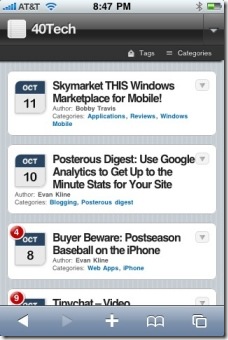
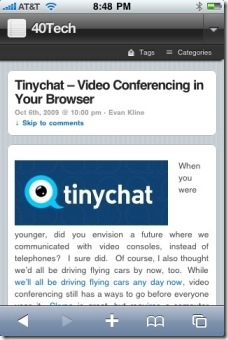
Login Lockdown gives your site some extra security, by restricting the number of login attempts from a given IP range. After a specified number of failed attempts, login is disabled for any further attempts from that IP range for a specified period of time. You are able to modify the number of failed attempts permitted, the period of time over which failed attempts are tallied, and the duration of the lockdown.
4. WP Greet Box
WP Greet Box is one way to increase the rate at which visitors return to your site. The plugin shows a different message to your visitors depending on what sent them to your site. For example, you can ask Google visitors to subscribe to your RSS feed, and Twitter visitors to follow you on Twitter. More than 20 services are supported out of the box, and you have the ability to add your own services as well.
5. Role Manager
If you have multiple authors for your blog, and want to give certain authors special permissions, you’ll find that the ability to customize user permissions in WordPress is limited. As noted in the WordPress Codex, WordPress "comes delivered ‘standard’ with five pre-defined Roles: Administrator, Editor, Author, Contributor, and Subscriber. Each Role is allowed to perform a set of tasks called Capabilities." These capabilities are predefined, and can’t be changed. This plugin allows you to change the capabilities of these standard roles, and also add new ones. For example, you could give a "Contributor" some but not all of the capabilities that an Editor possesses, such as the ability to Publish Posts but not the ability to Publish Pages.
What lesser-known plugins do you use on your WordPress site?

Kosmo @ The Casual Observer says:
I actually wrote an article on this very same topic a while ago -> http://www.observingcasually.com/favorite-wordpress-plugins/
I used WP Greetbox for a while, but it didn’t seem to be achieving a great conversion rate, and it just seemed to make the screen too busy.
You’re making me think about cache buster and login lockdown.
.-= Kosmo @ The Casual Observer´s last blog ..Rockies vs. Phillies – The Philly Perspective =-.
October 13, 2009 — 11:05 pm
Evan Kline says:
Great minds think alike, I guess. I’ll be checking out your post to see if there’s something there I need.
October 14, 2009 — 12:29 pm
Kosmo @ The Casual Observer says:
Another one that I forgot (and hadn’t rated in the earlier article, because I hadn’t found it yet) is “different posts per page”. This allows you to show a differening number of articles for the main page, search results, tag page, etc. I show 4 full articles on my main page, but I show as many as 10 excerpts on my other pages.
October 14, 2009 — 11:44 pm
Evan Kline says:
Ah, I like that one Kosmo, thanks! I had used it on my personal site for a while, to just put the most recent post, and nothing else, on my front page. Sometimes I get so wrapped up in this site, I forget to see what I’m using on a couple of other non-public WordPress sites I have.
October 15, 2009 — 9:17 am
Octávio Sá says:
I really like the WP Greet Box idea. About the Role Manager, I’m looking for a plugin that allows author to have a “profile page”, they can costumize with they data and a list of their posts. a bit like you did with the pages but in an automatic way.
I have a kind of advanced animation videoblog website at http://www.wowtion.com/ that will have even more “video related features”. and would love to have this kind of feature were we can have a studio os artist profile page. Do you know any?
.-= Octávio Sá´s last blog ..Pixar – Lifted =-.
October 14, 2009 — 5:50 pm
Kosmo @ The Casual Observer says:
You can easily link to all posts by a specific author by simply adding this PHP code to the WordPress template:
In order to add author page like Evan has, you could have each person create their own page with a page title that corresponds to their username and then contruct the URL automatically by appending the username to a base URL.
Maybe I’m misunderstanding your requirements.
.-= Kosmo @ The Casual Observer´s last blog ..Reflections from a Ledge =-.
October 14, 2009 — 11:35 pm
Evan Kline says:
Yes, I stumbled upon this a while back, figuring WordPress had to have something like it built in. I found that if, for example, you go to http://www.40tech.com/author/evan-kline/ . Obviously, you would need to plug in your site name, and replace my name with the author’s name, but WordPress will then automatically display a list of that author’s posts.
October 15, 2009 — 9:22 am
Kosmo @ The Casual Observer says:
Hmm. I think WordPress ate my PHP code snippet:
“”
Remove the quotes, of course.
You can also do quite a lot with some of the other functions related to author. For example, I append a bio to the end of each article via:
“”
The WordPress codex goes into more detail:
http://codex.wordpress.org/Template_Tags/the_author_meta
I have about a dozen people who write for my sites (some more frequently than others) so these tools are great to have.
.-= Kosmo @ The Casual Observer´s last blog ..Health Care: Carrot or Stick? =-.
October 15, 2009 — 11:58 am
Kosmo @ The Casual Observer says:
erg. it keeps eating the code. Maybe this will work. If not, just shoot me an email at kosmo@observingcasually.com if you want the code snippets.
list of author’s posts:
author info appended to bottom:
October 15, 2009 — 12:03 pm
Octávio Sá says:
thanks kosmo, I will try to build some author’s page/profile, and will keep you updated, with what I came up.
.-= Octávio Sá´s last blog ..Pixar – Lifted =-.
October 15, 2009 — 12:24 pm
George Serradinho says:
I have Role Manager and it helps a lot as I can decide what others can do or not and I can create new ones.
I also have Login Lockdown, it helps me out a lot for those who try their luck in trying to crack my blog.
.-= George Serradinho´s last blog ..eBooks – 4 Exciting Free Downloads =-.
October 16, 2009 — 8:25 am
Evan Kline says:
Those are two good plugins. The interesting thing is that both are invisible to readers, but are invaluable behind the scenes.
October 16, 2009 — 9:00 am
John Samuel says:
I have used WP greet box for some time. I’ve to try Login Lockdown
.-= John Samuel ´s last blog ..Create a Free Logo for your Website =-.
November 2, 2009 — 2:40 am