
 I’ve talked about Evernote quite a bit here. Next to Firefox, it may be my most used application. One of the strengths of Evernote is that it is available on several different platforms, such as Windows, Mac, portable USB, iPhone, Blackberry, Palm Pre, and via the web. A quick visit to the Evernote forums, though, reveals that many people feel that one of the chinks in Evernote’s armor is the Windows client. That will change, with a new Windows version in the pipeline.
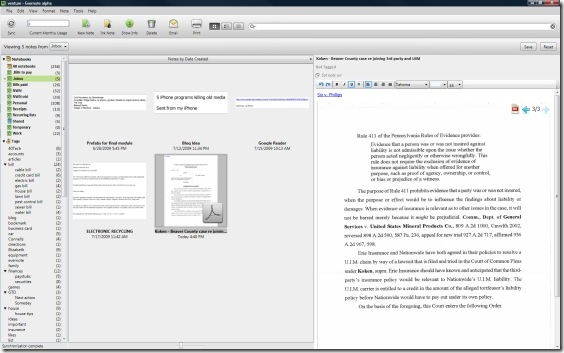
The image below shows a portion of the current Windows user interface, which is less than elegant (to make it fit this page and still be visible, I’ve cut off the notebook and tag list on the left side of the screen, and also cut off part of the center column of the page). The current interface uses a “tape” view that lists dates down the right side of the window, with the notes appearing in the center of the screen. You have the option to toggle on and off a listing of notes in the top half of the screen. I find it clumsy to scroll through notes in the current Windows version. It is actually easier for me to use the web interface for most functions, than to use the Windows client. 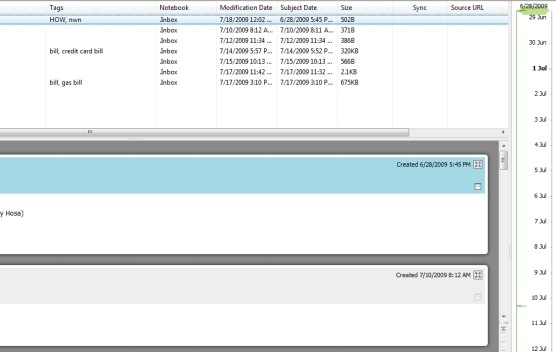 Enter Evernote 3.5 Alpha for Windows. While not an official release yet, it gives a glimpse into what we might expect from the 3.5 client. The Evernote team has indicated that this will be a complete rewrite of the Windows client, and if the Alpha is any indication, they weren’t kidding. The Alpha is currently available for download via a link in the Evernote forums. As the forum post explains, an Alpha is an early build, and may contain bugs and missing features, so use it at your own risk. I have found it to be very stable, but I haven’t tried it out on the machine hooked up to my scanner yet, either. The first feature you may notice with this version is that you now have three choices on how you want to display your information. The first display option is what Evernote calls “thumbnail view,” and is displayed in the image below. As with the current Windows client, your notebooks and tags are listed to the left, and buttons for various functions are aligned across the top. Now, though, the notes in a selected notebook are displayed in thumbnail view, as shown in the left of the two largest screen panes in the image below. This pane shows a small version of the document, along with the title, and the creation date and time. No tags are displayed in this pane. The pane farthest to the right shows the selected note. In this particular image, the note displayed is a pdf file.
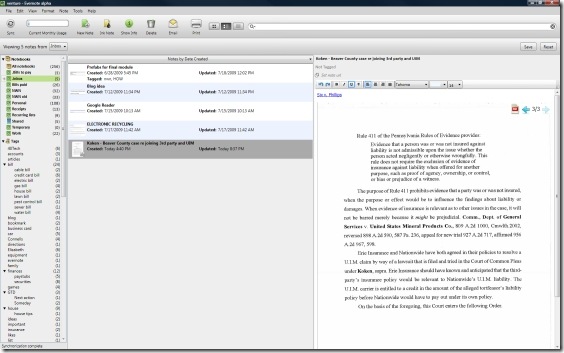
  Another view is what Evernote refers to as “mixed view,” as displayed in the image below. The only part of the screen that changes is how the list of notes is displayed. This view provides more information about notes, but at the cost of thumbnail size. The additional information provided includes the tags for the notes, and the dates and times on which the notes were updated.
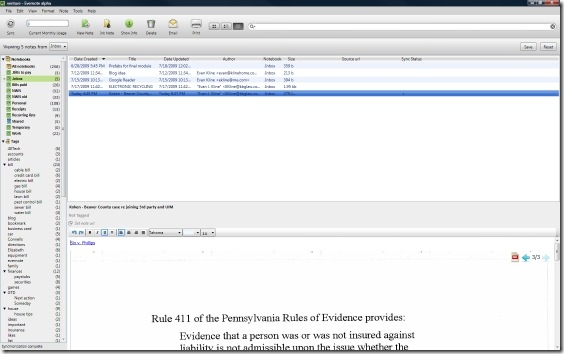
  The final display option is the List View, as displayed below. This view is most similar to the current Windows client. This view displays even more information, but has no thumbnails. The added information includes Author, Notebook, Size, Source url (for items clipped from the web), and Sync Status.
  There are other changes as well. For one, the “Tags” button has disappeared from the toolbar at the top of the screen. There is also a dropdown menu just above the list of notes, allowing another method of switching notebooks. When a search is performed, additional parameters appear to the right of this dropdown menu, allowing you to display a list of results showing “all” words in your search, or “any” of the words in your search.
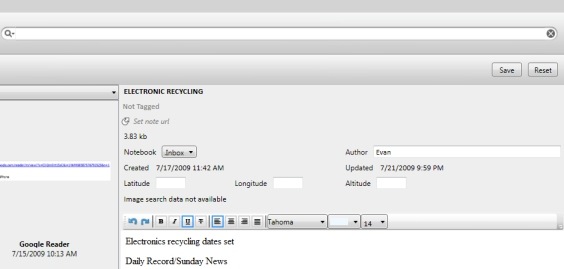
 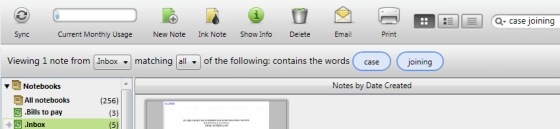 Also gone is the “Attributes” button from the toolbar, which in the past popped up information about your note. Instead, it has been replaced by an “Info” button which toggles between “show” and “hide.” The image below, which shows the top right portion of the Evernote window in Thumbnail View, shows what the information bar looks like when this is toggled to “show.” It appears just above a note when the button is toggled on.
  The Windows 3.5 Alpha is a great step up from the current Windows client, and is already my client of choice on one of my Windows machines. I have yet to run into any crashes, or other glitches. If the final release is similar, or better, then Evernote will have a real winner on its hands. You can download the Alpha from a link in the Evernote forums. As with any pre-release software, there may be glitches (I haven’t noticed any), so install at your own risk. Have any of you given the Alpha a try? Or are any of you using Evernote on a Mac, so that you can compare the Alpha to what is already present in the Mac client?

Bobby Travis says:
I never really understood why they didn't just go the way of many apps and do a fairly uniform version of their application across platforms. This is something that has annoyed me most prominently in the Windows Mobile application (which you forgot up top — typical iphone user… :P ) which has come closer, but still can't and probably never will match the features of the iphone app.
Personally, I have had good experience with the current evernote app for windows. I just know how to use it leaving the unwieldy “features” behind. It helps, I think that I have pared things down to 1 notebook and a tag/subtag/sub-subtag model for easier navigation. The new features interest me, though, especially the text-editing features. Currently, you have to pop the note into an external window to edit text in any sort of wysiwyg fashion.
I'll give it a try, I think…
July 23, 2009 — 1:26 pm
Evan says:
Regarding your comments about trying it out- you may want to send your suggestions to windows-preview@evernote.com . That is the email address they listed in the forum for feedback. Since it is only an Alpha, there are probably changes to come. I'm at work, so I don't know if those things are configurable either.
When you say you know you can do quick notes with shortcuts, do you mean a bookmarklet? Or is there something nice I could be using that I don't know about? If I need to add a note that isn't too complex, I use a bookmarklet with this as the address: http://www.evernote.com/mobile/CreateNote.action . That is from the mobile interface, but works from a normal browser, too. The one drawback is that it doesn't autocomplete tags, so you need to get them right. I also email notes into Evernote often, but you have to go back and tag the note later. I think there was some talk in the forums about being able to tag via email (perhaps by formatting the subject line a certain way), but I'm not sure what the official response was to that.
Don't feel too bad about the iPhone app. The 3.0 version of the app has had a rocky road. At least for me, it seems a good bit slower than it was, or maybe my phone is just overdue for a reboot.
July 23, 2009 — 4:19 pm
Bobby Travis says:
Ohhh I sent in my comments… :)
As for the keyboard shortcuts, there are a whole list and (I think) are somewhat configurable to. I really only use the quick note one though and that, if you have the client installed on a windows machine, is generally ctrl-windowsbutton-n. Instantly opens client to new noteland (as long as you have opened it at least once before since the computer booted).
July 24, 2009 — 5:52 am
Steve Rubel says:
Can you install it on a USB drive too?
July 29, 2009 — 12:32 pm
Andrew says:
Does anyone else think the interface looks too fake? Most of the interface text is very pixely for me (note content is good, though); also, there doesn't seem to be any consistency on the editing toolbar: some items have borders, some don't, etc. Overall, I don't think they've used native interface controls as much as they should have. Like you, I use Evernote all the time, and I really like the new 3.5 features, but I think the interface needs quite a bit of polish before it's officially released.
July 29, 2009 — 1:38 pm
Evan says:
Good question- I will check it out when I get home this evening and report back.
July 29, 2009 — 1:50 pm
Evan says:
I hadn't noticed that, but hopefully they will polish it up. Since it is an alpha, I imagine a good bit might still change. I'm away from the computer I have it installed on, but I can see what you mean in the screenshots above about the editing toolbar.
July 29, 2009 — 1:56 pm
Steve Rubel says:
Great. Any issues with data integrity either?
July 29, 2009 — 2:19 pm
Evan says:
I didn't notice any problems with data integrity. I had it installed on the same machine with the 3.0 version, too, and sometimes went back and forth between them (although I think I had the local database file for each in a different location).
July 29, 2009 — 3:19 pm
Evan says:
I just checked, and there is no option to install a portable version like there is in the desktop 3.0 version. I'm guessing that may just be due to this being an alpha, but that's just a guess.
July 29, 2009 — 7:48 pm
Steve Rubel says:
Nuts, that's too bad! Is there a later build?
July 29, 2009 — 8:27 pm
Evan says:
I don't think so, no. I've been prompted for updates twice previously by the alpha build, but just manually forced an update check, and it tells me I have the latest version.
July 29, 2009 — 8:42 pm