

I love Swype on my Android phone, but I still prefer typing on a full keyboard. For that reason, I’m not a big texter on my phone. If you’re like me, and prefer typing on your computer keyboard, then DeskSMS might interest you. DeskSMS is an Android app that lets you send and receive text messages from your computer.
To get up and running with DeskSMS, you install the app on your phone, and then install either a chat client or browser extension on your computer or tablet, or use Gmail or a web interface. When you install the app on your phone, you check boxes next to which services you want your text messages forwarded to.

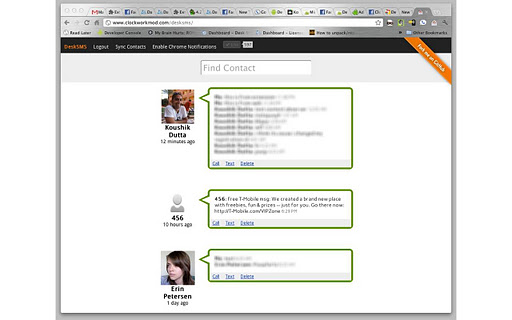
Text messages then show up at that destination, and you can send messages from there as well. I just set it up with the Chrome extension, since I almost never use a chat client. The web client, shown below, can be opened right from the browser extension.
One word of warning – DeskSMS looks like it is free from the Android page, but that is actually just a free trial. When the trial expires, you have to pay a yearly $4.99 subscription fee. The listing in the Android Market doesn’t mention this, and I can’t find a developer website with any information on the trial or the subscription. I had to comb through user reviews on the Android Market to get that information. It’s a shame that the developer isn’t more up front about the cost, because in my trial of the app, it worked really well.
There are a few other apps that work similarly to DeskSMS. We previously covered AirDroid, which includes texting among several other features. If you have a favorite app for sending and receiving texts from your computer, let us know in the comments.

Tammy Guise says:
Wonderful Evan! I find typing on my Android very tough. I was never able to find such software but used to manage with delayed replies due to extremely small keypad. Thanks for helping me out.
May 1, 2012 — 7:34 am
Evan Kline says:
I’m glad it helped, Tammy!
May 1, 2012 — 11:42 am
Chaitanya says:
Great feature. But I have an alternative for my phone. I use Nokia and I can send text messages and even make calls using my Nokia PC Suite.
May 16, 2012 — 8:33 am
Chip says:
I have downloaded DeskSMS but when I install and try to link it to my gmail, only one gmail account shows up. I have two and only want it linked to the one that isnt showing. When I try to readd the account to my phone, it says its already there. Why cant DeskSMS find all of my gmail accounts?
May 21, 2012 — 4:22 pm
George Mackie says:
Well at first when I started using Swype I was really interested with the technique but gradually I couldn’t continue and had to go to full keyboard as that is more convenient…
May 25, 2012 — 11:03 am
Dave Mackey says:
I use MightyText, it is actually free and works well for me. :)
June 2, 2012 — 10:37 am
Paul Groberts says:
I also use MightyText and it’s quite nice. I am not that much of a touchscreen fan! :D
July 2, 2012 — 4:51 pm
Evan Kline says:
2 votes for MightyText – I might have to check it out!
July 9, 2012 — 5:24 pm
Neville Harkenberg says:
Dear Evan
Please also try MooMle, you can manage your SMS from your mailbox. So you do not need to install anything.
Bye
November 3, 2013 — 2:48 am