

If you have a webcam, you can make logging in to your Windows PC super easy. Blink! lets you log into your account by simply looking into your webcam. You have to install Blink! on your system, and then it will load with Windows at startup. From there, it requires no action on your part. Sit in front of your computer, and Blink! uses facial recognition to verify your identity, and log you in.
Photo by Justin Moore.
While we had no way to test their claims, the developers of Blink! say that the app has no false positives. Still, if you place a premium on security, you may want to think twice before using it.
Blink does save your login history, so you can see a snapshot of everyone who successfully logs in to your PC. That alone makes it pretty handy.

Blink! is a free program that works on Windows 7 and Windows Vista. If you have a 64 bit system, make sure you follow the link on the Blink! site to the 64 bit version.
Would you trust a program like this?
Blink! [Luxand]

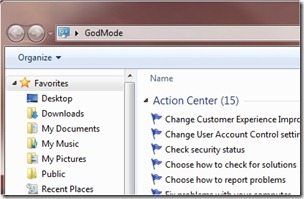 We tech geeks love to discover hidden features in our tech toys. And we love it even more those hidden features are actually useful. An Easter egg that has been making the rounds among Windows 7 users is Windows 7 "God Mode." At its simplest level, what Windows 7 God Mode does is simple – it puts a myriad of configuration options at your fingertips, in one list. Beyond that, users have discovered additional "god modes" that open up more Windows 7 configuration options. Read on for more on God Mode.
 Earlier, we discussed
  Unlike Bobby, the other writer here at 40Tech, I wasn’t brave enough to install the Windows 7 Release Candidate or Beta. As a result, I’ve only been using