
 If you’re like me, you use many different services for communication. From Outlook, to Gmail, to my iPhone, I have multiple ways to stay in touch. The problem? Until recently, I had my contacts spread out among those platforms, in no coherent fashion. I had no problem keeping my frequent contacts consistent among those platforms, but when it came time to find contact information for someone I hardly contacted, I’d find myself digging among all my platforms, not sure where I had saved that person’s information. Those problems ended when I discovered Soocial, a contact management service that will keep your contacts synchronized across multiple platforms. Soocial is actually quite simple, and consists of two main features – synchronization and backup. Read on for a discussion of each, and then let us know in the comments how you keep your contacts in sync.
Tag: Web Apps (page 14 of 15)
We’ve written extensively about backup solutions for your computer here on 40Tech — well, Evan has written extensively about it — but what about backing up your online life? With cloud services beginning to dominate our computer use, we continue to sign up for more and more services in which to post our photos, share our ideas, and share or store other things of a personal or otherwise important nature. This begs the question: What if the super-awesome new service I just signed up for goes the way of the forgotten dodo? What happens to all my stuff? Backupify does a great job of, well, backupifying your online life — and until January 31st, 2010, you can sign up for free — unlimited and for life. Read more
 If you’re like us, you spend most of your computing time in the cloud, using online applications. And, if anything, the trend towards online apps is gaining momentum as time passes. The days of desktop applications aren’t gone, but they sure are diminished as more and more web-based applications catch on. There are some apps that we use more than others, though. As 2009 draws to a close, we take a look at the five web applications that we used the most this year.
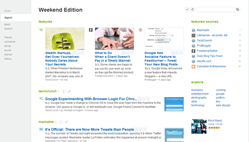 As is apparent from my last article on 40Tech, I have been playing around with a multitude of Google Chrome Extensions since the official beta-door was opened, last week. Last night, I discovered Feedly, a social RSS extension based on Google Reader and Twitter that “organizes your favorite sites into a fun, magazine-like start page” (also available for Firefox). In a word, Feedly is awesome. In two words it is dangerously awesome, or, as the title states, dangerously useful– if you install it for either browser, make sure you set some time aside. You’re going to be there for a while.
 Twitter users certainly don’t have a shortage of Twitter clients from which to choose. There are many twitter desktop and mobile Twitter apps, but also a few browser-based Twitter clients. One such browser-based client is Brizzly. Brizzly follows Twitter’s example in its simplicity, but does add a few nice wrinkles. Brizzly is not yet open for general release, but read on for a chance to get a Brizzly invite.