
 Remember, back in the day, when email was one-dimensional? The good ol’ days when all you had to do was remember one contact list and deal with one inbox? Well, those days are long gone, buddy. Today, we are in a world of social media: connecting and sharing with the planet at large in as many ways and as quickly as possible. Workplaces everywhere are banning social media because people are addicted to it and they just ain’t gettin’ nuthin done. Nuthin’. Yep. We are also in a world of the high speed degradation of da englich langage, loosing it fastr den wat wuz expected — but that’s another post (ohh that pained me!). Threadsy can’t help you with that last bit or the work bans — you’ll need to look to yourself, your conscience, and your pocket computery phone for that — but Threadsy can help you out with the constant jumping from webpage to webpage or tool to tool to deal with your three main inboxes: Email, Facebook and Twitter.
Tag: Twitter (page 5 of 6)
 As is apparent from my last article on 40Tech, I have been playing around with a multitude of Google Chrome Extensions since the official beta-door was opened, last week. Last night, I discovered Feedly, a social RSS extension based on Google Reader and Twitter that “organizes your favorite sites into a fun, magazine-like start page” (also available for Firefox). In a word, Feedly is awesome. In two words it is dangerously awesome, or, as the title states, dangerously useful– if you install it for either browser, make sure you set some time aside. You’re going to be there for a while.
 Windows Mobile is not known for being either pretty or exceptionally user friendly, and the apps have been repeatedly put to shame by iPhone and Android software. WinMo users were waiting with baited breath for the launch of the Windows Mobile applications store (Skymarket), but initial offerings were largely disappointing and often grossly overpriced. Hope springs eternal, however, and TouchTwit, the newest Twitter app on the block for Windows Mobile, leaves you feeling all warm and fuzzy inside.
Bobby Travis also author’s the Bluetoque Marketing Tips blog. This post is a first in a Twitter Series cross-venture with 40Tech and is featured on both sites.
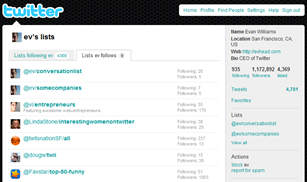 Earlier this month, Twitter finally launched Twitter Lists, a groups feature that helps you to easily organize and share the people you follow (or are just interested in), and view what they’re tweeting about without being hit over the head by the tweets of your (likely) massive general follow list. For example, maybe you want to view only the tweets from your favourite tech blog writers or business peers — all you would need to do is create an appropriately named list and add only those people into it, and whenever you want an update from that group, click on the list in your Twitter sidebar. Voila! Instant filter! I know, I know, many of the Twitter apps you are using probably already do something similar, but Twitter Lists is more than just a simple grouping or filter mechanism. There are a few key features that may make a huge difference in both the way you use Twitter and your reputation and credibility on Twitter.
 Twitter users certainly don’t have a shortage of Twitter clients from which to choose. There are many twitter desktop and mobile Twitter apps, but also a few browser-based Twitter clients. One such browser-based client is Brizzly. Brizzly follows Twitter’s example in its simplicity, but does add a few nice wrinkles. Brizzly is not yet open for general release, but read on for a chance to get a Brizzly invite.