Menu Close

Tag: Social media (page 4 of 8)

Google+ Envy? Or Are You the More Cautious Type?

Google+ Envy? Or Are You the More Cautious Type? | 40Tech

Google+ is all the rage among the tech-geeks of the world right now. It’s the tech geek — and social geek — media equivalent of a major presidential upset or natural disaster. And with a new Google product, it could end up being either. It really depends on your level of cynicism when it comes to Google launches. Their efforts in the social tech space, while fantastic from the innovation perspective, have fallen flat repeatedly when it comes to adoption. And when I say flat, I mean a fall from a tall, tall building that ends with something reminiscent of a pancake. Or a crêpe.

So I’m curious: where do you stand on the Google+ front?

For me, I’m definitely interested and excited to try it out if and when it ever gets to me. However, I’m more than a bit cautious when it comes to the “Google+ will change social media and business as we know it” spiel. Sure, it’s possible that Google may kill, or at least finally be able to compete with Facebook and Twitter, but we’ve heard all of that before. Hello Google Buzz — and damn you Google Wave.

Frankly, I’m a bit tired of tech media spinning new products like this out of proportion. I’m tired of hearing about unproven products that are destined to kill proven products, especially when the creator has a poor track record of success and their only real merit is that the creator is a tech giant. What has been proven, time and again, is that — if you’ll excuse the age-old, multi-layered saying — size doesn’t matter.

So, what do you think? With the failures of Google Wave, Buzz, Orkut and Sidewiki drag Google down yet again? Is Google+ as amazing as it sounds? Even if it is, do you think it has a prayer of taking on Facebook and/or Twitter? Let us know in the comments.


Find Updates, Files, Connections Quickly: Search Your Personal Cloud with Greplin

Greplin: Find Updates, Files, Connections Quickly: Search Your Personal Cloud | 40Tech

With all of the information, files and, well… stuff we have stored online, it can be a bit complicated to sift through it all when you need to go back and find something. Greplin makes that sort of search a whole lot easier. It indexes several of your online accounts, not the least of which are Facebook, Dropbox, and Gmail, and works like your own personal Google.

Greplin Using the Twitter Search Filter | 40Tech

Greplin has been around since the latter part of 2010, and entered public beta in February of this year. Since then, they have been adding more and more services, and have even developed a Chrome extension that plugs them right into your Gmail — for a search experience that is arguably better than Google’s built in functionality.

Greplin is free to use for the most part, indexing up to 10GB worth of data from services like Twitter, Gmail, and other personal Google services like Gcal, Docs and Contacts, as well as Facebook, LinkedIn, and Dropbox. If you want to index accounts like Evernote, Google Apps, and business-related services like Basecamp and Salesforce, however, you will need a premium subscription — which is only $4.99 per month ($49.99/year). There are also a few services that are unlockable via recommendations to friends, such as Tumblr, Google Reader, and Del.icio.us.

Greplin Indexes, Searches Gmail, Facebook, Twitter, Dropbox, and More | 40Tech

If you have a need to search through your online files and life in general, it doesn’t get better than Greplin. The interface is fantastic, the instant search feature saves time, and it actually performs better and faster than Google even in the search giant’s own services. The Chrome extension is a nice touch, as well, as it also plugs into the Omnibar, allowing you to search your data by simply typing the letter g, followed by a space and your search term.

Check it out here.

Want to help me unlock the unlockables? Get Greplin via this link.

What do you think of Greplin?


Want the Best Instagram Web App? Get Extragram!

Want the Best Instagram Web App? Get Extragram! | 40Tech

For some of our posts, we do like Lifehacker and other sites, finding articles about tech that interests us and then creating a summary post that links to the original article — replete with our own opinions, of course. :) One of my favourite sites is Web.AppStorm.net, which is part of the Envato network, and a great resource for web app reviews and articles. For this particular Web AppStorm-related summary post, I’m going to talk about Extragram, a fantastic web app interface for social photo-sharing service Instagram.

So why did I bother with that odd intro? Well, this time around, I have the pleasure of linking to none other than… well… me! My first article went live on Web AppStorm on Monday, and I didn’t want you guys to miss out. Read on for a summary of the sweetness that is Extragram!

Extragram - Best Instagam Web App | 40Tech

If you’ve had the chance to use Instagram at all, you will have noticed that it is more than just another photo-app that has a few fancy filters. It not only makes your pictures look cool, it also has its own very Twitter-like social network. You can follow users’ photo-streams, they can follow yours, there’s commenting, conversation, @mentions, the whole deal. You can even share your photos on the big social networks and microblog sites. What you can’t do with Instagram is view or interact with your social account — or even your own photos — outside of your mobile device. That changed rather quickly once Instagram released its API in February.

Since then, there have been several web apps that have popped up with the sole purpose of creating a comparable, or even better user experience on a screen that doesn’t fit into the palm of your hand. Some other notables are Gramfeed, Instgre.at, and Webstagram, but for a slick and fully-featured user experience, the web app you want is Extragram.

Extragram stands out from the other web apps by doing two things: getting out of its own way, and adding extra features that compliment the Instagram experience.

Here are the highlights:

  • Content-focused, consistent user experience
  • Easy commenting and photo liking
  • Navigation with mouse or keyboard
  • Grid and Filmstrip views
  • Map View to discover great photos and users near to you or anywhere in the world
  • Tag-based and “what’s hot” discovery
  • Sharing your own photos on Twitter, Facebook, Flickr, and Tumblr
  • Allowing other users to share your photos (opt-in, configurable)

The keyboard navigation is a nice touch, and works reasonably well — though it could be a bit tighter, overall. Other than that, Extragram is a great all ’round experience and the perfect compliment to Instagram. I highly recommend giving it a shot.

Check out my in-depth review here.

Some of my own Instagram Photos are here.

Get Extragram.

Get Instagram.

I’ll be writing for Web AppStorm fairly regularly over the next while, and am considering doing more summary posts here on 40Tech to make sure the readers here don’t miss out on the cool web apps I’ll be talking about. Before I commit to that, though, I would love some opinions from you about it. Let me know in the comments or send me a message via my contact form, Twitter, LinkedIn, or my personal site.


Memolane Finds Elusive Social Updates From Your Past

Memolane Finds Elusive Social Updates From Your Past | 40Tech

Have you ever tried looking backwards in Twitter or Facebook? It’s not easy. There was that funny conversation, link, or photo that one time that you suddenly feet the need to take a look at again, but when you tried to find it, you were faced with over a year’s worth of scrolling, waiting, scrolling, waiting, and then yet more scrolling? That’s one of the downsides of a world run by micro-updates — there are a lot of them. You could try using the built in search, or even Google, but it’ll probably be a chilly day down south before you find that elusive memory. That’s where Memolane comes in.

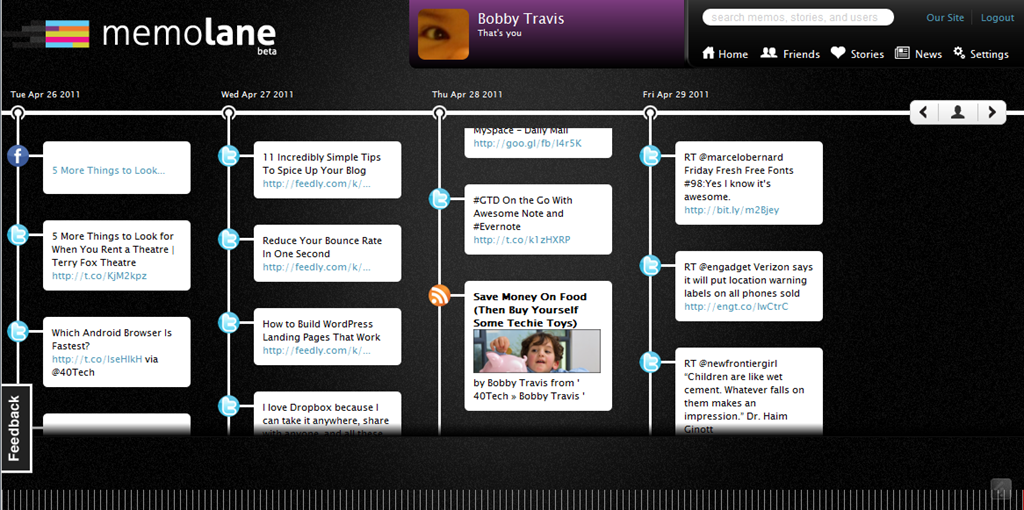
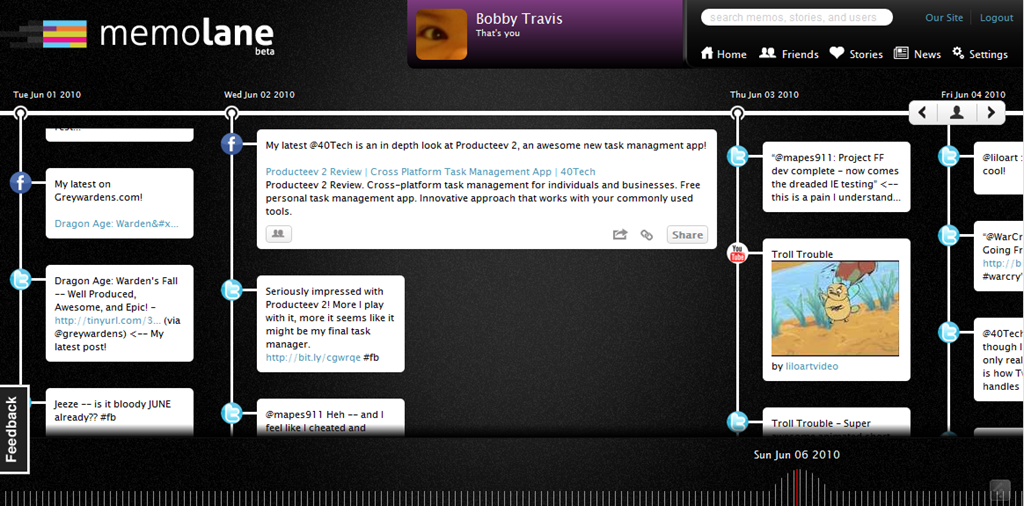
Memolane is a new web app that allows you to view content from multiple social media services in a single timeline that is easy on the eyes, and easy to search through. The timeline is scrollable and broken down into days, with the tweets, photos, updates, et al, that you posted online each day listed vertically in expandable memo bubbles. You can connect Facebook, Twitter, Flickr, YouTube, Last.fm, Trip.it, and more — and you can even add in RSS feeds to pull in custom content. I found that I was able to access Twitter updates as far back as February 2010, and Facebook updates, especially photos, all the way back to 2007. Clicking the timeline bar on the bottom of the window made for quick trips to the dates I was looking for, and the search is actually pretty powerful, so long as you don’t enter hash-tag symbols (#).

Memolane | Scrapbook for Online Life - 40Tech Memolane - Expanded | 40Tech

An easy way to find your old online memories isn’t all that Memolane is good for, however. You can also embed lanes into web pages (see it in action below), and connect with friends to create stories together around shared experiences. It’s a bit like an online scrapbook, really. In fact, Memolane may be adding a print aspect that will allow for real scrapbooking — digital life making it full circle back to the real world.

I like Memolane. It’s easy to set up and use, it allows me to find things that I may have never found otherwise, and it has per-memo and per-service privacy settings that make the sharing bit worry-free. I did find that, the further I went back in time, the more sparse the updates became, but it is entirely possible that that has more to do with the connected services than with Memolane itself. Also, it’s free — and awesome. That’s a good combination in my books.

http://vimeo.com/16474788

What do you think of Memolane?


Evernote Web App Gets a Makeover–Adds Social Sharing

Evernote Web App Gets a Makeover–Adds Social Sharing | 40Tech

Normally I try to avoid doing Evernote posts every week, but this latest update is too big to pass up! It marks an end to Evernote’s stoic insistence that its service is strictly for capturing information, not sharing it — and if that wasn’t huge enough, the overhaul to the web app makes Evernote a pleasure to use on machines and OS’s without a desktop version. Excited yet? If you’re an Evernote fan, you know you are! See below for details.

UPDATE: The recent pre-release version of Evernote Desktop for Windows (4.3.0.4293) has added social sharing features, including Twitter, which is not yet included in the web app. Word and character counts have also been added, along with a few other niceties and bug fixes.

The first thing you will notice when you log into the web app is that the new interface refreshingly familiar, adopting a three-panel approach that is very much like the desktop version. Notebook stacks are also included, as well as snippet view — which provides a preview of the note’s content to speed up browsing — and the ability to CTRL/CMD + click multiple notes and drag them to notebooks, tags, or trash. The easy to use updated interface also includes a handy toggle to control auto-save — a handy feature when writing in shared notebooks.

Evernote Web App Makeover | Evernote Blog

While the update is impressive, it’s not perfect yet. For example, some of the more advanced functionality, like filtering, printing, attaching files, viewing note history, and creating saved searches, is still only available in the older version of the web app. If you want or need any of these features, you will need to switch back to the archaic mode for the time being.

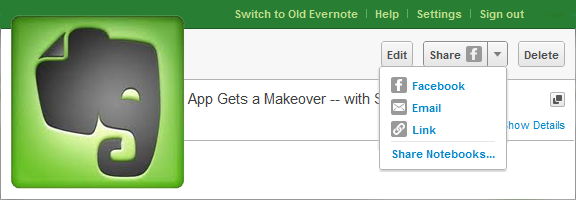
I love the work that Evernote put into the new version of the web app, but am absolutely thrilled by their decision to include some social sharing capability! Until now, I honestly thought that the only way to share notes I collected would be using tools like Springpad and Shelfster, but Evernote’s inclusion of Facebook sharing, with plans to add Twitter in the near future, gives users the added freedom they need in today’s social web. It would be nice to see them open up sharing to the same extent that Springpad has, but baby-steps, yes? Sharing to Facebook, (soon) Twitter, via email, or by adding a link into your social platform of choice will have to be enough for now. You can also revoke shares at your discretion, which is handy. The Evernote blog promises that the new sharing features will find their way into their other apps in future updates.

So how excited are you about Evernote’s foray into the modern web — and its revitalized web app too, of course?