Menu Close

Tag: Problem solving (page 4 of 5)

Block Sites From Search Results with the Personal Block List Extension [Chrome]

Block Sites From Search Results with the Personal Block List Extension [Chrome] | 40Tech

A new and incredibly useful extension has popped up on the Chrome Web Store: Personal Block List (by Google). If you have ever searched for something and been plagued by useless links that wiggle past Google’s algorithm — and odds are you have — then this extension is your friend. Personal Block List adds a handy little “Block [URL]” button to the right of the “Cached” and “Similar” links in Google’s search results. Once clicked, that site is omitted from your search results until you decide otherwise.
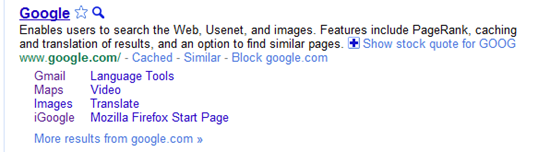
Block Sites from Search Results with Personal Block List Extension for Google Chrome, Rockmelt | 40Tech

Neat, huh? Of course, it should be mentioned that this extension will transmit information to Google regarding the sites you have blocked, including patterns that you create as you block or unblock sites. Google promises to only use this information for good and to improve their products. Actually, there are no promises. They just say that you “agree that Google may freely use this information to improve [their] products and services.” Considering all of the things out there that already track browsing habits — including Google — this sort of tracking may actually be a step forward.

In any case, the extension does its job well. In a few of the coding-related searches I have been conducting lately, looking for help on a particular area of menu design, I repeatedly found myself directed, via several different domains, to the same annoying website trying to sell me their tool that was apparently supposed to make my life easier. My annoyance in this regard is no more. The Personal Block List extension for Google Chrome (as well as Chromium, and Rockmelt) works!

If I were to have any issues with the extension, they would be that it does not work from the searchbar, only from the actual Google site, and that it doesn’t appear to have a master list in the cloud. That last surprised me, and meant that I had to block the same site twice, once in Rockmelt, and once in Chrome. Still, it did the job. I can see that there will be many more sites that will end up being forcibly removed from my search results soon.

Try it out the Personal Block List (by Google) Chrome extension here.


Fend Off Tracking Cookies, Keep Functionality With Disconnect [Google Chrome]

Cookies. We have a love hate relationship with them. They track what we do and report all kinds of information back to the site that generated them — and to third parties as well, in many cases. But they also often provide a better user experience, keeping track of our preferences and removing small annoyances like having to sign in to a website every single time we open it up. Unfortunately, as is the case with most things on the internet regarding your privacy and security, the only completely effective way to protect yourself is to simply turn the potential problem off. The only problem with this course of action is that turning off cookies also has the effect of making a huge part of the web practically unusable.

So what to do about it? Well, if you use Google Chrome, try out Disconnect.

Disconnect, which was created by a former Google employee, is a Google Chrome Extension that helps you to keep your personal data safe while still maintaining the ability to work effectively with sites like Gmail, Facebook, Twitter, and others. You may run into a few issues now and again, but overall, the experience is fairly seamless. All you need to do is install the Disconnect extension in your Google Chrome browser, make sure the extension is turned on, then watch as the tally of daily attempted intrusions upon your privacy climbs. The basic functionality, and much of the more advanced uses, of the webapps should work without problems, helping you to do what you like, and search for what you like, without passing along any personally identifiable data. If you have need to unblock a service, say to do something like play Facebook games, it’s a simple matter of a click on the extension’s dropdown menu (which includes Facebook, Twitter, Digg, Yahoo, and Google).

Disconnect Extension for Google Chrome in Action

Disconnect is open source software. Download it for Google Chrome here.

Disconnect for Chrome Disables Third-Party Tracking While Keeping Webapps Operational [Lifehacker]


AirDropper: An Easy Way to Request Files — and Have Them Sent Straight to Your Dropbox

AirDropper: An Easy Way to Request Files -- and Have Them Sent Straight to Your Dropbox | 40Tech

Recently, we talked a bit about Ge.tt, an extraordinarily easy way to send files to people without having to talk them through how to receive them. But what if you are the one who needs a file sent to you, and you want to make it as easy as possible to get that request taken care of? You could explain Ge.tt to people (it really is easy), or you could be a bit more direct and use the tool that one of our readers brought to our attention: AirDropper. After all, when you need something from someone, the best way to get it is to require the fewest steps possible — and to sweeten the deal, AirDropper uses your Dropbox folder, so you will be able to access the file(s) from anywhere.

Getting set up with AirDropper is pretty straightforward. You head to www.airdropper.com and click START. You will then be redirected to Dropbox to authenticate the AirDropper service, which will add an AirDropper folder in your Dropbox folder. Once that’s done, you will head back to AirDropper, and will be presented with a form that allows you to send an email (from your email address of choice) to multiple recipients to request files. The email contains your message, and a large, friendly button that says Upload and brings the user to an even friendlier ADD FILES interface. The file or files — AirDropper has supported multiple file sends since about September of 2010 — will then be sent directly to your Dropbox with no fuss, no muss, and not a worry except for your storage limit.

Note: If you are sending sensitive files, be sure to have a look over the AirDropper terms of service first.

AirDropper is free while in beta, but will likely charge for some of their service in the future, which will likely include tiered pricing for things like the size of the transfer(s), etc. Either way, it is definitely a useful tool!

Thanks to Martin for bringing it to our attention!


Word Lens: Real Time Language Translation (iOS)

Word Lens: Real Time Language Translation | 40Tech

File this under very cool and potentially useful. Word Lens is the kind of app you will want to have on you when travelling, or when presented with text in a language you don’t understand that you just have to know the translation of. I say “will want” because, so far, it only works with Spanish and English, so it is useless for your other translation needs. It’s still awesome, though — the bees knees, even.

All this iOS app needs is a device with a camera, and — with no network required — it will translate the text that the camera sees, in real time. It works surprisingly well, too! I think that, next to (prepare for Star Trek reference) a Universal Translator, this is best thing to happen to translation software in a while. Maybe Google will buy them and offer the tech for free some day soon. For now, however, even though the app looks free, it will actually cost you $10 per language set. That means that you need to spend $10 to get it to translate Spanish to English and another $10 for the vice versa. For what it does, though, and especially as it adds in more languages, Word Lens might actually be worth it.

Check out the video below:

Word Lens is a Mind-Blowing App that Translates Any Text Your Camera Can See On the Fly [Lifehacker]


Ge.tt: File Sharing for the Technology-Challenged

Ge.tt: File Sharing for the Technology-Challenged | 40Tech

How many of you have had that moment in time when you need to share a file (big or small) with someone who just shuts down when introduced to new technology? Tools like Dropbox, while they make obvious sense to anyone who traffics in such things, will, in many cases, be responsible for blank stares, open derision, and comments like “can’t you just mail me a CD?” Alas, not everyone has made it to our little techie corner of the world.

Ge.tt is going to solve that little problem for us all.

The last time I faced this issue was a month or so ago, and in looking for a solution, I happened across a post by our friend from Digitzd, David Pierce. David outlined several other file sharing services he’d tried, like YouSendIt, FileDropper, Dropbox, and Box.net. His findings with these other options were much the same as my own; which is to say that they were either too complex for the tech-challenged (or uninterested), or were unreliable. He thought pretty highly of Ge.tt, though, so I gave it a try.

Ge.tt, as David said, is “stupid simple.” The website is a white-space filled, single-big-button experience that allows you to quickly and easily find a file, upload it, and then share the link via email, Twitter, or Facebook. Any file type you want is just fine, drag and drop is supported in modern browsers, and you can even add multiple files at a time. No logins are required, but you can set up an account if you want a few additional features, like live download stats, or adding/removing files at a later date.

The Best Way to Share Files | Ge.tt

Download files while uploading with Ge.tt | 40Tech

The best thing about Ge.tt, however, is the near real-time download capability. The person or persons you are sharing the files with don’t have to wait until the upload is completed to start downloading — they can actually start as soon as you do, receiving every byte you upload as it goes up on the Ge.tt servers. Sharing large files no longer has to be an all day event — and I can’t express to you how much I dig that! To top it off, the download process is as easy as the upload. Users click the link you give them, find the file they want and download away with just a click. If the recipient has difficulty with that — which is still possible, if unlikely — then the process will still be extremely simple to talk him or her through.

Easily download shared files with Ge.tt | 40Tech

Things to watch for:

  • The obvious — don’t upload anything you don’t own the rights to, or may otherwise be construed as illegal or relating to an illegal act. Big Brother is watching, boys and girls.
  • Shares only last for 30 days from upload, or 30 days from the last download. You can increase this to three months by signing up for a free account. Don’t use this service as a backup tool…
  • There is a 2 GB upload limit, at least according to the terms of service. David was able to upload a 4 GB file with no problems, but the terms may have been updated since then.
  • There is an ad on the receiver’s page, and at least one of the advertisers has an ad with a big download button on it. You may want to warn the people you send the link to to avoid any confusion.
  • Depending on your browser, images may open in a new window, and may require right-click to save actions.
  • Ge.tt is in beta. It seems stable, and I haven’t heard of any problems, but beta is their insurance. Also, their terms of service indicate that they will very likely be implementing paid services at some point, which may add to their current free services, or may reduce their free offerings. Get it while its hot.

What services do you use to share files simply (especially large ones)?

Ge.tt: The Best Way to Share Big Files (or Small Ones) [Digitizd]