Menu Close

Tag: Mac (page 22 of 25)

App of the Week: MenuWeather Lite [Mac]

menu weather

8/20/11 UPDATE: Just a few days after this post went live, the developer of MenuWeather Lite announced that MenuWeather Lite would be discontinued. His web site indicates that it will remain in the App Store for a month or two, but I can no longer find it in the App Store. The paid version, now $1,99, is still there.

If you want to be able to quickly check the weather on a Mac, check out MenuWeather Lite. The app places an icon in your menu bar that displays the temperature and general conditions, such as cloudy or sunny, at a predetermined location. Click on the icon, and a dropdown list appears, showing you more detailed current conditions, and a five day forecast. The drop down also contains a link to a 10 day forecast, hour by hour forecast, radar map, and weekend and monthly forecasts.

Read more


App of the Week: BetterTouchTool [Mac]

bettertouchtool.jpeg

Mac’s latest update to OS X, Lion, is geared toward trackpads. You can use your trackpad to launch Mission Control, to swipe between full screen apps, and even to navigate in Safari. If you want, though, you don’t have to stop there. With a free tool, you can assign even more gestures to perform certain actions.

Read more


Control Multiple Computers With One Keyboard and Mouse – and No Extra Hardware [Windows, Mac, Linux]

SynergyKM1.png

If you have more than one computer sitting on your desk, and don’t want extra mice and keyboards cluttering up your workspace, take a look at Synergy. Synergy is free and open source software that lets you control multiple computers with one keyboard and mouse, using your home network. Each computer will need its own monitor. Once you’ve set it up, you can drag your cursor from one computer’s screen, right off the edge to the other computer’s screen.

Read more


App of the Week: Easily Switch Between Audio Sources with SoundSource [Mac]

soundsource

We’ve previously covered how to quickly switch audio sources if you’re on Windows. The tool that we covered comes in handy, for example, if you want to switch your audio and mic input over to your headset to make a Skype call. But what if you’re on a Mac, and want to do the same? A free app, SoundSource, has you covered.

SoundSource can be installed to your menu bar, and from there it is a simple matter of clicking it, and selecting your input or output source from the menu that drops down. SoundSource also lets you adjust volume, and gives you a quick link to sound preferences and MIDI setup.

If you’re constrained for space on your menu bar, you can get much of the same functionality by holding down the option key and then clicking on the Sound icon on your menu bar. You won’t get the granular volume control offered by SoundSource, but you will be able to switch devices. Credit to TUAW for this native OS X tip.

If you find that you’re switching your audio source on a Mac with any regularity, check out SoundSource. The link at the end of this article takes you to the free apps by Rogue Amoeba, the developer. SoundSource is at the bottom of the page.

SoundSource [Rouge Amoeba]


How to Add Folders to the Finder Sidebar [Mac]

Finder1.png

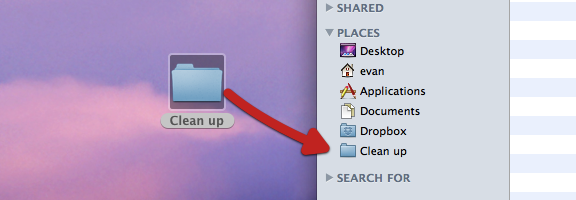
If, like me, you’re relatively new to the Mac world, you stumble across tips that are both incredibly useful, and incredibly simple. One such tip concerns how to add folders to your Finder sidebar. There are several reasons you might want to do this. Perhaps you have a folder that you access all of the time, and don’t want to go digging for it. Or perhaps you’re in the middle of a project, and want to temporarily access your project folders with one click. Getting those folders into the Places section of your Finder sidebar is easy, using either of two methods.

Read more