Menu Close

Tag: iOS (page 16 of 19)

Springpad Clipper for iOS and an Evernote eBook

Springpad Clipper for iOS and an Evernote eBook | 40Tech

Heads up folks! Great things are happening surrounding two of your favourite apps: Springpad and Evernote. Firstly, Springpad is doing something that has been long-awaited and needed — namely, adding a web clipper that is optimized just for Mobile Safari. They’ve also caught up with Android by finally giving us iPhone and iPad users a Quick Add button for the home screen.

More importantly though — and this is no slight to the awesome Springpad, but credit where credit is both due and needed — my friend and one of our most informative and helpful commenters, Daniel Gold, has just released his first eBook [affiliate link]! It’s about Evernote, it’s about GTD in Evernote, it looks awesome — and it’s only $5 bucks!

I will be testing out the new Springpad awesome for a full report next week, and will also read and review Daniel’s Evernote eBook. I’m already a bit biased in its favour, because I’m familiar with Daniel’s work on his blog and his many awesome comments here (where I met the man). In fact, he has been a major contributor in both inspiration and expertise to several of my posts on this blog. Nonetheless, I’ll be as narrow-eyed and judgemental as any good reviewer should be… :P

Stay tuned for more next Wednesday night!


Google+ for iPhone and Android Sharing — Too Little Too Late?

Google+ for iPhone and Android Sharing -- Too Little Too Late? | 40Tech

Though the initial excitement of Google+ has worn off, millions of users are still using the service and more people connect every day. For its part, Google has been working hard at bringing the preview social network closer to a production offering, adding social gaming without annoying people, verified accounts for prominent users and famous folk, and ironing out their sign-up rules (the heavily debated real name only policy). They have also been paying attention to their mobile apps, finally adding post sharing into the Android app. iOS users had to wait a bit, as is per usual, but the much awaited update is now available in the app store.

But is development coming along too slowly to keep up interest?

Personally, I’m a huge fan of Google+. There are a lot of innovative uses that are cropping up — cooking classes via hangout, blog replacement, collaborative writing groups; Evan and I are even putting together a hangout-based pen and paper roleplaying game, cementing our geek status once and for all. Google+ is also a fantastic place to meet and converse with new people, focusing on like interests over general broadcasting, which makes for better conversation and better relationships.

The problem is, I’ve started to notice that my streams are starting to degrade. People appear to be less active, less conversant, or generally gone and gone. This could be due to the end of the summer — people are getting busier as the school season and work focus heat up — and it could be part of the overall ebb and flow of a new product. It could also be that Google is taking too long to get their service off the ground and into the hands of the general public.

Gmail was in beta for years, and to the point that it was really more of a long-standing joke than anything else, but the Internet back then was, if you can believe it, less fickle. With the world takeover of social networking and subsequent obsession with real-time streams, the attention span of your average user is practically gnat-sized. And let’s not forget that, in order to get noticed in the massive amounts of information flowing through the digital-verse, bloggers and people in general tend to gravitate toward sweeping sentiments of “wow this is awesome” build-up and “it’s never gonna make it, and here’s why!!!” doom and gloom statements. And yes, I realize that it wouldn’t take a stretch if the imagination to lump this post in with them, no matter what I say t the contrary. The point is, it makes it really hard to accurately gauge if a service will live or die.

To top things off, Facebook hasn’t been sitting about with thumbs in nethers, either. They’ve been paying attention to what people like about G+ over Facebook and have been making changes to how their own streams work, attempting to make it easier to share with those you want to share with, and even (finally) updating their mobile apps for new sharing and privacy options.

I say again, I’m digging Google+ — but I dug Google Wave, too. I think that Google’s push to integrate Plus into their overall offerings will help keep things moving, but I have to wonder: if users as a whole notice their streams downgrading in quality and movement, will it start one of those slow spirals into web oblivion?

It’s been a few months now, what are your thoughts?


Evernote for iOS Update Brings Rich Text Support, Shared Notebooks, and Other Goodies

Evernote for iOS Update Brings Rich Text Support, Shared Notebooks, and Other Goodies | 40Tech

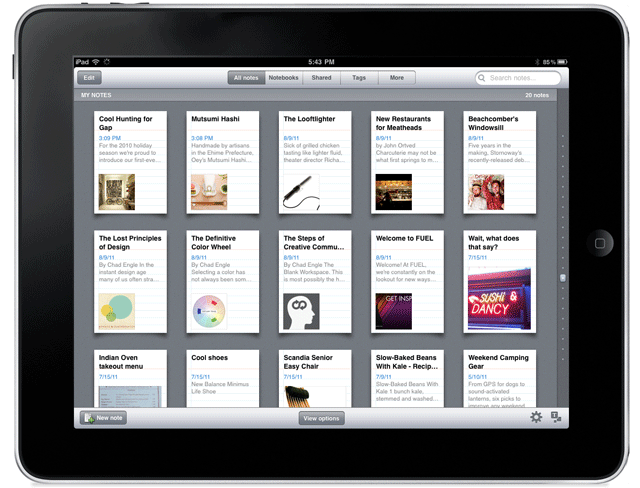
Last week, when it was still August (where the hell did the summer go?), Evernote released the mother of all iOS updates. There was a lot to it — a cool redesign, a lock feature for premium users — but the big deal was the inclusion of a rich text editor and the ability to access notes in shared notebooks.

The new features aren’t as robust as the desktop version of Evernote, of course, but are nonetheless dripping with the sort of awesome that makes you want to find your Irish roots and dance a merry jig.

Here are the highlights:

Rich Text Editor

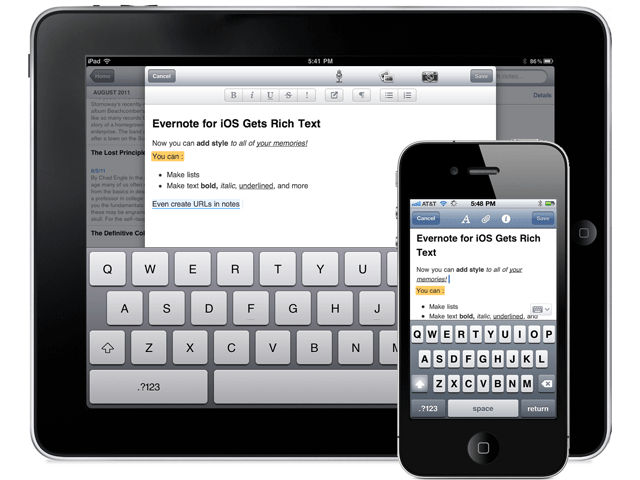
The new editor allows for basic bold, italics, underline, bullets and the like, as well as strike-through, header text, highlighting and linking. You can also edit notes that were already created with rich text, which is great, but don’t think the append prompt is gone for good. If the note has too much fancy in it, even the new editor may not like it. There is a new option, though, that saves at least a bit of headache: the ability to simplify the formatting to be workable in the iOS apps. This way, you only lose some of the formatting, instead of everything.

Evernote for iOS (iPhone, iPod Touch, iPad) Now Has a Rich Text Editor | From Evernote Blog

Note: Checkboxes are still not able to be created in Evernote for iOS. You can check them, but not make them.


Shared Notebooks

Tired of not being able to access a note or notebook that someone shared with you? Now that Evernote has added shared notebooks into iPhone, iPad, and iPod Touch, you can breathe easy. Note that I said access, however. You can only read them, not create new ones. Yet.


Another handy feature is the new ability to search within notes. Want to find a word or turn of phrase from your note? Now you can, quickly and easily. It’s no desktop search, but it’s definitely a good start.

This is only the tip of the update-iceberg. There’s a lot more going on under the hood and in the form of a new look and feel for Evernote’s iOS apps. If you haven’t updated yet, you should. Get the full list of new features here.

New Evenrote Design for iPad | From Evernote Blog

Thoughts on Evernote’s new iOS features? Head down to the comments!


App of the Week: PressReader [Mobile]

App of the Week: PressReader [Mobile] | 40Tech

Traditional newspapers are struggling. We’ve all heard this, time and again, and know that they are having the same problem that the music and other “olde world” industries have: namely, that the people in charge don’t truly understand the medium of the internet, and are too wrapped up in either complaining about it, trying to figure out how to control it, and suing people to recoup their perceived losses to take advantage of it. Some newspapers have embraced the web, openly or behind paywalls, and some of these websites and mobile apps are actually good, presenting their content well, and occasionally adding a bell or whistle here and there.

What if you have simpler tastes, though? What if, all you want to do is read your favourite newspapers, in their full, original, cover-to-cover glory, from the comfort of your iOS or Android device? How about from your Blackberry? If this is a dream of yours, then Newspaper Direct’s PressReader is your new best friend. Hell, you and your new buddy might even save a tree or 10.

PressReader is fantastic. If I had to use one word to describe it, that would be the one — that or awesome. There are over 1900 newspapers (though the app still says 1700) from around the world available (92 countries, 48 languages) for your reading pleasure, updated daily. These are, as I said, available in full, just the way you would pick them up from the news stands, including all ads, classifieds, the funnies, sections and stories. They are downloaded directly to your device (you can choose download by Wi-Fi only, if you like) so that they are available even when offline.

PressReader Downloads Full Newspapers to Your Device | 40Tech

Newspaper Direct, who are also the purveyors of PressDisplay (the web version and precursor to PressReader), have license agreements in place with all of these newspapers, receiving daily .PDF scans which Newspaper Direct then process to add all sorts of fun interactivity.


An Interactive Newspaper (the Really-Real One)

What sort of interactivity, you say? Well, for starters, all headlines are clickable. You can swipe through the pages as you like, in portrait or landscape mode, and can double-tap, pinch, and zoom to your heart’s content to read the stories — but if you want to see something that’s formatted for easy reading, then tap any headline and you will get a pop up version of only that story. While in the pop-up, you can change the text size and move to the next and previous story, as well, making for a customizable reading experience.

imageIMG_0861IMG_0863IMG_0865IMG_0859

The story pop-up also allows you to print the story in plain text or with full graphics, and has sharing features as well. At the moment, you can share a story via email, Twitter, and Facebook. The Facebook share is a bit ugly with it’s long, title-less hyperlink, but all three methods link you to the full article on PressDisplay.com. In my tests, I was able to access the shared article on the web and mobile safari (the mobile web app is pretty cool, too), without having to log in, or pay for access. That could be the case for all, or just for the papers I was using.


Newspapers That Read to You

The best feature, by far, of PressReader (and PressDisplay) is yet another gem that’s available in the pop-up when you touch a headline. It’s not the ability to search within nearly 2000 papers, and it’s not the Top Stories or Favourites feature (all available from the main menu-bar, not the pop-up) — it’s the cute little headphones icon in the bottom right. Touch this button, and PressReader’s built in text to speech functionality will read the story to you! This is a beautiful thing! If you are on the go, driving, or busily working, your newspaper story can be read to you, keeping your hands and eyes free for more important things — like not killing yourself while driving. I’ve seen more than one moron on the road that was reading a newspaper while in motion — and I’ve called the cops on the idiots, too. I’m no snitch/narc/derogatory tell-tale word of the day, but I’m on the road with my kid and you are not going to cause an accident that hurts her. If you like the paper while driving… get PressReader and save us all the trouble.

Slight digressions about morons aside, I highly recommend PressReader to anyone who enjoys the full newspaper experience (plus more) while on the go, or is interested in saving a few trees (NewsDirect claims to have saved 173,824 trees, and counting). You can get it on the iPhone, iPad, and iPod Touch, as well as on Android (Gingerbread and Honeycomb devices), Blackberry (no Playbook yet, but it’s on the way), Windows 7 Slate, and even Windows Mobile 5 (go figure). No mention of Windows Mobile 6 (5 should still work) or 7 yet, but it is likely on the way. You can also download Pressreader for your PC or Mac, iRex Digital, WebOS is on the way, and you can access PressDisplay via the web or even on your Kindle and other eReaders.


What it Costs

The PressReader app itself is free, but newspapers cost $0.99 each, or you can get an unlimited subscription to everything (all 1900 papers) for $29.95 per month. If you want to try before you buy, PressReader comes with seven free newspaper downloads of your choice, and you can give the Top News feature a whirl as well. If you want to try and offset the cost a bit, head over to your account on PressDisplay and check out the referral widget. This is a beta tool that can get you 10% of each subscription that comes through you.

NOTE: My only problem with PressReader, is that the papers you choose to subscribe to don’t sync in your account and therefore have to be re-downloaded for each device. What I am not certain of, as I am using a trial of an unlimited account, is whether or not you would have to pay for that paper on each device. I’ve asked the people at News Direct and expect them to get back to me shortly.

UPDATE: According to my contact at NewsDirect, as well as a comment by Gayle, who also appears to work for them, you can download your newspaper issues on up to six different devices, unless there is something that precludes that in NewsDirect’s licensing deal with a particular publisher.

Also, for those worried about download size and data on your mobile, go into settings to change how long you want PressReader to keep a paper, and to set your PressReader app to download via WiFi only.


PressReader


How to Watch US Netflix on Your iPad/iPhone When Outside of the US

How to Watch US Netflix on Your iPad/iPhone When Outside of the US | 40Tech

If you have Netflix, you have the ability to stream a wide array of movies and television shows for less than $10 per month. The digital streaming library isn’t as impressive as their mail-out catalogue, but any way you look at it, that’s a pretty decent price for what you get. And what you get is a lot. Old shows, new shows, crazy amounts of anime, and even some favourites like Glee, the now (sadly) cancelled Stargate Universe, and 2009’s Star Trek movie are on there. Unless you live in or visit a country other than the United States, of course.

If you do happen to be on the other side of that imaginary border line, however, and you have an iOS device, you can use a VPN to access the US Netflix streaming library — and you can do it without spending a dime if you use Hotspot Shield.

Note: Please note that, while this is a fun workaround, and can be useful in certain situations, the inability to access Netflix or any other media site mentioned in this post outside of the United States is due to international licensing agreements. These sites and services may prohibit broadcasting or accessing certain content from outside of the United States in their terms of use. As such, this post’s workaround is used solely at the device owner’s and account holder’s own risk and is for educational purposes only.

UPDATE: Hotspot Shield’s iOS configuration page is currently down. I’ll keep checking to see if and when it comes back up and will update you here. You could also try other VPN options, such as Witopia, but that one comes with a $40/year price tag.

UPDATE 2: I’ve been in touch with Anchorfree support (they are the purveyors of Hotspot Shield), and have been told that they are working on the issue. Apparently, they are re-launching the iPhone version of the VPN. I will update again when I know more.

UPDATE 3: The iOS app for Hotspot Shield is officially here! Check this post for more info.

We’ve talked about Hotspot Shield before, and even though the free version forces ads down your throat, it’s pretty handy when you want to access Hulu, Pandora, or US-only website content from across the border. It’s also handy for surfing securely at public WiFi locations, and all of the other fancy things you can do with a VPN.

So why bother with an additional post just for Netflix? Because Netflix isn’t a US-only site, but it does have US-only content. This content is accessible depending on where you are, as I found out by accident when visiting a friend in Washington state a couple weeks ago. I pulled out the iPad for my kid, loaded up Netflix to keep her busy, and was immediately boggled by the amount of new content I found staring back at me. I was hoping that we Canadians had suddenly gotten a slew of new titles, but was sadly disappointed when I returned home that evening.

Out of curiosity, I tried out Netflix on my laptop with Hotspot Shield enabled. That didn’t work. Generally (unless launched via the Chrome app, oddly enough) Netflix thought that I was trying to access the US site with a Canadian account. No dice, there. Then I remembered that Hotspot Shield was also configured on my iPad… and I was pleasantly surprised that it worked!

Here’s how you can try it out

Go to the iPhone configuration page on Hotspot Shield’s website, and follow the instructions there. You’ll want to be on a separate device for this, for simplicity’s sake.

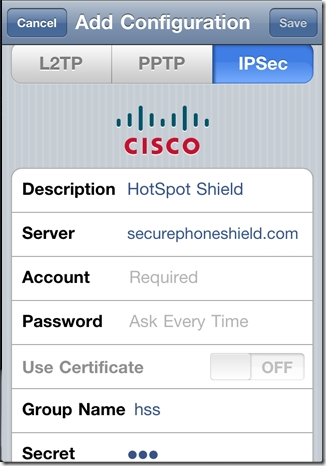
Basically, they will have you turn off your iPad’s (or iPhone’s) WiFi, and then head to Settings > General > Network > VPN > Add VPN Configuration. From there, you do the following:

  • Select the IPSec tab/pane
  • In Description, type HotspotShield
  • In the Server field, type 68.68.107.101
  • Go back to the website and click the “Get Account ID” button
  • Type the code that the button generated into the Account field
  • Type the same code into the Password field
  • Make sure that Use Certificate is set to OFF
  • In Group Name, type hss
  • In Secret, type hss
  • SAVE and then turn your WiFi back on

Hotspot Shield iPhone Configuration

Once you are set up, turn on the VPN. I’ve noticed that, if you try and turn it on from the iPad’s Settings dashboard, it will fail to connect. No idea why that is, but, if you turn it on from the Settings > General > Network > VPN switch, it connects just fine. Once the VPN says it’s connected, load up Netflix and watch in wonder as the app believes that you are in the United States and loads up the US Netflix library!

Things to note

  • The VPN will slow you down a little bit, but not enough to affect video playback. Netflix technology is very good at figuring out how to play videos optimally, even at slower speeds.
  • The VPN will disconnect periodically. This is annoying, but if you are already playing a video it will not affect it. The movie or TV show will play through to the end unless you pause it and let the iPad time out. If you find that you are having difficulty launching a show, check to see if the little VPN icon is in the upper left corner of the iPad’s notification bar. If it is, then you may need to restart the app. If it isn’t, then head back into the VPN settings and turn it on again. You may want to close Netflix out completely, first to make sure that the VPN takes with the app (double-tap the iPad’s hardware button to see the running/recently running programs, press and hold Netflix till it shakes and gets an X in the corner, then tap the X to close it).

There you have it! Access to US Netflix on your iPad whether you have a non-US account, or just happen to be visiting another country. It is important to note that this trick may only last until Netflix figures a way to block it out, but HotSpot Shield is versatile. They have managed to get people back into Hulu every time they’ve been locked out so far, so it will probably be the same with Netflix.

Thoughts?