
According to the Book of Genesis there was a time when all people of the world spoke one language and were one people. At least that is what Wikipedia tells me in an article about the Tower of Babel. With an estimated 6,800 languages worldwide, such a time has long since passed, if it ever existed.
According to some estimates, Mexico alone has almost 300 languages spoken, but Papua-New Guinea wins with over 800 languages. So the logical and pressing question is, what do you do when you absolutely need to know what David Hasselhoff is doing right now in Germany? (I imagine that is where he is, since I hear that people there really like him).
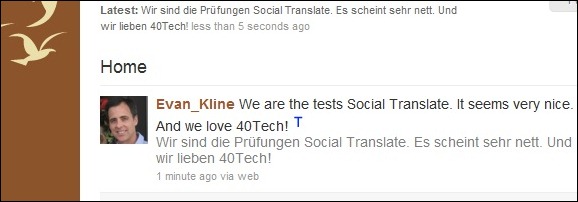
Previously, the answer to this burning question was simple – "nothing." You would have to wait until he surfaced on the pages of the National Enquirer with Bat Boy to get your Hasselhoff fix. However, thanks to an enterprising Chrome developer, you now can find a German who tweets or updates his Facebook status with news on Hasselhoff’s daily comings and goings. The extension, Social Translate, will translate the messages for you.
The extension uses Google Translate’s translation engine. As a result, the translation quality is a bit limited for those more rarefied languages, but it seems to work seamlessly for everyday use for hundreds of languages.
So whether you are looking for news on Hasselhoff or you would like to follow the Dos Equis guy in the language of wherever he happens to be, you should check out Social Translate for Chrome.
Social Translate [at the Chrome extension library]


 On Tuesday night,
Internet Explorer is Now Losing the Browser Wars? Magic 8-Ball Says: Doubtful
Internet Explorer has been slowly but steadily losing ground in the “browser wars” since the invention of that little hot little vulpine browser, Firefox. Google Chrome shook up the market even more and is continuing what’s considered to be a fast upward climb. Safari is Safari, and Opera is largely underestimated.
In the article I read about IE’s plummet, on Mashable, the tone was very much in the negative for Internet Explorer, citing phrases such as “to little, to late” and “Hail Mary” in reference to the coming improvements of IE9. Now, I am no fan of Internet Explorer (my web-designer-self hates it with a furious feral fire), and no disrespect intended to the knowledgeable minds over at Mashable, but I think a little bit of perspective may be called for.
Yes, IE has finally hit a downward slide (thank you, powers that be!) — but even with the European ruling that dropped IE from Microsoft Windows installations, and the rise of Google Chrome, Internet Explorer still holds 49.87% of the browser market (as stated in the Mashable article). Another unfortunate truth is that a good percentage of that percentage still uses IE6. The fact that anyone is still using that piece of crap is proof positive that people aren’t as far advanced into the world of technology as we might have hoped. But I digress…
The point I am making here is that 49.87%, while still a hefty drop for IE when compared to the gains of other browsers, is still the largest segment of the market by nearly 20%. Internet Explorer 9 may be a bit late, but it is still going to compete soundly with the other browsers out there. IE9 may not win back Microsoft’s haters (count me in that batch), but it will win back some people — and it will keep even more. If Internet Explorer is going anywhere, I don’t think it will be anytime soon.
What do you think?