One of the nice features of Safari on Mac and iOS is how your bookmarks can stay in sync between your devices, with no plugin required. The one flaw in that setup was that there was no way to sync your Safari bookmarks to any other browser on Windows aside from Internet Explorer. If you wanted a universal bookmark experience, you had to use another browser with cross platform sync support, such as Chrome, on all of your devices. That has now changed. One piece of news almost lost amid the hoopla with iOS 7 and the new iPhones, is that Apple has added Chrome and Firefox to the list of browsers that support iCloud bookmark sync on Windows.
If you want to squeeze every last ounce of speed out of your browsing experience, then check out the latest browser speed tests at Tom’s Hardware. The site takes a look at several browsers on both the PC and on a Mac, and offers results in several different categories. The site then crowned a winner on each platform, as well as overall.
Lately, I’ve been seeing how well I can survive without Flash on my MacBook Air. I find my browsing experience to be faster without it, but every now and then I need Flash to use a site. We previously talked about how to watch many YouTube videos without having Flash installed on your system, but what about other sites that use Flash? My setup involves using Firefox as my main browser on my MacBook Air (I use Chrome on my iMac), and switching over to Chrome when I need Flash. Chrome has Flash built in. My setup lets me automatically open my Firefox tab in Chrome, which supports Flash by default, by using a keystroke. Here’s how.
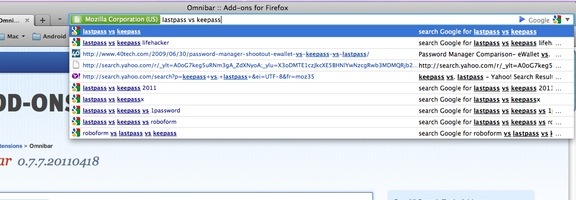
I was a long time Firefox user, but moved to Chrome when Firefox started to feel bloated. With the release of Firefox 4, I’ve gone back to using Firefox as my primary browser (although I still use Chrome quite a bit, too). When I’m using Firefox, one feature that I miss from Chrome is the Omnibar, Chrome’s combined location box and search box. Firefox’s Awesome Bar has some nice features of its own, but if space is at a premium on your machine, you can get Chrome-like Omnibar goodness with the Omnibar extension for Firefox.
One of the ways to speed up web browsing on your smartphone is by using a snappy browser. On Android, you have many choices. Recently, both MakeUseOf and PC Magazine put several Android browsers through the paces, to see which one was fastest. The browsers tested by MakeUseOf included Firefox, Dolphin Mini, Dolphin HD, Opera Mobile, xScope, Skyfire, and the stock browser. PC Magazine tested Dolphin HD, Dolphin Mini, Firefox, Opera Mobile, and Opera Mini.
The conclusion? According to MakeUseOf, Firefox was the fastest. It beat the competition in the synthetic benchmarks, and edged the other browsers in the page loading test. The losers were Skyfire, and the stock Android browser. My browser of choice, xScope, fell in the middle of the pack.
PC Magazine didn’t rate the browsers just based on speed, but if you click through to the individual browser reviews, you will see the speed results. Unfortunately, at the time of this writing, the article appears to have a typo and shows the same chart for two of the tests. Still, reading the text of the reviews, it appears that Firefox comes out on top, with the other browsers displaying mixed results. As the Firefox review notes, though, Firefox’s mobile offering has other issues, such as video handling and how it displays pages.
My take? Speed isn’t the only consideration. See which browser feels most comfortable to you, so long as the speed is acceptable. My browser of choice, xScope, sports a user interface that I love, and respectable speed. Once you get into the middle of the browser speed results, the differences among browsers was negligible, making other considerations more important.
What is your favorite Android browser? What do you like about it?