

There’s no way to say it nicely – Flash is a resource hog. On a beefy machine, you might not notice it, but if you’re running something like an older MacBook Air, Flash could bog your system down. You can try living without Flash – or even use a browser plugin to block it, but then you run into problems on a site like YouTube. Fear not, though, as YouTube gives you an option to watch videos without using Flash.
The trick on YouTube is to join the HTML 5 trial. To do so, simply go to the trial’s YouTube page, scroll towards the bottom, and click on the “Join the HTML 5 Trial” link. After that, whenever you visit YouTube, you’ll be presented with an HTML 5 version of a video, instead of the Flash version. There are some exceptions, though, as explained below. The trial is on a per-browser basis, so you need to activate the trial for each browser that you use. Chrome has Flash built in by default, but you can still choose to use HTML 5 on YouTube.
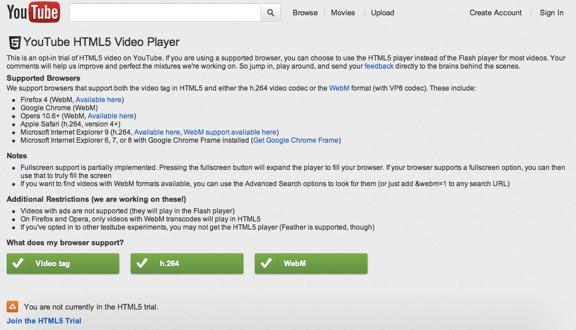
The trial is available for browsers that support both the video tag in HTML5, and either the h.264 video codec or the WebM format. That means Firefox 4, Chrome, Opera 10.6+, Safari 4+, and Internet Explorer 9, as well as Internet Explorer versions 6 and up if Chrome Frame is installed. You might need to download an update to get WebM or h.264 support. The trial’s page graphically displays what your browser supports, and has links for what you’ll need.
There are some notable restrictions to the trial. Fullscreen support is only partially implemented, as pressing the fullscreen button will expand the player to fill your browser. If your browser supports a fullscreen option, you can then use that to truly fill the screen. Not all videos are available in WebM formats, either, and videos with ads are not supported in the trial. In Firefox and Opera, only videos with WebM transcodes will play in HTML5. If that’s too much for you, you can always return to the trial page, and click on a link to leave the trial.
Do you hate Flash enough to live with those restrictions?

qka says:
Do you hate Flash enough to live with those restrictions?</i.
Yes.
December 12, 2011 — 11:06 pm
Martin says:
So how have you found it Evan? Is it using a lot less resources than the flash version?
December 14, 2011 — 7:57 am
Evan Kline says:
I’m really not missing Flash much, Martin. It seems like not all videos are available, though, or maybe I’m doing something wrong. If I need Flash, I just fire up Chrome.
January 5, 2012 — 10:50 am
Evan Kline says:
OK, and my 2010 Air runs much better without Flash.
January 5, 2012 — 10:50 am
Martin says:
I agree with your other comment. I think this is definitely the beginning of the end of flash. Even Adobe agrees!
January 5, 2012 — 3:56 pm
Joe Doe says:
Good call.
Do I hate Flash enough? Probably!
The only drawback is that, as you say, there is not fullscreen and also I don’t think there is 1080p (killer).
It is still a good choice for those of us specially under a hackintosh and having yo resource to obscure graphics drivers just for getting flash videos to play! :)
January 4, 2012 — 4:47 am
Evan Kline says:
I think this is only going to get better and better. Now that Adobe is dropping support for mobile Flash, I think Flash will continue to die on the vine, and support for HTML5 will grow.
January 5, 2012 — 10:51 am
The Master says:
Thanks for the link to TURN OFF YouTube’s HTML5 trial. It vastly sped up my older and many of my client’s older computers. HTML5 may be the future, but flash is still required for the present.
May 29, 2012 — 11:46 pm
alhakim says:
Until now, HTML5 player still can not play all YouTube videos. How long will we have to wait HTML5 to works 100%.
May 23, 2013 — 4:32 am